
TRACING LIGHT · DARK TIDE
Where every respawn writes a new verse — one year of light, one year of tide.
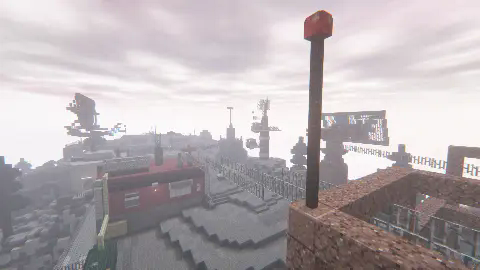
Screenshots


About this Modpack
The Perfect combination of FPS and Randomness
Ever felt buried under a mountain of gun mods — yet never really got to use most of them?
Tired of manual loadouts that break both immersion and competitive balance?
🎯 This is where randomness meets fairness.
Every respawn is a new random weapon.
Just pure, unpredictable gunfight action.
Fair play. Full arsenal. One click. Endless fun.

🔥 Immersive Gunfight Experience
14 maps · 8 random spawns per solo arena · Every match feels fresh
Each respawn gives you a completely different loadout and starting position — no two battles play the same.

💥 Massive Arsenal
| Category | Count |
|---|---|
| Firearms | 400+ |
| Attachments | 500+ |
| Modern Vehicles | 10+ |
- All weapons from TACZ + addons
- Vehicles from SUPERB WARFARE — stunning models, realistic physics
- Fully datapack-driven — tweak everything with VS Code
🧬 Built for Performance
800+ FPS on integrated graphics · Lightweight server · Admin-friendly
- Extreme client optimization — tested on iGPU
- Datapack-driven logic — minimal server tick load
- One-command match control — see "core command" below.
💓 Game Modes
| Mode | Description |
|---|---|
| Team Deathmatch | 15min — eliminate as many as possible |
| Free For All | 15min — solo elimination |
| Team Extreme | One life per round. First to 10 rounds wins |
| Manhunt | Survivors vs Hunters — elimination turns sides |
| Knife Fight | Only knife + grenade. Last one standing |
| Rocket Air Battle | Aerial rocket duels |
| Classic Demolition | CS2-style bomb planting — tactical 5v5 |
🎯 How a Match Works
Click to see the full competition flow
- Teams split (team modes only)
- Match info broadcast — map, mode, rules
- Random teleport — fixed spawns for teams, 10 random points for solo
- Respawn buffs — 3s invincibility, 100 HP, random full loadout
- Mid-match supplies — every 2 minutes.
- Auto ranking & reset — results announced, arena cleaned, ready for next match
⚙️ Core Commands
You can start the game directly by double-clicking the item on the right side of the screen after opening the chat bar.
Meanwhile, you can also use the following instructions:
# Start a match — the word after "start" defines mode and map
/function rgf:start/...

# End the match early
/function rgf:over
🛠️ Server Setup
[👉 Download our official server core here)
ℹ️ Important Notices
Resource reuse & permissions
- All content except maps and weapon/gun packs may be reused for non-commercial purposes
- Maps and weapon packs are available from their original authors in the modding community
💡 Want only the core random gunfight system without maps/guns?
Download the standalone datapack
After downloading this modpack:
- All players must install it. The host simply opens a LAN world.
- Do not modify game files — mismatches can break connections.
- No anti-cheat — play with trusted friends.
❓ Q&A
Quick answers
Q: Low FPS or crashes?
A: Turn off shaders. Vehicle model detail may cause drops — normal.
Q: Gun has no animation?
A: First, make sure that your gunpack is compatible with the server. If there is a mismatch, request the missing gunpack from the administrator and install it. If it matches, use the /tacz reload command in the single-player save file.
Q: Have a feature idea?
A: Share it on the issue feedback page — we'd love to hear it.
Q: Can I use files from this pack in my own project?
A: Yes — except for all gunpacks and maps. Those belong to their original authors.
💬 Bug Reports
Found an issue? Report it here:
👉 Bug Report Page
Please include your modpack version and attach a valid screenshot!
🙏 Credits
All contributors
🏆 Gunpack contributors:
🎖️ Map contributors:

💡 Other contributors:
- Datapack inspiration: Nox_Obscura, Amedazi
- Testers & volunteers: Algal algae, Fungus, Yunju
My deepest gratitude — this project wouldn't exist without them.
Thank you for playing.
The battlefield never sleeps — see you in the dark tide.

💡Join our community
QQ Development Group: 1074226823
Available Versions
How to Set Up a TRACING LIGHT · DARK TIDE Server
Order Server
Choose at least 4 GB RAM (6 GB recommended for TRACING LIGHT · DARK TIDE). Based on player count: per 5 players.
Install Modpack in Dashboard
Open the modpack browser in the dashboard, search for "TRACING LIGHT · DARK TIDE" and click "Install". The forge loader and Minecraft 1.20.1 are configured automatically.
Start Server & Play
Start the server – all mods are loaded automatically. Share the server IP with friends and play together!
Frequently Asked Questions
TRACING LIGHT · DARK TIDE server crashes or won't start – what to do?
Most common causes: insufficient RAM or wrong forge loader. Check latest.log for "OutOfMemoryError" → increase RAM to at least 6 GB. For "Mixin" or "ClassNotFoundException" errors: modpack version and loader don't match. With Mado Hosting, loader and Minecraft version are auto-configured on modpack install – preventing most startup issues.
How much RAM does a TRACING LIGHT · DARK TIDE server really need?
Minimum 4 GB, recommended 6 GB for stable performance. per 5 players. Important: Minecraft modpacks need more RAM than vanilla – plan extra per additional player. With Mado Hosting, you can scale RAM up live at any time without data loss (from €5.2/month).
Can I add custom mods to TRACING LIGHT · DARK TIDE without conflicts?
Yes, but check compatibility: only use mods for the same loader (forge) and same Minecraft version (1.20.1). Common issues: ID conflicts with recipe mods and incompatible coremod versions. The Mado dashboard mod browser only shows compatible mods and warns about known conflicts.
TRACING LIGHT · DARK TIDE server lagging – performance tips
1) Increase RAM to 6 GB+. 2) Reduce server view-distance to 8 (server.properties). 3) Pre-generate chunks with the "Chunky" plugin. 4) Use /spark profiler to check which mods consume the most tick time. With Mado Hosting, all servers run on NVMe SSDs with dedicated CPU cores – eliminating hardware as a bottleneck.
Similar Modpacks

![COBBLEVERSE - Pokemon Adventure [Cobblemon]](https://cdn.modrinth.com/data/Jkb29YJU/581ecf54530972afb18a04660afd820f2f24f6c7.png)




Rent TRACING LIGHT · DARK TIDE Server
Start your own server with automatic modpack installation.
Details
- License
- Creative Commons Attribution Non Commercial Share Alike 4.0 International
- Server-side
- Required
- Client-side
- Required
Supported Versions
Start your TRACING LIGHT · DARK TIDE Server now
From €5.20/month; 6 GB RAM is recommended for best performance.
Configure Server →