
One Last Adventure
One Last Adventure is an exhilarating Minecraft modpack players explore ancient ruins, battle formidable foes, and master magical arts. This immersive experience offers a perfect blend
Screenshots
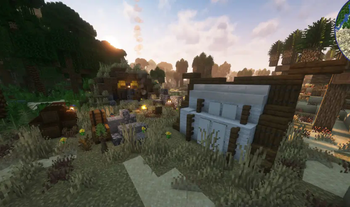
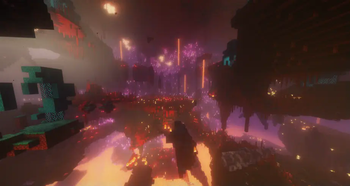
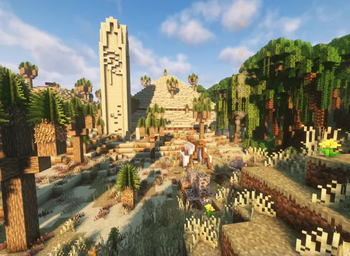
About this Modpack

🗺️ One Last Adventure – Your Final, Epic Quest Awaits
One Last Adventure is a story-driven, exploration-focused modpack that sends you on a grand journey across a vast and mysterious world. Built with carefully curated mods, this pack invites you to uncover ancient secrets, conquer formidable enemies, and harness powerful magic as you carve your path through an unforgettable adventure.
⚔️ What Awaits You
🏛️ Explore Ancient Worlds
Travel through diverse biomes, hidden temples, forgotten ruins, and dangerous dungeons packed with lore, treasure, and mystery.
🐉 Face Powerful Foes
Battle challenging enemies, deadly bosses, and monstrous creatures that test your skill, strategy, and courage.
✨ Master Magic & Progression
Unlock new abilities, study arcane arts, and craft powerful gear as you grow stronger throughout your journey.
🤝 Built for Solo and Friends
Whether you're adventuring alone or teaming up with allies, the pack encourages cooperation, strategy, and shared triumphs.
🌄 A Cinematic & Immersive Experience
Featuring enhanced visuals, atmospheric environments, and polished gameplay systems, One Last Adventure brings the thrill of a classic RPG quest into the world of Minecraft.
Prepare yourself for one final, unforgettable journey—the adventure of a lifetime.
Available Versions
How to Set Up a One Last Adventure Server
Order Server
Choose at least 6 GB RAM (8 GB recommended for One Last Adventure). Based on player count: per 5 players.
Install Modpack in Dashboard
Open the modpack browser in the dashboard, search for "One Last Adventure" and click "Install". The fabric loader and Minecraft 1.20.1 are configured automatically.
Start Server & Play
Start the server – all mods are loaded automatically. Share the server IP with friends and play together!
Frequently Asked Questions
One Last Adventure server crashes or won't start – what to do?
Most common causes: insufficient RAM or wrong fabric loader. Check latest.log for "OutOfMemoryError" → increase RAM to at least 8 GB. For "Mixin" or "ClassNotFoundException" errors: modpack version and loader don't match. With Mado Hosting, loader and Minecraft version are auto-configured on modpack install – preventing most startup issues.
How much RAM does a One Last Adventure server really need?
Minimum 6 GB, recommended 8 GB for stable performance. per 5 players. Important: Minecraft modpacks need more RAM than vanilla – plan extra per additional player. With Mado Hosting, you can scale RAM up live at any time without data loss (from €7.800000000000001/month).
Can I add custom mods to One Last Adventure without conflicts?
Yes, but check compatibility: only use mods for the same loader (fabric) and same Minecraft version (1.20.1). Common issues: ID conflicts with recipe mods and incompatible coremod versions. The Mado dashboard mod browser only shows compatible mods and warns about known conflicts.
One Last Adventure server lagging – performance tips
1) Increase RAM to 8 GB+. 2) Reduce server view-distance to 8 (server.properties). 3) Pre-generate chunks with the "Chunky" plugin. 4) Use /spark profiler to check which mods consume the most tick time. With Mado Hosting, all servers run on NVMe SSDs with dedicated CPU cores – eliminating hardware as a bottleneck.
Similar Modpacks
![Cobblemon Official Modpack [Fabric]](https://cdn.modrinth.com/data/5FFgwNNP/e7f9ee2e9d361623847853fe2ddce42f519ee64f.png)
![COBBLEVERSE - Pokemon Adventure [Cobblemon]](https://cdn.modrinth.com/data/Jkb29YJU/581ecf54530972afb18a04660afd820f2f24f6c7.png)
![Better MC [FABRIC] - BMC2](https://cdn.modrinth.com/data/shFhR8Vx/a19c2bcb51d38f32f138d3607e91cb2b7b8e387f_96.webp)


![Better MC [FORGE] - BMC4](https://cdn.modrinth.com/data/4BV47HRn/7f5ef7cc61b2593609aabef3ed07a866a4f11b73_96.webp)
Rent One Last Adventure Server
Start your own server with automatic modpack installation.
Supported Versions
Start your One Last Adventure Server now
From €7.80/month; 8 GB RAM is recommended for best performance.
Configure Server →