

Modrinth · Fabric
OMT's Optimized Horizons server hosting
Your own OMT's Optimized Horizons server on AMD Ryzen 9 without a thread limit. The server is ready usually under 60 seconds; then install the pack with one click in the modpack browser.
Aimed To Make JJThunder To The Max World Generation More faster and optimized with distant Horizons
- Downloads
- 13.1K
- Followers
- 0
- Loader
- Fabric
- Minecraft
- 1.21.1
- Updated
- –
Setup
Your OMT's Optimized Horizons server in four steps
For errors, check startup logs, Java version, loader and dependencies first. Increase RAM when there is evidence of memory pressure. Keep a copy of the working installation before updates.
- 01
Configure
8 GB of RAM is preselected and OMT's Optimized Horizons is noted in the configurator. You choose the term and add-ons.
- 02
Pay
By credit card or PayPal. Your server is ready usually under 60 seconds.
- 03
Install the pack
Open the modpack browser in the panel, choose Modrinth, verify the project ID and install your chosen pack release. Back up an existing world first.
- 04
Connect
Every player installs the same pack release in a compatible launcher and connects using the server address from the panel.
Modrinth project ID: 5RGBk1RM
The panel
Install the pack, find errors.
Real screenshots from the Mado panel. Both come with every Minecraft server.
Modpack browser
Modrinth and CurseForge, right in the panel.
Search the pack, choose a release, install. You do not have to upload the loader or server files by hand.

AI crash analysis
When a mod crashes, the analyzer reads the log.
Large modpacks often fail on a single mod, Java version or missing dependency. The analyzer names a likely cause and suggests a fix.

Releases
Published pack releases
The server and players need the same pack release. Pick it in the modpack browser to match your group’s clients.
OMT's Optimized Horizons · ModrinthOriginal description by the project author
Distant Horizons Optimized & JJThunder to the Max Modpack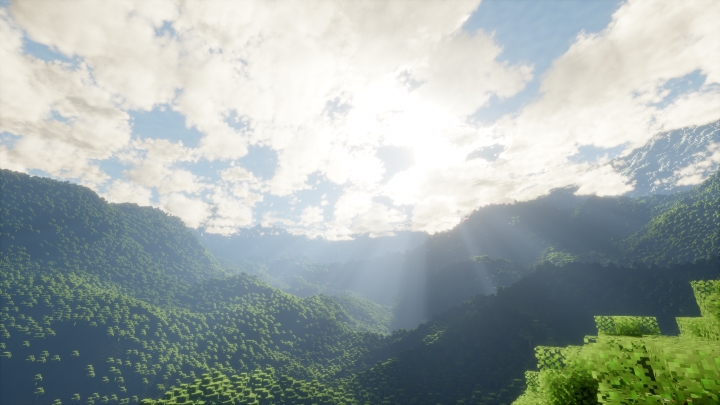
Embark on an Elevated Adventure!
Explore a vast, beautifully realized world with the Distant Horizons Optimized and JJThunder to the Max modpack! This immersive collection combines stunning visuals and enhanced gameplay, ensuring an unforgettable experience in your favorite universe.
Key Features:
Enhanced Graphics: Experience breathtaking landscapes and distant terrain rendered in stunning clarity. Distant Horizons Optimized utilizes advanced rendering techniques to bring the world around you to life.
Dynamic Weather and Lightning: JJThunder to the Max adds an exciting layer of realism with realistic mountain ranges, huge rivers,and more. Feel the thrill as storm clouds gather and lightning strikes illuminate the sky!
Performance Optimization: This modpack is carefully curated for both beauty and performance, ensuring smooth gameplay even in expansive environments.
Immersive Soundscapes: Engage with enhanced audio effects that immerse you in your surroundings, from the rustling of leaves to the roar of thunder, creating a captivating atmosphere.
User-Friendly Interface: Easy installation and intuitive settings allow you to dive into action without hassle.
Shaders : Bliss Shaders, Link : Here!
To Use JJThunder, Follow These Steps:
- While Creating A New World, Go To The "More" Section.
- Click On Datapack Button
- Open Folder
- Move Your JJThunder To The Max DataPack There.
Similar packs
More server-ready modpacks
 Server-ready

Cobblemon Official Modpack [Fabric]
by CobbledStudios
The official modpack of the Cobblemon mod, for Fabric!
 Server-ready

COBBLEVERSE - Pokemon Adventure [Cobblemon]
by LUMYVERSE
Start a true Pokémon adventure in Minecraft: Cobblemon 1.8.4 | ALL 1025 Pokémon! | Mega Evolutions | Gyms & Badges | Starter Kit | Unique Structures | Custom Music | Shaders | Optimized | So much more! [1.21.1]
 Server-ready

Better MC [FABRIC] - BMC2
by SHXRKIE
Version 1.20 | A Proper Vanilla+ Modpack | Don't play Vanilla play this!
 Server-ready

Vanilla Perfected
by demonjoeTV
A compilation of Vanilla Plus mods & packs to perfect the Minecraft experience without drifting too far from the feel of the base game!
Ready for your OMT's Optimized Horizons server?
8 GB of RAM from €16.00 per month. 35% off your first month with MADO35.