![[Cobblemon] PokeClash](https://cdn.modrinth.com/data/Y41C8zBC/415b9d287a735f33317b86ba285c96613be80694.png)
[Cobblemon] PokeClash
Includes everything you need to jump straight into the PokeClash Cobblemon server without extra setup, including performance optimizations.
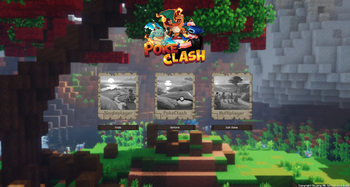
Screenshots

About this Modpack
This modpack is designed to optimize your gameplay when playing on the PokeClash Cobblemon server. We have an awesome community, and some great features to enhance your cobblemon experience. See our server features and pack contents below!
Server Features
- Dex Ranks
- All Pokemons modeled
- Player Markets
- Player Warps
- Land Claiming
- Breeding with Daycare
- Mega Evos
- Mega Raid Bosses
- Pokehunts
- PokeBuilder
- Custom Pokemon Skins
- Fakemon
- WonderTrade
- Community PokeTasks
- Cobblemon Community Leaderboards
- GTS
- Player Gym Leaders
- Legendary Spawns
- Keep Inventory
- Resource World
- Cosmetics
- Custom Terrain Generation
- Server Events
- Cobblemon Rider
- EV Training NPCs
- PokeFishing
- Catch Combos
- Ranked Battles (with ELO)

Have any questions or want to get to know our players? Come join our community!

QoL Mods
- Advancement Info
- AppleSkin
- AuthMe
- Better Ping Display
- Better Third Person
- Capes
- CIT Resewn (needed to see server cosmetics)
- Cobblemon Battle Extras
- Cobblemon Integrations
- Cobblemon Party Extras
- Cobblemon QoL
- Cobblemon: Interact Wheel Additions
- Cobblemon: Vocalized
- Continuity
- Crafting Tweaks
- Elytra Trims
- Emoji Type
- Fancy Menu
- Iris Shaders
- Jade
- Just Enough Items (JEI)
- Melody
- More Cobblemon Tweaks
- Overflowing Bars
- Reacharound
- Shulkerbox Tooltips
- Simple Discord RPC
- Simple Voice Chat
- Xaero's Minimap
- Xaero's Worldmap
- Zoomify
Performance Mods
- Dynamic FPS
- Lithium
- Sodium
- Sodium Extra
Included Resource Packs
- Cobblemon Interface
- Recommended to run with a minimum of 2.5 GB of memory. Use 3 GB or more for best performance.
Available Versions
How to Set Up a [Cobblemon] PokeClash Server
Order Server
Choose at least 4 GB RAM (6 GB recommended for [Cobblemon] PokeClash). Based on player count: per 8 players.
Install Modpack in Dashboard
Open the modpack browser in the dashboard, search for "[Cobblemon] PokeClash" and click "Install". The fabric loader and Minecraft 1.21.1 are configured automatically.
Start Server & Play
Start the server – all mods are loaded automatically. Share the server IP with friends and play together!
Frequently Asked Questions
[Cobblemon] PokeClash server crashes or won't start – what to do?
Most common causes: insufficient RAM or wrong fabric loader. Check latest.log for "OutOfMemoryError" → increase RAM to at least 6 GB. For "Mixin" or "ClassNotFoundException" errors: modpack version and loader don't match. With Mado Hosting, loader and Minecraft version are auto-configured on modpack install – preventing most startup issues.
How much RAM does a [Cobblemon] PokeClash server really need?
Minimum 4 GB, recommended 6 GB for stable performance. per 8 players. Important: Minecraft modpacks need more RAM than vanilla – plan extra per additional player. With Mado Hosting, you can scale RAM up live at any time without data loss (from €5.2/month).
Can I add custom mods to [Cobblemon] PokeClash without conflicts?
Yes, but check compatibility: only use mods for the same loader (fabric) and same Minecraft version (1.21.1). Common issues: ID conflicts with recipe mods and incompatible coremod versions. The Mado dashboard mod browser only shows compatible mods and warns about known conflicts.
[Cobblemon] PokeClash server lagging – performance tips
1) Increase RAM to 6 GB+. 2) Reduce server view-distance to 8 (server.properties). 3) Pre-generate chunks with the "Chunky" plugin. 4) Use /spark profiler to check which mods consume the most tick time. With Mado Hosting, all servers run on NVMe SSDs with dedicated CPU cores – eliminating hardware as a bottleneck.
Similar Modpacks

![Cobblemon Official Modpack [Fabric]](https://cdn.modrinth.com/data/5FFgwNNP/e7f9ee2e9d361623847853fe2ddce42f519ee64f.png)
![COBBLEVERSE - Pokemon Adventure [Cobblemon]](https://cdn.modrinth.com/data/Jkb29YJU/581ecf54530972afb18a04660afd820f2f24f6c7.png)
![Better MC [FABRIC] - BMC2](https://cdn.modrinth.com/data/shFhR8Vx/a19c2bcb51d38f32f138d3607e91cb2b7b8e387f_96.webp)


Rent [Cobblemon] PokeClash Server
Start your own server with automatic modpack installation.
Details
- License
- LicenseRef-All-Rights-Reserved
- Server-side
- Required
- Client-side
- Required
Supported Versions
Start your [Cobblemon] PokeClash Server now
From €5.20/month; 6 GB RAM is recommended for best performance.
Configure Server →