
Quantum Freedom 3
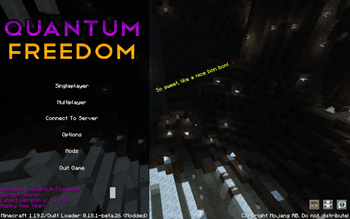
Quantum Freedom 3 is a sandbox style 1.21 Quilt/Fabric based modpack about relaxing and having fun alone or with friends! Build, Destroy or Control the world! (Public SMP Server Available Now!)
Screenshots
About this Modpack
Summary
Quantum Freedom 2 is a successor to the Technical Electrical Modpack Series. The pack allows you to create anything you can imagine in your worlds. You can build machines that can allow you to take control of the world or embrace nature and magic to integrate yourself into the world and its biomes. Quantum Freedom's philosophy is that one mod for one use, which helps keep the pack light by not including mods without a reason for them, they are all carefully chosen to help keep resource usage low, while having a fun modded experience. Quantum Freedom is about having fun in a modded environment. A minimal stress modpack, just kickback and relax with friends!
Mods
Quantum Freedom contains many mods including:
Bewitchment
Botania
Create
Modern Industrialization
The Bumblezone
And much more! Other included mods can be seen in the file dependencies
Server
The Public SMP Server can be accessed by the 'connect to server' button on the main menu. Temporarily unavailable due to some issues the server will return with QF3!
QF2 Server can be installed using superpack and installing the file that is alongside the client modpack.
Server Package QF1: https://drive.google.com/file/d/19eyXNSPoA4VnmhOF2ldXC0mSFmG7GBa9/view?usp=share_link
This pack has also been optimised for Steam Deck, the only thing you have to do is assign key bindings, but it works and performs well on the Steam Deck.
Sponsored by Meloncube
Available Versions
How to Set Up a Quantum Freedom 3 Server
Order Server
Choose at least 6 GB RAM (10 GB recommended for Quantum Freedom 3). Based on player count: per 4 players.
Install Modpack in Dashboard
Open the modpack browser in the dashboard, search for "Quantum Freedom 3" and click "Install". The fabric loader and Minecraft 26.2 are configured automatically.
Start Server & Play
Start the server – all mods are loaded automatically. Share the server IP with friends and play together!
Frequently Asked Questions
Quantum Freedom 3 server crashes or won't start – what to do?
Most common causes: insufficient RAM or wrong fabric loader. Check latest.log for "OutOfMemoryError" → increase RAM to at least 10 GB. For "Mixin" or "ClassNotFoundException" errors: modpack version and loader don't match. With Mado Hosting, loader and Minecraft version are auto-configured on modpack install – preventing most startup issues.
How much RAM does a Quantum Freedom 3 server really need?
Minimum 6 GB, recommended 10 GB for stable performance. per 4 players. Important: Minecraft modpacks need more RAM than vanilla – plan extra per additional player. With Mado Hosting, you can scale RAM up live at any time without data loss (from €7.800000000000001/month).
Can I add custom mods to Quantum Freedom 3 without conflicts?
Yes, but check compatibility: only use mods for the same loader (fabric) and same Minecraft version (26.2). Common issues: ID conflicts with recipe mods and incompatible coremod versions. The Mado dashboard mod browser only shows compatible mods and warns about known conflicts.
Quantum Freedom 3 server lagging – performance tips
1) Increase RAM to 10 GB+. 2) Reduce server view-distance to 8 (server.properties). 3) Pre-generate chunks with the "Chunky" plugin. 4) Use /spark profiler to check which mods consume the most tick time. With Mado Hosting, all servers run on NVMe SSDs with dedicated CPU cores – eliminating hardware as a bottleneck.
Similar Modpacks
![Better MC [FABRIC] - BMC2](https://cdn.modrinth.com/data/shFhR8Vx/a19c2bcb51d38f32f138d3607e91cb2b7b8e387f_96.webp)
![Better MC [FORGE] - BMC4](https://cdn.modrinth.com/data/4BV47HRn/7f5ef7cc61b2593609aabef3ed07a866a4f11b73_96.webp)


Rent Quantum Freedom 3 Server
Start your own server with automatic modpack installation.
Details
- License
- GNU Lesser General Public License v3.0 only
- Server-side
- Required
- Client-side
- Required
Supported Versions
Start your Quantum Freedom 3 Server now
From €7.80/month; 10 GB RAM is recommended for best performance.
Configure Server →