
Steam 'n' Rails Server Modpack
The official Steam 'n' Rails Season 2 SMP Modpack
Screenshots

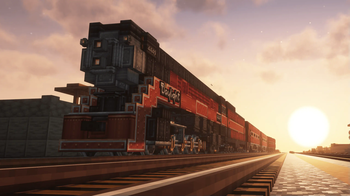
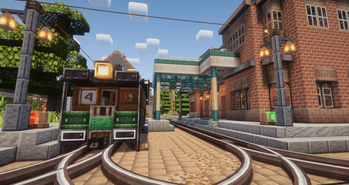

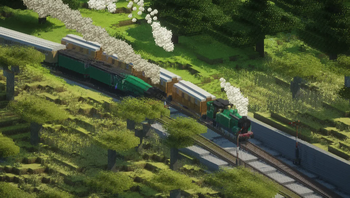
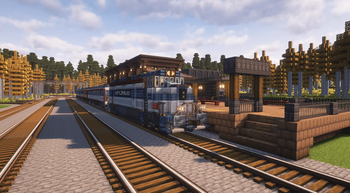
About this Modpack
This is the official modpack for the Steam 'n' Rails Season 2 SMP
To get whitelisted and learn more about the server and modpack visit s2.railways.dev. You can also check out our discord for more info.
Summary
This is a performant fabric modpack that is designed to be used on a large community-run nations SMP, complete with a full economy and extensive rail infastructure.
World Generation
The SMP features a large custom generated overworld seperated by vast oceans into seperate distinct continents where the SMPs nations can be found. A map of this world and the nether is available at map.s2.railways.dev.
We use custom world generation mods such as Natures Spirit, Better End, Nullscaped, & Amplified Nether so exploration is never dull.
The Nations
The server includes a number of community-run nations. All with different build styles, governance structures and access to certain resources such as Deep Drilling ore nodes. Nations are deeply interconnected by rail and are able to trade resources easily with the help of a common currency mod Create Numismatics.
Donate
The server is funded entirely from the individual contributions of our members. All this money goes towards improving our server infastructure. You can help support us by sending a donation to opencollective.com/railways
Available Versions
How to Set Up a Steam 'n' Rails Server Modpack Server
Order Server
Choose at least 6 GB RAM (8 GB recommended for Steam 'n' Rails Server Modpack). Based on player count: per 5 players.
Install Modpack in Dashboard
Open the modpack browser in the dashboard, search for "Steam 'n' Rails Server Modpack" and click "Install". The fabric loader and Minecraft 1.20.1 are configured automatically.
Start Server & Play
Start the server – all mods are loaded automatically. Share the server IP with friends and play together!
Frequently Asked Questions
Steam 'n' Rails Server Modpack server crashes or won't start – what to do?
Most common causes: insufficient RAM or wrong fabric loader. Check latest.log for "OutOfMemoryError" → increase RAM to at least 8 GB. For "Mixin" or "ClassNotFoundException" errors: modpack version and loader don't match. With Mado Hosting, loader and Minecraft version are auto-configured on modpack install – preventing most startup issues.
How much RAM does a Steam 'n' Rails Server Modpack server really need?
Minimum 6 GB, recommended 8 GB for stable performance. per 5 players. Important: Minecraft modpacks need more RAM than vanilla – plan extra per additional player. With Mado Hosting, you can scale RAM up live at any time without data loss (from €7.800000000000001/month).
Can I add custom mods to Steam 'n' Rails Server Modpack without conflicts?
Yes, but check compatibility: only use mods for the same loader (fabric) and same Minecraft version (1.20.1). Common issues: ID conflicts with recipe mods and incompatible coremod versions. The Mado dashboard mod browser only shows compatible mods and warns about known conflicts.
Steam 'n' Rails Server Modpack server lagging – performance tips
1) Increase RAM to 8 GB+. 2) Reduce server view-distance to 8 (server.properties). 3) Pre-generate chunks with the "Chunky" plugin. 4) Use /spark profiler to check which mods consume the most tick time. With Mado Hosting, all servers run on NVMe SSDs with dedicated CPU cores – eliminating hardware as a bottleneck.
Similar Modpacks
![Cobblemon Official Modpack [Fabric]](https://cdn.modrinth.com/data/5FFgwNNP/e7f9ee2e9d361623847853fe2ddce42f519ee64f.png)
![COBBLEVERSE - Pokemon Adventure [Cobblemon]](https://cdn.modrinth.com/data/Jkb29YJU/581ecf54530972afb18a04660afd820f2f24f6c7.png)
![Better MC [FABRIC] - BMC2](https://cdn.modrinth.com/data/shFhR8Vx/a19c2bcb51d38f32f138d3607e91cb2b7b8e387f_96.webp)


![Better MC [FORGE] - BMC4](https://cdn.modrinth.com/data/4BV47HRn/7f5ef7cc61b2593609aabef3ed07a866a4f11b73_96.webp)
Rent Steam 'n' Rails Server Modpack Server
Start your own server with automatic modpack installation.
Supported Versions
Start your Steam 'n' Rails Server Modpack Server now
From €7.80/month; 8 GB RAM is recommended for best performance.
Configure Server →