
The Quality Pack
A small pack that I decided to share for people to have fun on!
Screenshots
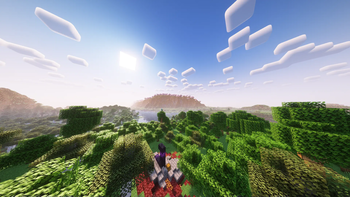
About this Modpack
The Quality Pack is a modpack that you play to get the better features of Minecraft that Mojang didn't want to add.
The modpack includes:
- Improvements to biome generation using mods like Wilder Wild
- Wilder Wild also improves the tree generation, which makes the world look more sleek
- It allows the addition of features Mojang would not add e.g. amethyst tools or axes getting looting and even impaling in the rain for Java
- It allows for banners to be used as flags
- An overhaul of the chatting system with cooler animation and looks of the messages
- It adds a bundle crafting recipe for the weirdos that prefer them over literally anything else
- You can explore the depths of the improved end from the Better End mod which completely overhauls the end biomes and even adds some additional armour sets and tools for you to get after beating the dragon
- You now have the combat roll from Minecraft Dungeons
- You have the ease of fast quitting and tree chopping
- Better farming including right click replant with hoes
- Inventory management additions
- Jade and JEI to know exactly what your look at and the crafting recipe
- I've added a light mod called Legacies and Legends to add a few high detail structures
- Better village trading through trading posts and a bunch of village additions from various other mods
If someone does actually play this modpack, Join the discord and give me some feedback I genuinely started this not that long ago and I'm open to feedback be it errors or just general shit mods that should be removed. If you need anything I am usually available so ping me and let me know! Enjoy!
Available Versions
How to Set Up a The Quality Pack Server
Order Server
Choose at least 6 GB RAM (8 GB recommended for The Quality Pack). Based on player count: per 5 players.
Install Modpack in Dashboard
Open the modpack browser in the dashboard, search for "The Quality Pack" and click "Install". The fabric loader and Minecraft 1.20.4 are configured automatically.
Start Server & Play
Start the server – all mods are loaded automatically. Share the server IP with friends and play together!
Frequently Asked Questions
The Quality Pack server crashes or won't start – what to do?
Most common causes: insufficient RAM or wrong fabric loader. Check latest.log for "OutOfMemoryError" → increase RAM to at least 8 GB. For "Mixin" or "ClassNotFoundException" errors: modpack version and loader don't match. With Mado Hosting, loader and Minecraft version are auto-configured on modpack install – preventing most startup issues.
How much RAM does a The Quality Pack server really need?
Minimum 6 GB, recommended 8 GB for stable performance. per 5 players. Important: Minecraft modpacks need more RAM than vanilla – plan extra per additional player. With Mado Hosting, you can scale RAM up live at any time without data loss (from €7.800000000000001/month).
Can I add custom mods to The Quality Pack without conflicts?
Yes, but check compatibility: only use mods for the same loader (fabric) and same Minecraft version (1.20.4). Common issues: ID conflicts with recipe mods and incompatible coremod versions. The Mado dashboard mod browser only shows compatible mods and warns about known conflicts.
The Quality Pack server lagging – performance tips
1) Increase RAM to 8 GB+. 2) Reduce server view-distance to 8 (server.properties). 3) Pre-generate chunks with the "Chunky" plugin. 4) Use /spark profiler to check which mods consume the most tick time. With Mado Hosting, all servers run on NVMe SSDs with dedicated CPU cores – eliminating hardware as a bottleneck.
Similar Modpacks
![Cobblemon Official Modpack [Fabric]](https://cdn.modrinth.com/data/5FFgwNNP/e7f9ee2e9d361623847853fe2ddce42f519ee64f.png)
![COBBLEVERSE - Pokemon Adventure [Cobblemon]](https://cdn.modrinth.com/data/Jkb29YJU/581ecf54530972afb18a04660afd820f2f24f6c7.png)
![Better MC [FABRIC] - BMC2](https://cdn.modrinth.com/data/shFhR8Vx/a19c2bcb51d38f32f138d3607e91cb2b7b8e387f_96.webp)


![Better MC [FORGE] - BMC4](https://cdn.modrinth.com/data/4BV47HRn/7f5ef7cc61b2593609aabef3ed07a866a4f11b73_96.webp)
Rent The Quality Pack Server
Start your own server with automatic modpack installation.
Supported Versions
Start your The Quality Pack Server now
From €7.80/month; 8 GB RAM is recommended for best performance.
Configure Server →