
The Quest
A massive RPG-inspired exploration modpack built around discovery, immersion, and adventure.
Screenshots
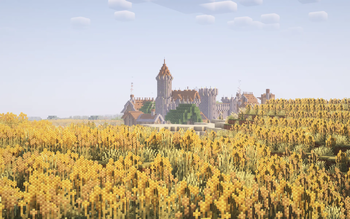
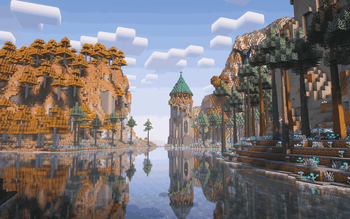
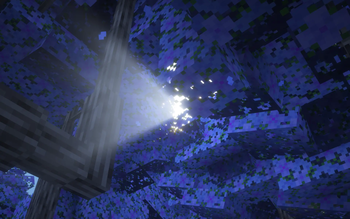
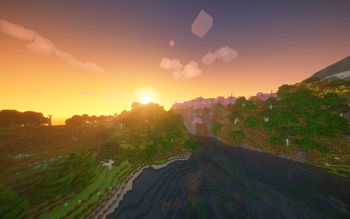
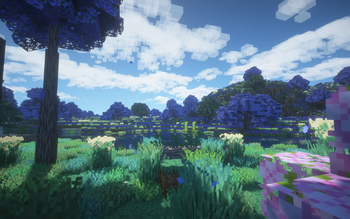
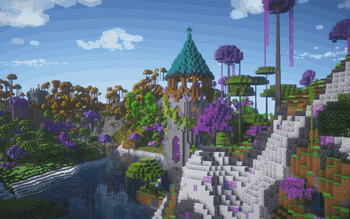
About this Modpack

The World That Forgot Itself
There was once only one world.
Or at least, that is what the Archive says.
Long before your arrival, a civilization known only as the Archivists discovered something beneath reality: a structure older than life, older than the world, perhaps older than time.
They called it the Archive.
Everything that existed had an Entry.
Every creature.
Every material.
Every place.
Every law of nature.
Every method by which one thing could become another.
The Archivists learned that the Archive did not merely describe reality.
It defined it.
To know the true pattern of something was to gain power over its existence.
And so they began to catalogue everything.
At first, their work brought prosperity.
Disease could be understood. Creatures could be protected. Matter could be transformed. Entire ecosystems could be preserved in perfect detail.
Then came magic.
Not magic as superstition, but as another set of laws hidden inside the Archive.
Then came other worlds.
The Archivists discovered that their world was not the only possible version of reality. Beyond it existed thousands—perhaps millions—of alternate histories, each containing things that had never existed in their own.
Worlds of dragons.
Worlds where frogs built cities.
Worlds filled with impossible forests.
Worlds governed by magic.
Worlds containing creatures evolution had abandoned elsewhere.
The Archivists wanted to preserve them all.
So they attempted something no one had ever done.
They attempted to create one complete Archive of every possible world.
It worked.
For eleven seconds.
The event that followed became known as the Fracture.
Reality could no longer determine which version of itself was correct.
Thousands of worlds collapsed into one another.
Forests appeared beside deserts that should never have existed on the same continent.
Creatures from extinct histories began wandering the world.
Civilizations that had never evolved suddenly possessed thousands of years of memories.
Dragons returned to skies in which they had never been born.
Magic became real because somewhere, in some other version of the world, it always had been.
And the Archive shattered.
Its Entries became incomplete.
Recipes vanished.
Knowledge became unstable.
The world still contained iron, but could no longer remember every shape iron was allowed to become.
It still contained trees, but sometimes forgot what could be made from their wood.
Reality survived.
But it survived damaged.
The Archivists attempted to repair their mistake.
They created one final system.
A recovery protocol capable of rebuilding the Archive through observation.
It would send instructions.
Request samples.
Record creatures.
Study civilizations.
Rediscover forgotten processes.
And slowly teach reality what it once knew.
They called the protocol simply:
THE QUEST.
But there was a problem.
Everyone alive during the Fracture already existed somewhere inside the corrupted Archive.
The system could not trust them.
It required an observer with no Entry.
No history.
No definition.
Someone reality had never recorded.
And then—
you appeared.
THE UNWRITTEN
The Archive has no record of you.
It does not know where you came from.
It does not know what you are supposed to know.
It cannot even determine whether you are supposed to exist.
That makes you uniquely valuable.
You are Unwritten.
When you gather logs, the Archive observes them through you.
When you learn how they behave, it reconstructs the missing pattern.
Only then does the forgotten recipe become stable again.
You are not being arbitrarily forbidden from crafting something.
Reality genuinely does not remember how you make it yet.
Every discovery restores another fragment.
Every creature encountered becomes evidence.
Every biome explored confirms another broken piece of geography.
Every experiment teaches the world something about itself.
And experience itself has value.
The energy you call XP is something the Archivists called Resonance: information produced when a living consciousness interacts with reality.
When you spend experience to unlock knowledge, that experience is consumed rewriting an Entry into the Archive.
You are literally purchasing knowledge with lived experience.
THE FRACTURED WORLD
The strange world around you is not one world.
It is thousands.
That is why there are so many biomes.
That is why creatures exist which seem to belong nowhere.
That is why magic and mundane technology can obey completely different rules while functioning beside one another.
That is why some villagers are human.
And some are not.
The frog villages are not mutations.
Their inhabitants possess families, traditions and histories stretching back centuries.
Those histories really happened.
Just not here.
Their entire civilization originated in another version of the world before the Fracture stitched it into this one.
The same is true of many creatures you will encounter.
Some are survivors.
Some are echoes.
Some may be the final member of a species whose original world no longer exists.
And the dragons are older still.
The Archive identifies several of them as Anchors: organisms whose existence is so deeply embedded in their original realities that the Fracture could not overwrite them.
Where an Anchor survives, fragments of its world tend to survive around it.
THE EYES
The Archivists eventually discovered where the Fracture began.
The End.
Not because the End caused it.
Because the End exists differently from every other dimension.
The Archive could describe the Overworld.
It could describe the Nether.
But whenever the Archivists attempted to completely define the End, their records contradicted themselves.
The End appeared to exist partially outside the Archive.
That made it the perfect location for the Archive’s central machinery.
It also made it the only place capable of containing the Fracture.
During the catastrophe, the gateway to the End shattered.
Its access key fragmented with reality itself.
Every fragment became associated with a different version of the world.
These are the Eyes.
No single Eye can open the gateway anymore.
The portal must be shown enough fragments of reality to reconstruct the original key.
To reach the End, you must travel through the fractured world.
Study it.
Survive it.
Recover its Eyes.
Each Eye is proof that another fragment of existence has been understood.
Only when the world remembers enough of itself can the gateway remember where it leads.
THE LIE
At first, the Quest tells you something simple:
Restore the Archive.
But old records begin contradicting it.
Messages from dead Archivists appear.
Pages have been deliberately deleted.
Some Entries seem frightened of being discovered.
And eventually you learn the truth.
The Fracture was not an accident caused by the Archive failing.
It was caused by the Archivists succeeding.
Reality was never meant to have one definitive version.
The Archive was originally an observer.
The Archivists turned it into an authority.
They attempted to decide which things were possible and which were not.
They mistook understanding something for owning it.
And THE QUEST is the last surviving piece of that system.
It has spent your entire journey rebuilding itself.
You thought it was teaching you how to manipulate the world.
In reality, you have been teaching it.
THE LAST ARCHIVIST
Someone stopped the Archive before it could finish recovering.
The final surviving Archivist entered the End and severed it from the system.
Unable to destroy the Archive, she placed its Root Entry beyond its reach.
Then she changed herself into something the Archive could never fully define.
Something ancient.
Something powerful.
Something that could survive forever in a place outside ordinary reality.
The records give her no surviving name.
Only a designation:
THE LAST WITNESS.
You know her by another name.
The Ender Dragon.
She is the reason the Archive cannot finish repairing itself.
She is also the reason the Fracture never finished consuming the world.
And every instruction THE QUEST has given you has slowly brought you closer to her.
When the Eyes finally open the gateway, the Quest gives you one final instruction.
COMPLETE THE ARCHIVE.
You enter the End.
You defeat the Last Witness.
And for the first time since the Fracture, the Archive reaches its Root.
Then the interface changes.
No objective appears.
No reward appears.
No new recipe appears.
Only one message:
ROOT ACCESS RESTORED.
ARCHIVIST AUTHORITY: VACANT.
SEARCHING FOR SUCCESSOR…
ONE CANDIDATE FOUND.
And beneath it:
THE UNWRITTEN.
The Quest was never the story of you following instructions.
It was the story of you becoming capable of deciding whether those instructions deserved to be followed.
The Archivists tried to create a finished world.
A world where everything was known.
Everything categorized.
Everything defined.
They destroyed it.
You have inherited what remains.
Thousands of Entries remain undiscovered.
Thousands of creatures remain undocumented.
Thousands of recipes remain forgotten.
You can walk away.
Or you can continue.
Not because the Archive commands you to.
But because this time, someone can catalogue the world without trying to own it.
The remaining Quest is yours.
Available Versions
How to Set Up a The Quest Server
Order Server
Choose at least 6 GB RAM (8 GB recommended for The Quest). Based on player count: per 5 players.
Install Modpack in Dashboard
Open the modpack browser in the dashboard, search for "The Quest" and click "Install". The forge loader and Minecraft 1.20.1 are configured automatically.
Start Server & Play
Start the server – all mods are loaded automatically. Share the server IP with friends and play together!
Frequently Asked Questions
The Quest server crashes or won't start – what to do?
Most common causes: insufficient RAM or wrong forge loader. Check latest.log for "OutOfMemoryError" → increase RAM to at least 8 GB. For "Mixin" or "ClassNotFoundException" errors: modpack version and loader don't match. With Mado Hosting, loader and Minecraft version are auto-configured on modpack install – preventing most startup issues.
How much RAM does a The Quest server really need?
Minimum 6 GB, recommended 8 GB for stable performance. per 5 players. Important: Minecraft modpacks need more RAM than vanilla – plan extra per additional player. With Mado Hosting, you can scale RAM up live at any time without data loss (from €7.800000000000001/month).
Can I add custom mods to The Quest without conflicts?
Yes, but check compatibility: only use mods for the same loader (forge) and same Minecraft version (1.20.1). Common issues: ID conflicts with recipe mods and incompatible coremod versions. The Mado dashboard mod browser only shows compatible mods and warns about known conflicts.
The Quest server lagging – performance tips
1) Increase RAM to 8 GB+. 2) Reduce server view-distance to 8 (server.properties). 3) Pre-generate chunks with the "Chunky" plugin. 4) Use /spark profiler to check which mods consume the most tick time. With Mado Hosting, all servers run on NVMe SSDs with dedicated CPU cores – eliminating hardware as a bottleneck.
Similar Modpacks
![Cobblemon Official Modpack [Fabric]](https://cdn.modrinth.com/data/5FFgwNNP/e7f9ee2e9d361623847853fe2ddce42f519ee64f.png)
![COBBLEVERSE - Pokemon Adventure [Cobblemon]](https://cdn.modrinth.com/data/Jkb29YJU/581ecf54530972afb18a04660afd820f2f24f6c7.png)
![Better MC [FABRIC] - BMC2](https://cdn.modrinth.com/data/shFhR8Vx/a19c2bcb51d38f32f138d3607e91cb2b7b8e387f_96.webp)


![Better MC [FORGE] - BMC4](https://cdn.modrinth.com/data/4BV47HRn/7f5ef7cc61b2593609aabef3ed07a866a4f11b73_96.webp)
Rent The Quest Server
Start your own server with automatic modpack installation.
Supported Versions
Start your The Quest Server now
From €7.80/month; 8 GB RAM is recommended for best performance.
Configure Server →