
Modrinth · Forge, NeoForge
AdvancedAE on your Minecraft server
AdvancedAE runs on Minecraft servers with Forge or NeoForge. Order your server, set the loader in the panel and install the mod with one click in the mod browser.
An AE2 addon that adds a lot of utilities and quality of life.
- Downloads
- 666.4K
- Author
- pedroksl
- Loader
- Forge, NeoForge
- Minecraft
- 1.20.1 – 26.1.2
- Updated
- –
Screenshots
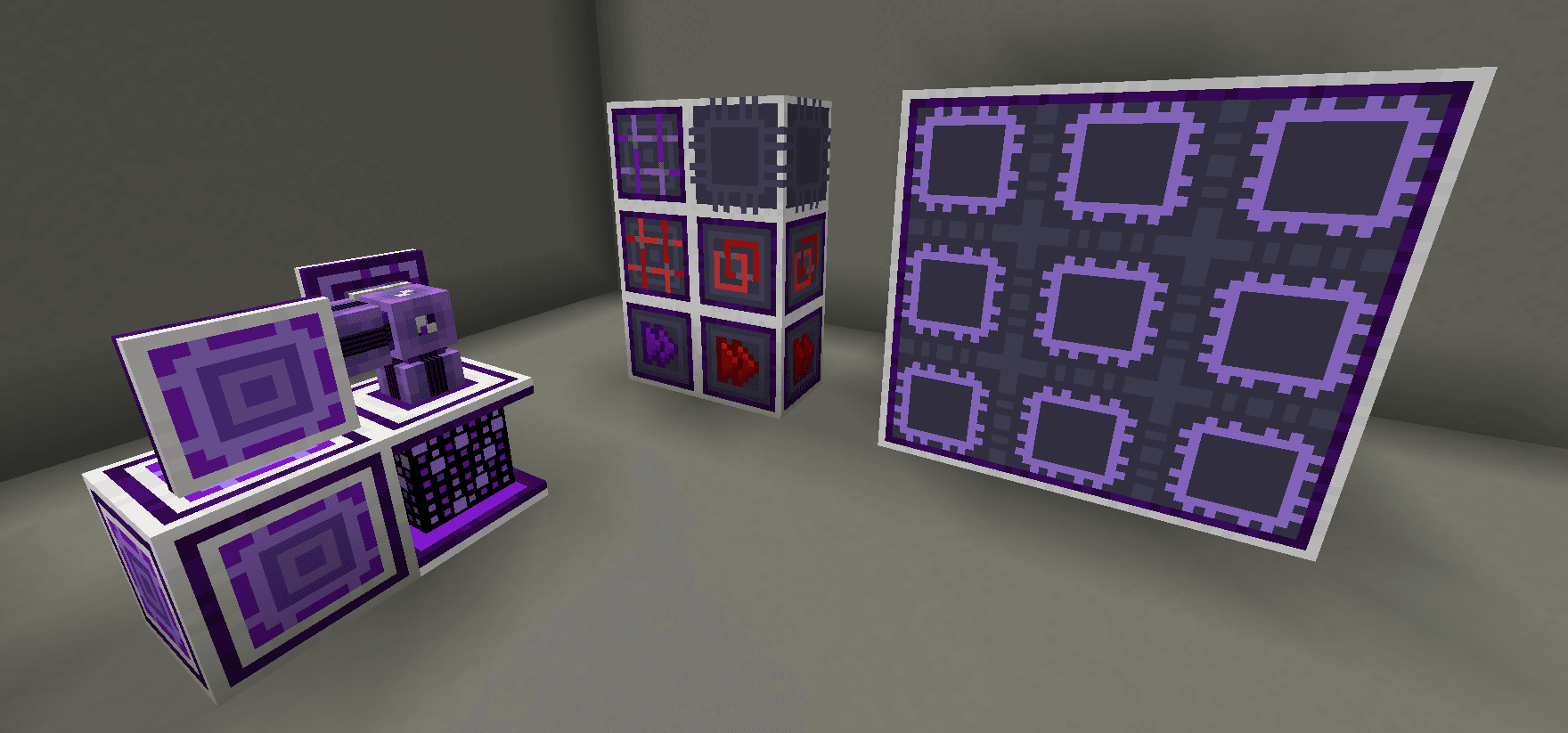
What AdvancedAE looks like


Images: AdvancedAE on Modrinth, published by the project team.
Setup
Install AdvancedAE on your server
The server and players need the same loader and Minecraft version. Back up the world before adding or updating mods.
- 01
Configure
4 GB of RAM is preselected. You choose the term and add-ons and pay by credit card or PayPal.
- 02
Set the loader
In the panel, set the server software to Forge or NeoForge and choose the matching Minecraft version, for example 26.1.2.
- 03
Install the mod
Search the mod browser for “AdvancedAE” and install the release for your loader. Alternatively, upload the .jar to the mods folder via SFTP. Required dependencies are listed on the project page.
- 04
Connect
Every player installs the same AdvancedAE release locally and connects using the server address from the panel.
- On the server
- Required
- On the client
- Required
- Loader
- Forge, NeoForge
- Minecraft
- 26.1.2, 1.21.1, 1.20.1
- License
- GNU Lesser General Public License v3.0 or later
The panel
Install mods, find errors.
Real screenshots from the Mado panel. Both come with every Minecraft server.
Mod browser
Modrinth and CurseForge, right in the panel.
The browser filters by your Minecraft version. Install mods with one click, without uploading .jar files.

AI crash analysis
When a mod crashes, the analyzer reads the log.
Mods often fail on a wrong loader version, Java version or missing dependency. The analyzer names a likely cause and suggests a fix.

Releases
Published releases
Pick the file that matches your server’s loader and Minecraft version. The server and players need the same release.
AdvancedAE · Modrinth- AdvancedAE-26.1.7August 8, 2026Minecraft 26.1.2 · NeoForge
- AdvancedAE-1.3.6-1.20.1August 2, 2026Minecraft 1.20.1 · Forge, NeoForge
- AdvancedAE-1.6.12-1.21.1August 2, 2026Minecraft 1.21.1 · NeoForge
Original description by the project author


Advanced AE!
Advanced AE focuses on convenience and improving user experience when handling your ME System.

Features
Advanced Pattern Providers
By utilizing an Advanced Pattern Encoder, you can modify Processing Patterns to select to which face each input will be sent, eliminating the need for multiple pipes and used sides to interact with machines that require them.

Quantum Computer

Quantum Computer is a special type of Crafting Unit. It is capable of running an unlimited amount of crafting tasks, as long as it has enough crafting storage.
Furthermore, all of these concurrent tasks are able to share all co-processors present in the Quantum Computer Multiblock!
The Quantum Core can be used as a standalone crafting unit with 256M storage and 8 co-processors. By creating a multiblock with one of them, you can extend those capabilities by a large amount.
Specially when using two special block types: The Quantum Data Entangler and the Quantum Multi-Threader, which multiply storage and co-processors present in the multiblock by 4, respectively.
The multiblock can be scaled up to a 5x5x5, and consumes a single channel for all of this computing power!
Quantum Crafter

A very powerful auto crafter that can perform a series of crafting operations every tick while accessing the ME System's
inventory directly. It is also capable of doing recursive crafting (like smithing templates) and multiple crafts that
require a non-consumed ingredient (Like Mystical Agriculture's essence upgrading). It can be configured to keep stacks
of the ingredients to avoid consuming all of it, or limit the end product, to keep an amount in stock.
Quantum Armor Set

An armor set capable of connecting to the ME System to harness its resources for various quality of life functionality.
It is also very powerful defensively and includes various quality of life upgrades, like flight with no inertia,
night vision, magnet, auto feeding directly from ME Storage, immunity to various damage sources, and much more!
- Special thanks to Jm3 for the base models and textures
Reaction Chamber

The reaction chamber is a machine that uses a ton of power to provide very efficient ways of processing materials. It is
used in the creation of various items needed to progress in AdvancedAE as well as offering efficient recipes for other mods.
Stock Export Bus

An Export bus that reads the contents of the target inventory and regulates an exact amount to be kept in it at all times,
provided that the ME system has them available. It accepts a crafting card, enabling the export bus to craft the items
needed.
ME Throughput Monitor

A special monitor that can be used to keep a close watch on the development of resources on your system. It can track
items, fluids and even energy in FE Cells (from AppliedFlux). To set it to track fluids or energy, right click with a
container with the desired ingredient twice. You can also configure the scale by using the Throughput Monitor Configurator.
Right-clicking a monitor with it will cycle between the options of "per tick", "per second" and "per minute".
Found a bug? Missing a feature?

AdvancedAE server crashes on startup – what to do?
Common causes: the loader or Minecraft version does not match the mod file, a dependency is missing, or RAM is too low. Check the log (latest.log) for “OutOfMemoryError”, “Mixin” or missing mods. At Mado, the AI crash analysis reads the log and suggests a cause. You can change the loader and version in the panel.
Which loader does AdvancedAE run on?
According to Modrinth, AdvancedAE supports Forge, NeoForge for Minecraft 26.1.2, 1.21.1, 1.20.1.
How much RAM does a server with AdvancedAE need?
As guidance, 3–4 GB for a server with this mod. This is an estimate, not a measured minimum. More mods, many players and long view distances need more. The spark profiler shows whether a mod is costing tick time.
Similar mods
Popular mods in the same category
 Server-ready

YetAnotherConfigLib (YACL)
by isxander
A builder-based configuration library for Minecraft!
 Server-ready

Text Placeholder API
by Patbox
Placeholder and Text manipulation library for your Minecraft mods.
 Client only

Dynamic FPS
by juliand665
Reduce resource usage while Minecraft is in the background, idle, or on battery.
 Server-ready

No Chat Reports
by Aizistral
Makes chat unreportable (where possible)
Ready for your server with AdvancedAE?
4 GB of RAM from €8.00 per month. 35% off your first month with MADO35.