
Aether Addon: Enhanced Extinguishing
Improves the consistency of fire being disallowed in the Aether by adding new extinguished variants of blocks.
Screenshots
About this Mod














🕯️ About this Addon 🕯️
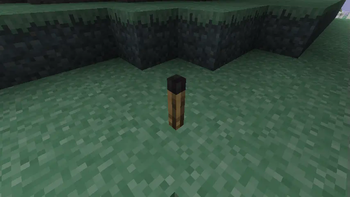
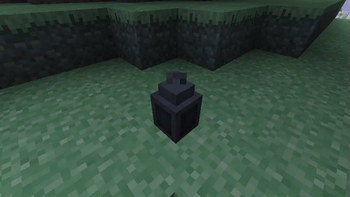
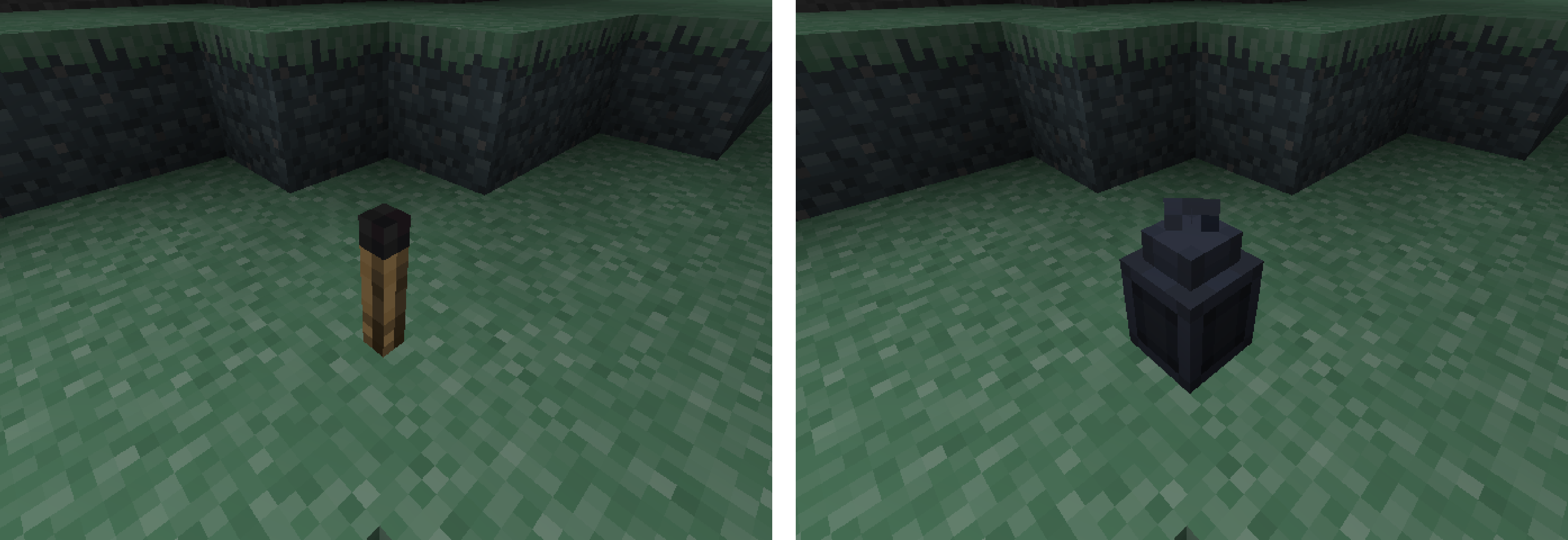
The Enhanced Extinguishing addon changes how placing Torches and Lanterns works in the Aether dimension. It removes the normal mechanic of disallowing their placement, and instead makes it so that placing these blocks will convert them into extinguished variants: the Extinguished Torch and Extinguished Lantern, respectively.
These two blocks resemble their lit counterparts, but both appear to have their flame extinguished and give off no light. This change makes placing these blocks more consistent with the behavior of other blocks in the Aether like Campfires and Candles, which convert to an unlit state. Similarly, breaking the Extinguished Torch and Extinguished Lantern will return their lit counterpart, just like Candles.
☁️ More from The Aether Team ☁️
If you have a question about the addon or are just interested in other projects developed by The Aether Team, you can join The Aether Project Discord! Our friendly staff and welcoming community will make sure you feel at home with us!

You can also support The Aether Team by pledging on Patreon! Every pledge goes directly towards development and enables us to continue doing what we love most.

Available Versions
How to Install Aether Addon: Enhanced Extinguishing on Your Server
Order Server
Order a Minecraft Java server with at least 3 GB RAM (4 GB recommended).
Set fabric Loader
In the panel under "Egg", select the fabric loader and matching Minecraft version (1.21.1).
Install Mod
Open the mod browser in the dashboard and search for "Aether Addon: Enhanced Extinguishing". Click "Install" – done! Alternatively, upload the .jar via SFTP to the /mods folder.
Compatibility
Mod Loaders
Minecraft Versions
1.21.1, 1.20.4, 1.20.2 (+3 more)
Server-side
✓ RequiredRecommended RAM
4 GB(min. 3 GB)Frequently Asked Questions
Aether Addon: Enhanced Extinguishing server crashes on startup – what to do?
Most common cause: wrong fabric version or insufficient RAM. Check the server log (latest.log) for "OutOfMemoryError" or "Mixin" errors. With Mado Hosting: ensure at least 3 GB RAM is allocated and the loader matches the mod version (1.21.1). You can switch loaders with one click in the panel.
Is Aether Addon: Enhanced Extinguishing compatible with fabric and forge and neoforge?
Aether Addon: Enhanced Extinguishing officially supports fabric, forge, neoforge for Minecraft 1.21.1, 1.20.4, 1.20.2. Note: Forge and Fabric mods are NOT cross-compatible – pick one loader and stick with it. The Mado dashboard automatically detects incompatible loader combinations.
Server lagging with Aether Addon: Enhanced Extinguishing – how to optimize performance?
Recommended RAM: 4 GB (per 8 players). Use /spark profiler to check if Aether Addon: Enhanced Extinguishing consumes the most tick time. Common fixes: reduce server view-distance to 8-10, install "performant" or "starlight" as supplementary mods on Forge. With Mado Hosting, your server runs on NVMe SSDs with dedicated CPU cores for minimal latency.
Similar Mods

![[ETF] Entity Texture Features](https://cdn.modrinth.com/data/BVzZfTc1/af683d206d50b05258d865b0d6e4aa2f2cee12f2_96.webp)
![[EMF] Entity Model Features](https://cdn.modrinth.com/data/4I1XuqiY/6e5bbd0d06b1741bfdab6c0cfab6de8fdaf0064c_96.webp)



Rent Modded Server
Install Aether Addon: Enhanced Extinguishing with just one click on your server.