
AFRoads Construction
This a minecraft road mod running on fabric.
Screenshots


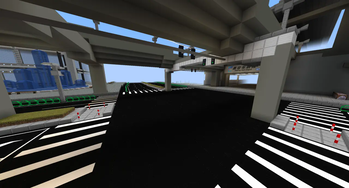
About this Mod

AFRoads Construction / AFRoads 路建
Mod introduction
This is a minecraft road mod running on fabric,it can help players build a huge road traffic network in the game.
Some reminders
If there are a few errors with this mod or if you would like to make some suggestions about it, you can report it to the issue on github.
This mod has not yet added any survival mode recipes,so you must get blocks in creative mode.
The minecraft version 1.16.5 is only compatible with this mod version "1.0.0-beta-build4" and below, if you want to play the updated mod content,please update to the minecraft version 1.17 and above to be compatible with this mod version "1.0.0-Release" or above.
Futher more,1.0.3dev-update1 is the final version supporting minecraft 1.17-1.19 ,futrue mod v1.1.x series use mojang official mappings and support 1.20+.
List of mod content types
Note: The road tool is placed at the bottom of the Tools card bar.
Normal Road Block
This type of block is a pavement foundation block or a road facility located on a pavement.Normal Road Sticker
This type of square is a reticulate line, an indicator arrow, and other types of ground signs placed on a pavement.Road Decoration
This type of block is a road facility that is placed everywhere, such as road separation zones, traffic lights, etc.Available Versions
How to Install AFRoads Construction on Your Server
Order Server
Order a Minecraft Java server with at least 3 GB RAM (4 GB recommended).
Set fabric Loader
In the panel under "Egg", select the fabric loader and matching Minecraft version (1.20.1).
Install Mod
Open the mod browser in the dashboard and search for "AFRoads Construction". Click "Install" – done! Alternatively, upload the .jar via SFTP to the /mods folder.
Compatibility
Mod Loaders
Minecraft Versions
1.20.1, 1.20, 1.19.4 (+9 more)
Server-side
✓ RequiredRecommended RAM
4 GB(min. 3 GB)Frequently Asked Questions
AFRoads Construction server crashes on startup – what to do?
Most common cause: wrong fabric version or insufficient RAM. Check the server log (latest.log) for "OutOfMemoryError" or "Mixin" errors. With Mado Hosting: ensure at least 3 GB RAM is allocated and the loader matches the mod version (1.20.1). You can switch loaders with one click in the panel.
Is AFRoads Construction compatible with fabric?
AFRoads Construction officially supports fabric for Minecraft 1.20.1, 1.20, 1.19.4. The Mado dashboard automatically detects incompatible loader combinations.
Server lagging with AFRoads Construction – how to optimize performance?
Recommended RAM: 4 GB (per 8 players). Use /spark profiler to check if AFRoads Construction consumes the most tick time. Common fixes: reduce server view-distance to 8-10, install "performant" or "starlight" as supplementary mods on Forge. With Mado Hosting, your server runs on NVMe SSDs with dedicated CPU cores for minimal latency.
Similar Mods

![[ETF] Entity Texture Features](https://cdn.modrinth.com/data/BVzZfTc1/af683d206d50b05258d865b0d6e4aa2f2cee12f2_96.webp)
![[EMF] Entity Model Features](https://cdn.modrinth.com/data/4I1XuqiY/6e5bbd0d06b1741bfdab6c0cfab6de8fdaf0064c_96.webp)



Rent Modded Server
Install AFRoads Construction with just one click on your server.