
Modrinth · Fabric · Client mod
Anchor Fade
Anchor Fade is a client-side mod. Install it on your computer; the server does not need it.
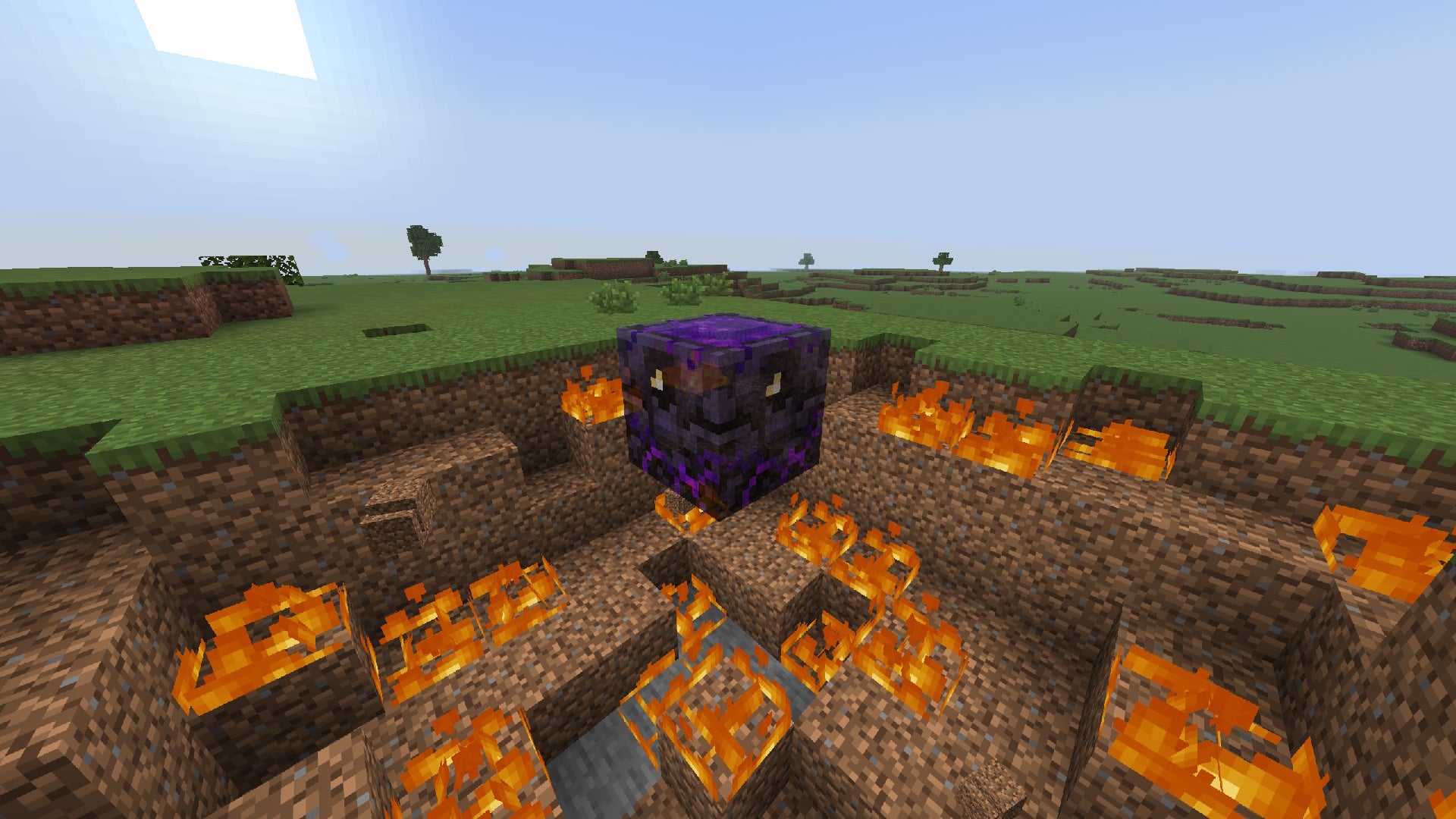
Makes popped Respawn Anchors fade out smoothly instead of disappearing instantly. The fade out and animation is customizable.
- Downloads
- 13.4K
- Author
- TheJoJoni
- Loader
- Fabric
- Minecraft
- 1.21.11 – 26.3
- Updated
- –
Screenshots
What Anchor Fade looks like


Images: Anchor Fade on Modrinth, published by the project team.
Setup
Install Anchor Fade on your client
Client-side mods only run on your computer. More server RAM does not change their performance.
- 01
Install the loader locally
Install Fabric for your Minecraft version in your launcher.
- 02
Download the file
Download the Anchor Fade file for your loader and your exact Minecraft version, for example 26.3.
- 03
Add it to the mods folder
Put the .jar file in your local .minecraft/mods folder and remove older duplicates.
- 04
Launch
Launch Minecraft with the loader profile. Nothing needs to change on the server.
- On the server
- Not needed
- On the client
- Required
- Loader
- Fabric
- Minecraft
- 26.3, 26.2, 26.1.2 +3 more
- License
- LicenseRef-All-Rights-Reserved
Releases
Published releases
Pick the file that matches your server’s loader and Minecraft version. The server and players need the same release.
Anchor Fade · Modrinth- Anchor Fade 1.1.1October 1, 2026Minecraft 26.3 · Fabric
- Anchor Fade 1.1.1June 30, 2026Minecraft 26.2 · Fabric
- Anchor Fade 1.1.1June 30, 2026Minecraft 26.1, 26.1.1, 26.1.2 · Fabric
- Anchor Fade 1.1.1June 30, 2026Minecraft 1.21.11 · Fabric
Original description by the project author
AnchorFade is a client-side visual mod for crystal and anchor PvP that makes popped Respawn Anchors fade out smoothly instead of disappearing instantly. It is designed to make anchor fights look cleaner, easier to read, and more polished without changing any gameplay or server behavior.
Features:
- Smooth fade effect for popped Respawn Anchors
- Fully customizable fade timing, opacity, and overlay color
- Optional animation effects such as movement, rotation, scale, shake, bobbing, and spin
- Built-in animation presets for quick setup
- Share and import codes for copying settings and animation setups
- Client-side only — does not affect damage, mechanics, or server-side logic
- Ressource Pack compatibility ✅
- Allowed on tier lists 🏆✅
Preview of Anchor fading out with Default Settings

General Settings with Cloth Config API

AnchorFade is focused on visual clarity and style, giving popped anchors a cleaner look while keeping the actual PvP unchanged.
Does Anchor Fade need to be installed on the Minecraft server?
No. Modrinth marks Anchor Fade as unsupported on the server side. Install it only in your local mods folder. Your server can stay unchanged unless the project page lists an additional dependency.
Which version and loader does Anchor Fade require?
Use a file for Fabric and your exact Minecraft version. Supported versions include 26.3, 26.2, 26.1.2. Files for different loaders are not interchangeable.
Anchor Fade is not working – what should I check?
First check the Minecraft version, loader version and required dependencies. Because the mod is client-side, more server RAM will not fix it.
Similar mods
Popular mods in the same category
 Client only

Iris Shaders
by coderbot
A modern shader pack loader for Minecraft intended to be compatible with existing OptiFine shader packs
 Client only

[ETF] Entity Texture Features
by Traben
Emissive, Random & Custom texture support for entities in resourcepacks just like Optifine but for Fabric
 Client only

[EMF] Entity Model Features
by Traben
EMF is an, OptiFine format, Custom Entity Model replacement mod available for Fabric and Forge.
 Client only

Not Enough Animations
by tr7zw
Bringing first-person animations to the third-person
Looking for mods for your own server?
The catalog lists mods that run on Minecraft servers.