
OverflowAnimations
The all-you-could-want 1.7, 1.8, and modern animations mod for Minecraft.
Screenshots
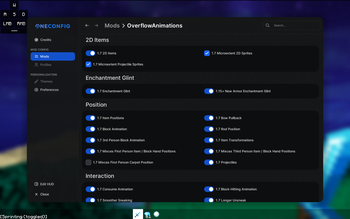
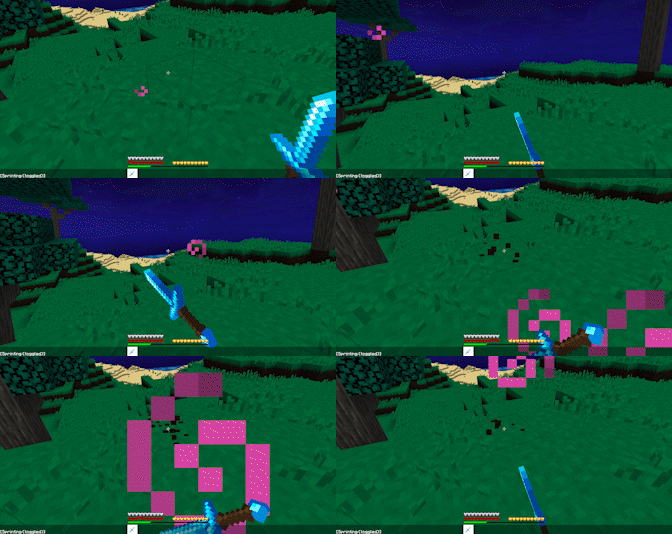
About this Mod
OverflowAnimationsV2


Download (Modrinth)
Extremely precise and advanced old animations mod for 1.8.9.
Originally a fork of Sk1erLLC's OldAnimations mod, it has turned into a much larger mod with essentially full 1.7 parity, animations from ancient and modern Minecraft, custom animations, and much more!
Features
All features from Sk1er's Old Animations Mod (1.7 Animations)
- Old Eating
- Old Rod Position
- Old Bow Position
- Old Blockhitting
- Old Swing Animation
- Old Sneak Animation
- Armor turning red when hit
- Old health
- Old blocking
- Old item held
- Punching a block while doing stuff
- 1.7 Debug
- Old Eating Animation
The "Old Debug Hitbox" feature has been removed as PolyHitbox has the same functionality.
Additional features from 1.7
- Old 2D/Fast Dropped Items
- Accurate First/Third Person Item Positions
- Old Held Item Lighting
- Old Projectiles
- Old Item Pickup Animation
- Old Debug and Tab Menu Styles
- Replace cast fishing rod texture with the texture of a stick!
- More features not seen in other old animation mods!
Modern animations
- Modern Armor Enchantment Glint
- Show Bow Pullback / Fishing Cast GUI Animation
- Modern Backwards Walk Animation
Bug Fixes
- Head Yaw Fixes (Fixes MC-105139)
- Block Breaking Fixes (Fixes MC-255057)
Quality of Life
- Disable Hurt Camera Shake
- Allow Particles to No-Clip
- Allow Punching the Ground in Adventure Mode
- Old Lunar/CheatBreaker Block-Hit Position
Custom Item Properties
Includes Custom Positions for: Swing, Eating/Drinking, Sword Block, Dropped Items, Projectiles, Fireballs, and the Fishing Rod Line.
Customization of Item Postions
- Custom Item X Position
- Custom Item Y Position
- Custom Item Z Position
- Custom Item Rotation Yaw
- Custom Item Rotation Pitch
- Custom Item Rotation Roll
- Custom Item Scale
Customization of Item Swing Speed
- Ignore Mining Fatigue Slowness
- Custom Mining Fatigue Speed
- Ignore Haste Speed
- Custom Haste Speed
Customization of Item Re-equip Animation
- Disable Item Re-equip Animation
- Item Re-equip Animation Speed
- Only Play Re-equip Animation Upon Switching Slots
Available Versions
How to Install OverflowAnimations on Your Client
Install the Mod Loader Locally
Install fabric for your local Minecraft version.
Download the Matching File
Choose the OverflowAnimations file for fabric and Minecraft 26.3.
Install Mod
Place the .jar file in your local .minecraft/mods folder and restart Minecraft. No server-side installation is required.
Compatibility
Mod Loaders
Minecraft Versions
26.3, 26.2, 26.1.2 (+10 more)
Server-side
✗ UnsupportedRecommended RAM
4 GB(min. 3 GB)Frequently Asked Questions
Does OverflowAnimations need to be installed on the Minecraft server?
No. Modrinth marks OverflowAnimations as unsupported on the server side. Install it only in your local Minecraft mods folder. Your server can remain unchanged unless the mod page lists an additional dependency.
Which version and loader does OverflowAnimations require?
Use a file for fabric, forge, ornithe and your exact Minecraft version. Supported versions include 26.3, 26.2, 26.1.2. Files for different loaders are not interchangeable.
OverflowAnimations is not working – what should I check?
First check the Minecraft version, loader version and required dependencies. Put the .jar file in your local .minecraft/mods folder and remove older duplicates. Because this mod is client-side, adding server RAM will not fix it.
Similar Mods




![[ETF] Entity Texture Features](https://cdn.modrinth.com/data/BVzZfTc1/af683d206d50b05258d865b0d6e4aa2f2cee12f2_96.webp)

Minecraft Server for Your Group
OverflowAnimations stays on your client. Host a compatible world for your group.