
Auto Clicker
Relatively complete auto clicker for Minecraft that avoid abusing game mechanics and prefers vanilla like interactions
Screenshots
About this Mod
Auto Clicker (Fabric)
Quick and dirty Auto Clicker mod for Fabric(mc)
Features
- Auto click (hold & spam) for Right and Left click
- Support for AFK farms when respecting cool down
- Configurable spam timeout (speed)
- (almost) No janky key press logic, all native Minecraft key button handling.
How to use (Subject to change)
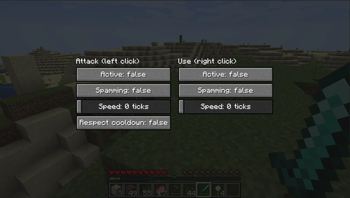
- Open GUI with
O(default key) to enable and edit the settings of each button being clicked - Use
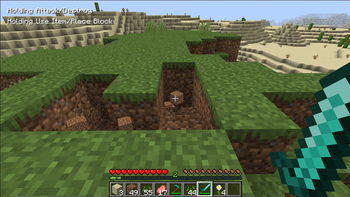
I(default key) to enable auto clicker
Option descriptions
Active: Enables that key to be held whenAuto Clickeris active (holding)Spamming: Enables per tick spamming meaning every tick the button is quickly pressed and un-pressedSpeed: Speed controls how fast (per tick) the spamming will happen, 0 being the quickest, 10 being the slowestRespect cooldown: Will Attack only once the cooldown has cooled down
Use on public servers
I DO NOT support the use of this mod on any public servers which do not allow this kind of mod. The mod does work on servers but I do not approve of, and will not, support anyone that attempts to use this mod on servers. I do not have the time to review each issue; I will simply close any issue with server connections in the crash log.
If you wish to use this mod on private servers then that's on you. If you use this on public servers and are banned then that's on you and I will not support your use of this mod in that way.
Available Versions
How to Install Auto Clicker on Your Client
Install the Mod Loader Locally
Install fabric for your local Minecraft version.
Download the Matching File
Choose the Auto Clicker file for fabric and Minecraft 26.3.
Install Mod
Place the .jar file in your local .minecraft/mods folder and restart Minecraft. No server-side installation is required.
Compatibility
Mod Loaders
Minecraft Versions
26.3, 26.2, 26.1.2 (+29 more)
Server-side
✗ UnsupportedRecommended RAM
4 GB(min. 3 GB)Frequently Asked Questions
Does Auto Clicker need to be installed on the Minecraft server?
No. Modrinth marks Auto Clicker as unsupported on the server side. Install it only in your local Minecraft mods folder. Your server can remain unchanged unless the mod page lists an additional dependency.
Which version and loader does Auto Clicker require?
Use a file for fabric, neoforge and your exact Minecraft version. Supported versions include 26.3, 26.2, 26.1.2. Files for different loaders are not interchangeable.
Auto Clicker is not working – what should I check?
First check the Minecraft version, loader version and required dependencies. Put the .jar file in your local .minecraft/mods folder and remove older duplicates. Because this mod is client-side, adding server RAM will not fix it.
Similar Mods





Minecraft Server for Your Group
Auto Clicker stays on your client. Host a compatible world for your group.