
Axiom
The all-in-one tool for editing Minecraft Worlds.
Screenshots
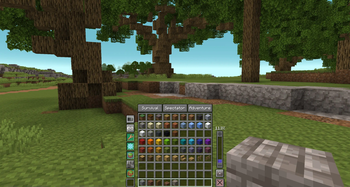
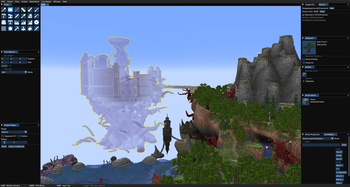
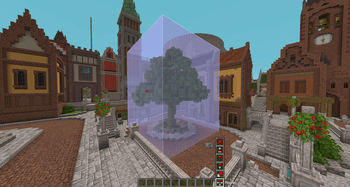
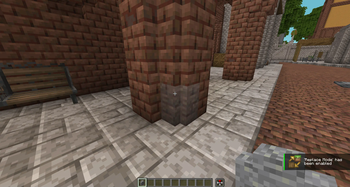
About this Mod







https://axiom.moulberry.com/
By installing Axiom, you agree to the EULA available at https://axiom.moulberry.com/eulaAxiom is an all-in-one tool for Minecraft editing. It merges the capabilities of 3D software with a sleek interface and an innovative toolset. Axiom simplifies Minecraft building while elevating its potential. Real-time previews and client-side rendering, powered by specialized algorithms, enhance both visual feedback and performance while building.
Support the Project
By backing the project on Patreon or acquiring a commercial license, you play a direct role in supporting Axiom's development, ensuring that we can keep delivering new features and updates.


Features
Axiom provides a comprehensive toolset for real-time and detailed Minecraft world adjustments. Each tool is equipped with unique settings tailored for precision.
Builder Mode
Enhances vanilla Creative mode with Builder Mode's suite of enhancements:
- Builder Context Menu: Hold 'Left Alt' to access a range of features such as Capabilities and Builder Tools.
- Hotbar Swapper: Switch between hotbars for easier building material management.
- Capabilities: Toggle various building functionalities that will enhance building in various ways so you build whatever, whenever.
- Flight Speed: A convenient slider to adjust your flight speed, with speeds up to 10x.
Editor Mode
Press Right-Shift to enter the Editor Mode. Explore a range of tools ideal for world manipulation, painting, terraforming, and sculpting. The Editor Mode integrates familiar camera controls from 3D software with tailored tools for Minecraft building. Customize the UI layout by rearranging windows to suit your needs.
- Selection Tools:
Innovative selection methods, including magic and cuboid options.
Use boolean logic for enhanced selection capabilities. - Painting Tools:
Replace blocks seamlessly without just adding new ones.
Choose from a variety of tools for specific block editing needs. - Drawing Tools:
Sculpt and mold your world with an array of tools.
Benefit from distinct placement algorithms for different effects. - Heightmap Tools:
Modify terrains using a layered approach, inspired by tools like World Machine. - Manipulation Tools:
Fine-tune terrains for your desired outcome.
Smooth, distort, and refine using a series of specialized tools.
Commercial Use
We ask that 'Professional Builders' (i.e. people who make money through building in Minecraft)
purchase a Commercial License. The commercial license unlocks the full potential of Axiom to power your commercial endeavours and provides several extra features such as:
- Multiplayer Support:
Collaborate with others on private build servers using Multiplayer Support - Custom Server APIs:
Leverage powerful server APIs like serverside custom blocks to accelerate development - Automatic History Persistence:
Automatically back up any changes to the world made by Axiom
In order to enable the above functionality, Axiom sends a request with your UUID to https://axiom.moulberry.com/.
Non-Commercial Use
If you are using Axiom non-commercially, you can use it in singleplayer, localhost servers, or plot-based servers like Builders Refuge and The Bakery without any restrictions. If you wish to use it on your own private multiplayer server, you can request a multiplayer whitelist through the Axiom discord. Large public servers may also request a permanent server whitelist by contacting moulberry through discord.
How to Install
Here is a simple video that guides you through the installation process of Axiom.
Links
You can follow the project on other socials listed here.



Available Versions
How to Install Axiom on Your Server
Order Server
Order a Minecraft Java server with at least 3 GB RAM (4 GB recommended).
Set fabric Loader
In the panel under "Egg", select the fabric loader and matching Minecraft version (26.3).
Install Mod
Open the mod browser in the dashboard and search for "Axiom". Click "Install" – done! Alternatively, upload the .jar via SFTP to the /mods folder.
Compatibility
Mod Loaders
Minecraft Versions
26.3, 26.2, 26.1.2 (+21 more)
Server-side
~ OptionalRecommended RAM
4 GB(min. 3 GB)Frequently Asked Questions
Axiom server crashes on startup – what to do?
Most common cause: wrong fabric version or insufficient RAM. Check the server log (latest.log) for "OutOfMemoryError" or "Mixin" errors. With Mado Hosting: ensure at least 3 GB RAM is allocated and the loader matches the mod version (26.3). You can switch loaders with one click in the panel.
Is Axiom compatible with fabric?
Axiom officially supports fabric for Minecraft 26.3, 26.2, 26.1.2. The Mado dashboard automatically detects incompatible loader combinations.
Server lagging with Axiom – how to optimize performance?
Recommended RAM: 4 GB (per 8 players). Use /spark profiler to check if Axiom consumes the most tick time. Common fixes: reduce server view-distance to 8-10, install "performant" or "starlight" as supplementary mods on Forge. With Mado Hosting, your server runs on NVMe SSDs with dedicated CPU cores for minimal latency.
Similar Mods






Rent Modded Server
Install Axiom with just one click on your server.