
Modrinth · Fabric
Basic Storage on your Minecraft server
Basic Storage runs on Minecraft servers with Fabric. Order your server, set the loader in the panel and install the mod with one click in the mod browser.
Drawer-style, vanilla-friendly mass item storage
- Downloads
- 48.1K
- Author
- June
- Loader
- Fabric
- Minecraft
- 1.20.1 – 26.1.2
- Updated
- –
Screenshots
What Basic Storage looks like
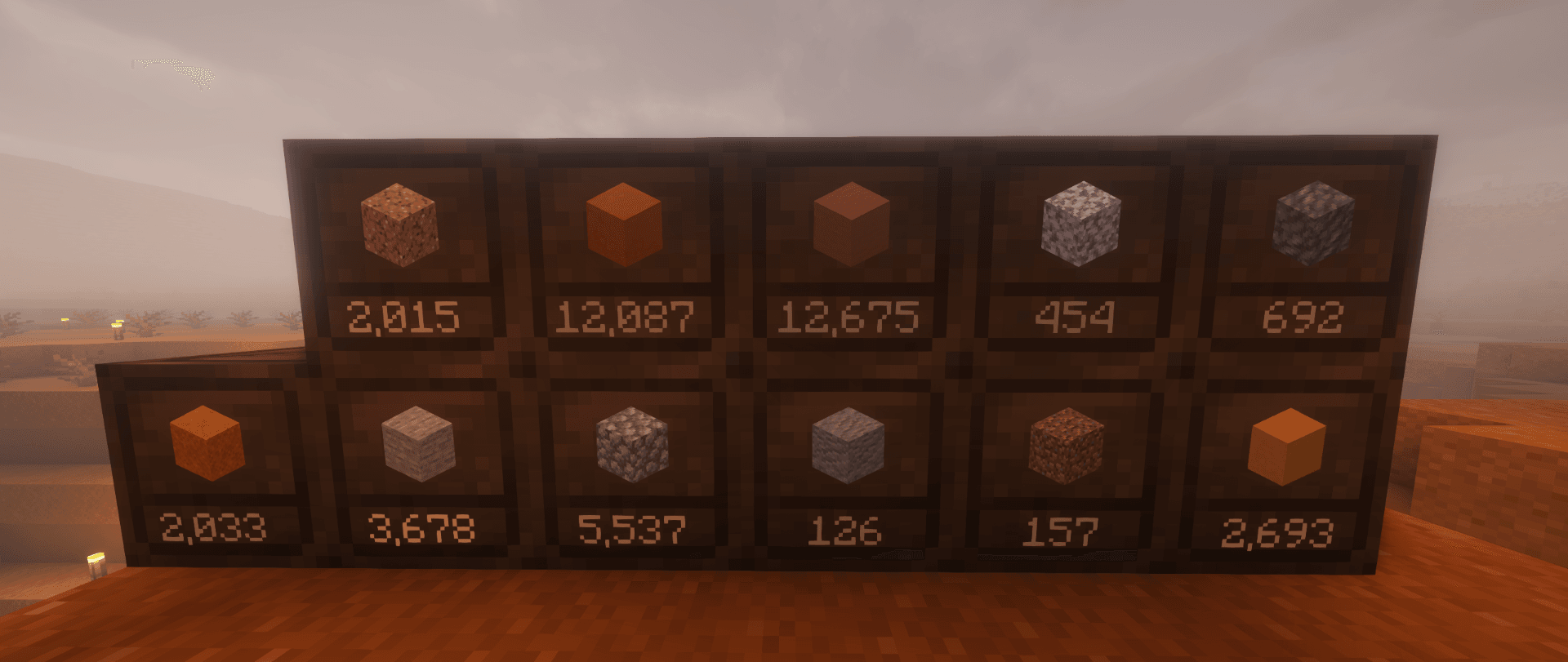
 Builders Rejoice!
 Crates Hold Everything
 Perfect For Farms
 Stack Unstackable Items
 Organize Crates With Ease
Images: Basic Storage on Modrinth, published by the project team.
Setup
Install Basic Storage on your server
The server and players need the same loader and Minecraft version. Back up the world before adding or updating mods.
- 01
Configure
4 GB of RAM is preselected. You choose the term and add-ons and pay by credit card or PayPal.
- 02
Set the loader
In the panel, set the server software to Fabric and choose the matching Minecraft version, for example 26.1.2.
- 03
Install the mod
Search the mod browser for “Basic Storage” and install the release for your loader. Alternatively, upload the .jar to the mods folder via SFTP. Required dependencies are listed on the project page.
- 04
Connect
Every player installs the same Basic Storage release locally and connects using the server address from the panel.
- On the server
- Required
- On the client
- Required
- Loader
- Fabric
- Minecraft
- 26.1.2, 26.1.1, 26.1 +8 more
- License
- GNU General Public License v3.0 or later
The panel
Install mods, find errors.
Real screenshots from the Mado panel. Both come with every Minecraft server.
Mod browser
Modrinth and CurseForge, right in the panel.
The browser filters by your Minecraft version. Install mods with one click, without uploading .jar files.

AI crash analysis
When a mod crashes, the analyzer reads the log.
Mods often fail on a wrong loader version, Java version or missing dependency. The analyzer names a likely cause and suggests a fix.

Releases
Published releases
Pick the file that matches your server’s loader and Minecraft version. The server and players need the same release.
Basic Storage · Modrinth- Basic Storage 2.4.3May 9, 2026Minecraft 26.1, 26.1.1, 26.1.2 · Fabric
- Basic Storage 2.4.2February 17, 2026Minecraft 1.21.11 · Fabric
- Basic Storage 2.0.1+1.21.10November 22, 2025Minecraft 1.21.10 · Fabric
- Basic Storage 1.2.1+1.21.1November 22, 2025Minecraft 1.21.1 · Fabric
- Fabric → 1.0.5+1.20.1March 17, 2025Minecraft 1.20.1 · Fabric
Original description by the project author
🏷️ This description may not reflect the version of the mod you’re using.
If you have questions or need help, ask in the #support channel on my Discord server.








About
Basic Storage adds simple, vanilla-friendly crates for players who want bulk storage without
an upgrade system or a complicated GUI.
- Store up to 1 billion items of a single type in each crate
- Deposit and withdraw directly from the block
- Build crate networks with the Crate Station and Crate Connectors
- Move full crates without losing their contents
- Works with hoppers, hopper carts and common storage mods
Demonstration Video
Crate
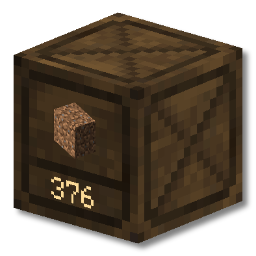
Basic Storage adds a new block, the Crate. It can hold up to 1 billion items of a single
type. Items can be quickly deposited and withdrawn by:
- directly interacting with crates (no GUI)
- Right Click inserts one item
- Shift Right Click inserts all matching items from your inventory
- Left Click takes out one item
- Shift Left Click takes out a single stack of items
- using hoppers/hopper carts
- using third party mods (e.g. AE2, RS, Tom's Storage, Copper Pipes)
Crate Station
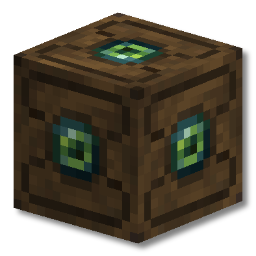
The crate station functions as a quick-insert hub for a network of crates.
Any crates connected directly to the crate station or via crate connectors or other crates are part of the same network.
Interacting with the crate station is similar to crates:
- Right Click inserts the entire stack of what you're holding into a compatible crate
- Shift Right Click inserts all items from your inventory which match crates in the
network.
Use Case
Imagine you have a crate wall for materials such as stone, dirt, gravel and raw ore.
You've just been on a mining trip and your inventory is full of these items.
Simply shift right click on the Crate Station and your inventory will be freed up super quick, with
every item in the right place!
Recipes
While resources to make crates are available at the very start of the game, a crate station is
slightly harder. This is to encourage players to use crates however they see fit in the early game,
and then adapt their storage systems to work on a larger scale later in the game if they wish.

Transporting Crates
Crates are fantastic for keeping your storage organized and accessible, but what if you need to move
that storage?
Dynamic Item Models
Crates can easily be broken with an axe. Once you've broken a crate with items in and picked it up you'll notice that it looks different.

Crates with items in them will show the item it contains on both the item model itself, and in the
crate's tooltip. The number of items in the crate can be found in the tooltip too.

Frequently Asked Questions
What are the mod's dependencies?
Basic Storage has no extra dependencies.
Is there a NeoForge/Fabric/quilt version?
There is currently a Fabric version.
NeoForge is planned. Quilt may work, but is not explicitly supported.
Can you backport the mod to Minecraft 1.X.X?
Unfortunately I don't have the time to backport Basic Storage to earlier versions.
The mod will however support each new major version of Minecraft.
I found a bug / my game crashed
If you find any problems with Basic Storage, please feel encouraged
to create an issue on the GitHub repository issue tracker.
Bug reports are incredibly helpful, and help make Basic Storage the best it can be.
Acknowledgements
Basic Storage wouldn't exist without the hard work and creativity of those that came before it. I'd
like to give special thanks to the talented developers and artists behind JABBA, Storage Drawers and
Extended Drawers, as well as every other barrel/drawer mod that came before them.
Basic Storage server crashes on startup – what to do?
Common causes: the loader or Minecraft version does not match the mod file, a dependency is missing, or RAM is too low. Check the log (latest.log) for “OutOfMemoryError”, “Mixin” or missing mods. At Mado, the AI crash analysis reads the log and suggests a cause. You can change the loader and version in the panel.
Which loader does Basic Storage run on?
According to Modrinth, Basic Storage supports Fabric for Minecraft 26.1.2, 26.1.1, 26.1.
How much RAM does a server with Basic Storage need?
As guidance, 3–4 GB for a server with this mod. This is an estimate, not a measured minimum. More mods, many players and long view distances need more. The spark profiler shows whether a mod is costing tick time.
Similar mods
Popular mods in the same category
 Client only

Iris Shaders
by coderbot
A modern shader pack loader for Minecraft intended to be compatible with existing OptiFine shader packs
 Client only

[ETF] Entity Texture Features
by Traben
Emissive, Random & Custom texture support for entities in resourcepacks just like Optifine but for Fabric
 Client only

[EMF] Entity Model Features
by Traben
EMF is an, OptiFine format, Custom Entity Model replacement mod available for Fabric and Forge.
 Client only

Not Enough Animations
by tr7zw
Bringing first-person animations to the third-person
Ready for your server with Basic Storage?
4 GB of RAM from €8.00 per month. 35% off your first month with MADO35.