
Modrinth · Fabric, NeoForge, Quilt
BetterNether: New Dawn on your Minecraft server
BetterNether: New Dawn runs on Minecraft servers with Fabric or NeoForge or Quilt. Order your server, set the loader in the panel and install the mod with one click in the mod browser.
An unofficially maintained continuation of BetterNether for Fabric and NeoForge, bringing the latest BetterNether content to every supported Minecraft version alongside bug fixes, compatibility improvements, and expanded Nether world generation
- Downloads
- 237.2K
- Author
- Raijin2312
- Loader
- Fabric, NeoForge, Quilt
- Minecraft
- 1.21 – 26.3
- Updated
- –
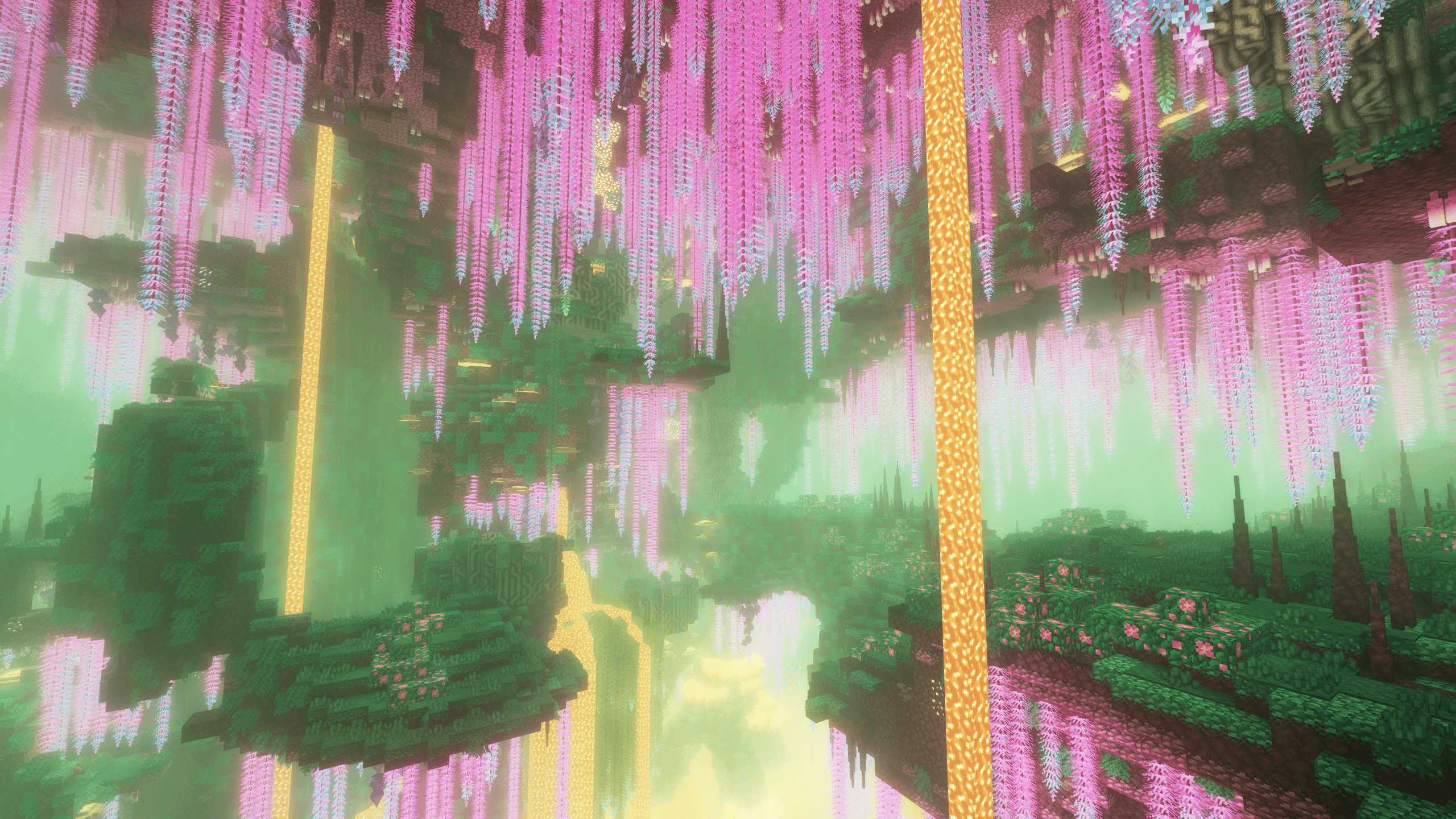
Screenshots
What BetterNether: New Dawn looks like


Images: BetterNether: New Dawn on Modrinth, published by the project team.
Setup
Install BetterNether: New Dawn on your server
The server and players need the same loader and Minecraft version. Back up the world before adding or updating mods.
- 01
Configure
6 GB of RAM is preselected. You choose the term and add-ons and pay by credit card or PayPal.
- 02
Set the loader
In the panel, set the server software to Fabric or NeoForge or Quilt and choose the matching Minecraft version, for example 26.3.
- 03
Install the mod
Search the mod browser for “BetterNether: New Dawn” and install the release for your loader. Alternatively, upload the .jar to the mods folder via SFTP. Required dependencies are listed on the project page.
- 04
Connect
Every player installs the same BetterNether: New Dawn release locally and connects using the server address from the panel.
- On the server
- Required
- On the client
- Required
- Loader
- Fabric, NeoForge, Quilt
- Minecraft
- 26.3, 26.2, 26.1.2 +5 more
- License
- MIT License
The panel
Install mods, find errors.
Real screenshots from the Mado panel. Both come with every Minecraft server.
Mod browser
Modrinth and CurseForge, right in the panel.
The browser filters by your Minecraft version. Install mods with one click, without uploading .jar files.

AI crash analysis
When a mod crashes, the analyzer reads the log.
Mods often fail on a wrong loader version, Java version or missing dependency. The analyzer names a likely cause and suggests a fix.

Releases
Published releases
Pick the file that matches your server’s loader and Minecraft version. The server and players need the same release.
BetterNether: New Dawn · Modrinth- 26.3.7-fabricNovember 22, 2026Minecraft 26.3 · Fabric, Quilt
- 26.3.7November 22, 2026Minecraft 26.3 · NeoForge
- 26.2.7-fabricNovember 22, 2026Minecraft 26.2 · Fabric, Quilt
- 26.2.7November 22, 2026Minecraft 26.2 · NeoForge
- 26.1.12-fabricNovember 22, 2026Minecraft 26.1, 26.1.1, 26.1.2 · Fabric, Quilt
Original description by the project author
BetterNether: New Dawn
An independently maintained continuation of BetterNether for modern Minecraft versions
BetterNether: New Dawn is an unofficial continuation of BetterNether for Fabric, Quilt, and NeoForge.
The project continues maintenance of the original BetterNether experience with bug fixes, compatibility improvements, selected balance changes, quality-of-life improvements, and support for modern Minecraft versions and mod loaders.
Check the Versions tab before downloading and make sure you select the correct file for your Minecraft version and mod loader.
Required on both the client and server.
Latest BetterNether Content on Every Supported Version
New Dawn includes all content introduced in the latest BetterNether releases across every supported Minecraft version - including Minecraft 1.21.1.
All additions have been integrated and adapted for the corresponding Minecraft version and mod loader.
Included New Content
- The complete Gloomwood biome
- Bleached, Veined, and Molten Gloomsculk terrain
- Gloomwood trees, leaves, saplings, grass, and vegetation
- Gloomsculk geodes, crystals, vines, and lamps
- Interactive glowing Gloomwisps
- Complete Gloomwood and Dark Gloomwood building sets
- Gloomwood boats and chest boatsNew furniture, containers, signs, and decorative blocks
- Three new biome music tracks and collectible music discs
- New advancements, block mechanics, particles, sounds, and world-generation features
- Natural Gloomwood groves, sparse grove edges, and solitary trees
- Rare Bleached Gloomwood trees with inverted foliage and Ancient Debris beneath their roots
- Massive multi-chunk lava lakes. Search command: /locate structure betternether:mega_lava_lake
- 2×2 giant Willow Tree growth
- Optional 2×2 giant Anchor Tree growth via gamerule: /gamerule betternether:grow_large_anchor_trees true
- Gloomwood Sapling support for Cincinnasite Pots
- Chiseled Bookshelves for every single BetterNether wood set
- Added new spawn egg artwork for the Naga, Jungle Skeleton, Flying Pig, Hydrogen Jellyfish, and Skull
- Fire Ruby retaliation now activates on half of eligible hits instead of one quarter (50% chance instead of 25%)
- Flaming Ruby equipment can now be repaired with Gloomsculk Crystals and Gloomsculk Geode Crystals
- Obsidian Breaker now mines netherrack, Nether ores, glass, and glass panes faster
- Hook Mushroom now converts only Awkward Potions into Healing Potion
- Gamerule for disabling Blue Obsidian in generated ruined portals: /gamerule betternether:generate_blue_ruined_portals
- LabPBR specular textures
Required dependencies
Supported platforms
- NeoForge
- Fabric
- Quilt, through the compatible Fabric edition
Platform availability may differ between Minecraft versions.
About BetterNether
BetterNether makes adventures in the Nether more exciting by adding new biomes, plants, materials, mobs, structures, tools, food, building blocks, and world-generation features.
You will encounter challenging creatures such as the Naga, explore dark dungeons occupied by Nether mobs, discover large and rare Nether Cities, and use new tools and materials to improve your chances of survival.
Builders also receive many unique decorative blocks and additional variants of familiar vanilla blocks.
Features
- Dozens of new plants for the Nether
- New Nether mobs
- New unique biomes
- Vertical and volumetric biome system supporting other mods and datapacks
- Many new materials, recipes, food, tools, and items
- Farmable resources through plant and mob farms
- Many Nether structures, including large and rare Nether Cities
- Configurable blocks, items, structures, biomes, and plant density
- Configuration-screen support through Mod Menu on Fabric
- Integrations and compatibility with other mods
Fixes and changes in this project
- Fixed: crash when clicking on the Respawn Statue
- Fixed (datagen): the automatic tag provider only looked at blocks with the BlockTagDataProvider interface and ignored blocks with the org.betterx.wover.block.api.BlockTagProvider interface (such as BlockTerrain). As a result, runData was writing to wover:surfaces/nether/terrain only what came from other sources
- Change (suggestion): removed the Sculk Catalyst from loot tables (thanks Yukiroshi). It was too easy to obtain Fireruby gear early; now you’ll have to pay a visit to the Warden
- Change (suggestion): full translation for ru_ru.json (thanks FO13E)
- Fixed: Cincinnasite furnace does not drop when mined in 1.21 (thanks happykgit)
- Change (suggestion): new name for moss cover in the Russian translation (thanks happykgit)
- Fixed: “flying block” issue in 1.21 (thanks happykgit)
- Fixed: Golden vine does not drop in 1.21 (thanks happykgit)
- Fixed: Hook mushroom does not drop in 1.21 (thanks happykgit)
- Fixed: Giant lucis drops loot twice in 1.21 (thanks happykgit)
- Fixed: Eye Plants not dropping loot (thanks Myrrium)
- Fixed: missing loot tables and incorrect vanilla and common block tags.
- Fixed: broken plant survival checks and incorrect bone meal behavior.
- Fixed: Eye Vine and Whispering Gourd Vine behavior.
- Fixed: incorrect Statue Respawner and Ruby Fire behavior.
- Fixed: incorrect firefly color packing.
- Fixed: Rubeus leaves not decaying correctly.
- Fixed: Rubeus tree generation issues.
- Fixed: duplicate vine drops.
- Fixed: broken Feather Fern models.
- Fixed: Nether Cities intersecting Nether Fortresses, Bastion Remnants, caves, trees and vegetation during generation.
- Fixed: slim armor rendering incompatibilities with 3D Skin Layers and vanilla player rendering.
- Fixed: incompatibility with Tech Reborn that prevented world creation and caused crashes after deleting worlds (26.3).
- Change (compatibility): added Copper Golem support for modified wooden chests.
- Change (suggestion): prevent the Fireruby pickaxe from smelting ores when it has the Silk Touch enchantment (thanks TimVincii)
- Fixed: Fireflies do not spawn from monster spawners (thanks nothingtown)
- Change (suggestion): changed all fire bowl blocks to use lit instead of fire (thanks Cicopath)
- Change (suggestion): Nether Brewing Stand now brews 2× faster, 200 ticks; UI progress remains correct (thanks AcaGamer5)
- Change (suggestion): Willow wood renamed to Nether Willow in all languages, with native localized wording (thanks AcaGamer5)
How this project differs from upstream
The original BetterNether project is maintained by the BetterX developers.
BetterNether: New Dawn is an independent community continuation that maintains additional Minecraft versions and mod-loader editions.
The project focuses on:
- continued maintenance of the Fabric edition;
- compatibility with Quilt through the Fabric edition;
- support for modern NeoForge versions;
- compatibility fixes required by different mod loaders;
- selected balance and quality-of-life changes;
- support for newer Minecraft versions;
- compatibility with other biome and world-generation mods;
- consistency across the New Dawn ecosystem.
BetterNether: New Dawn is not maintained, endorsed, or officially supported by the original BetterNether developers or the BetterX Team.
Support and issue reports
Please do not report New Dawn-specific issues to the upstream BetterNether repository, the original developers, or the official BetterX support channels. They do not maintain this continuation.
For crashes, bugs, compatibility problems, and other issues affecting BetterNether: New Dawn, use the New Dawn issue tracker:
BetterNether: New Dawn issue tracker
When reporting a problem, include:
- Minecraft version
- Mod loader and loader version
- BetterNether: New Dawn version
- BCLib, WunderLib, and WorldWeaver versions
- Complete mod list
- Latest log or crash report
- Clear reproduction steps
New Dawn community
Source code
BetterNether: New Dawn on GitHub
BetterNether: New Dawn is independently maintained by Raijin.
Credits and attribution
BetterNether was originally created by Paulev and its contributors.
The original artwork and the majority of the original code belong to their respective creators, contributors, and the BetterX Team.
BetterNether: New Dawn is an independent, unofficial continuation maintained by Raijin.
Thanks to everyone credited in the fixes and changes section for their reports, suggestions, translations, and contributions.
Original project
Upstream community
The BetterX Discord is provided only as a link to the upstream community. Do not use it to request support for New Dawn-specific problems.
License
BetterNether: New Dawn is distributed under the licensing and attribution terms included in its source repository.
Review the repository license files before modifying or redistributing the project or its assets.
BetterNether: New Dawn server crashes on startup – what to do?
Common causes: the loader or Minecraft version does not match the mod file, a dependency is missing, or RAM is too low. Check the log (latest.log) for “OutOfMemoryError”, “Mixin” or missing mods. At Mado, the AI crash analysis reads the log and suggests a cause. You can change the loader and version in the panel.
Which loader does BetterNether: New Dawn run on?
According to Modrinth, BetterNether: New Dawn supports Fabric, NeoForge, Quilt for Minecraft 26.3, 26.2, 26.1.2.
How much RAM does a server with BetterNether: New Dawn need?
As guidance, 4–6 GB for a server with this mod. This is an estimate, not a measured minimum. More mods, many players and long view distances need more. The spark profiler shows whether a mod is costing tick time.
Similar mods
Popular mods in the same category
 Client only

Iris Shaders
by coderbot
A modern shader pack loader for Minecraft intended to be compatible with existing OptiFine shader packs
 Client only

[ETF] Entity Texture Features
by Traben
Emissive, Random & Custom texture support for entities in resourcepacks just like Optifine but for Fabric
 Client only

[EMF] Entity Model Features
by Traben
EMF is an, OptiFine format, Custom Entity Model replacement mod available for Fabric and Forge.
 Client only

Not Enough Animations
by tr7zw
Bringing first-person animations to the third-person
Ready for your server with BetterNether: New Dawn?
6 GB of RAM from €12.00 per month. 35% off your first month with MADO35.