Modrinth · Fabric, Forge, NeoForge · Client mod
Better Tab Info
Better Tab Info is a client-side mod. Install it on your computer; the server does not need it.
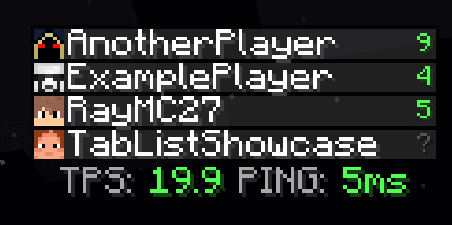
Improves tab list with extra info (TPS & numerical ping), customizable rows and columns, as well as scrolling.
- Downloads
- 354.6K
- Author
- tricube
- Loader
- Fabric, Forge, NeoForge
- Minecraft
- 1.20 – 26.3
- Updated
- –
Screenshots
What Better Tab Info looks like


Images: Better Tab Info on Modrinth, published by the project team.
Setup
Install Better Tab Info on your client
Client-side mods only run on your computer. More server RAM does not change their performance.
- 01
Install the loader locally
Install Fabric or Forge or NeoForge for your Minecraft version in your launcher.
- 02
Download the file
Download the Better Tab Info file for your loader and your exact Minecraft version, for example 26.3.
- 03
Add it to the mods folder
Put the .jar file in your local .minecraft/mods folder and remove older duplicates.
- 04
Launch
Launch Minecraft with the loader profile. Nothing needs to change on the server.
- On the server
- Not needed
- On the client
- Required
- Loader
- Fabric, Forge, NeoForge
- Minecraft
- 26.3, 26.2, 26.1.2 +21 more
- License
- MIT License
Releases
Published releases
Pick the file that matches your server’s loader and Minecraft version. The server and players need the same release.
Better Tab Info · Modrinth- Better Tab 2.2.3 Fabric 26.2September 26, 2026Minecraft 26.2, 26.3 · Fabric
- Better Tab 2.2.3 Neoforge 26.2September 26, 2026Minecraft 26.2, 26.3 · NeoForge
- Better Tab 2.2.1 Fabric 1.21.11July 16, 2026Minecraft 1.21.11 · Fabric
- Better Tab 2.2.1 Fabric 1.20.1July 16, 2026Minecraft 1.20.1 · Fabric
- Better Tab 2.2.1 Fabric 1.21.1July 16, 2026Minecraft 1.21.1 · Fabric
Original description by the project author
Better Tab Info

Client-side Fabric/(Neo)Forge mod improving the tab list with TPS & ping display, scrolling, and other configurable tweaks. Works on any server without server-side mods.
Features
- Numerical ping
- Scrollable player list
- Customise amount of rows and columns visible
- Enables the use of tablist in singleplayer worlds
- Readds player heads beside player names in offline servers, just like how it works in online servers
- Colored TPS and Ping shown in footer
Showcase

Scrollable tab with 2 columns and 10 rows.
By default, vanilla has max of 4 columns and 20 rows.
Config
To access configs, use the command /bettertab or by using Mod Menu for Fabric or the built in (neo)Forge config menu.

note: In servers, TPS is estimated from client-side packets. Accuracy may vary on servers that modify packets or on poor connections.
Dependencies (For versions >= 2.0.0)
Fabric Dependencies
Mod Menu is optional.
| Modrinth | Curseforge |
|---|---|
| Craft Config Lib | Craft Config Lib |
| Fabric API | Fabric API |
| Mod Menu | Mod Menu |
(Neo)Forge Dependencies
| Modrinth | Curseforge |
|---|---|
| Craft Config Lib | Craft Config Lib |
Does Better Tab Info need to be installed on the Minecraft server?
No. Modrinth marks Better Tab Info as unsupported on the server side. Install it only in your local mods folder. Your server can stay unchanged unless the project page lists an additional dependency.
Which version and loader does Better Tab Info require?
Use a file for Fabric, Forge, NeoForge and your exact Minecraft version. Supported versions include 26.3, 26.2, 26.1.2. Files for different loaders are not interchangeable.
Better Tab Info is not working – what should I check?
First check the Minecraft version, loader version and required dependencies. Because the mod is client-side, more server RAM will not fix it.
Similar mods
Popular mods in the same category
 Server-ready

YetAnotherConfigLib (YACL)
by isxander
A builder-based configuration library for Minecraft!
 Server-ready

Text Placeholder API
by Patbox
Placeholder and Text manipulation library for your Minecraft mods.
 Client only

Dynamic FPS
by juliand665
Reduce resource usage while Minecraft is in the background, idle, or on battery.
 Server-ready

No Chat Reports
by Aizistral
Makes chat unreportable (where possible)
Looking for mods for your own server?
The catalog lists mods that run on Minecraft servers.