
Screenshots
About this Mod


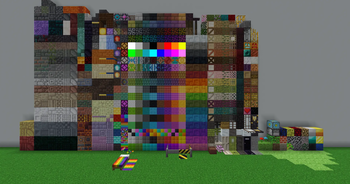
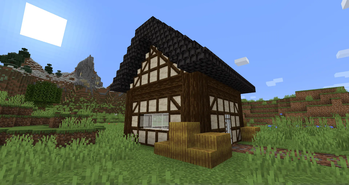
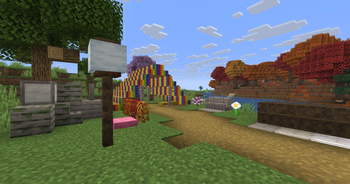
Blockus is a mod made using Fabric API. It adds blocks of several types.
Most of the blocks require a stonecutter to make them. I recommend the use of a mod like Roughly Enough Items (REI) for all recipes.
NeoForge support is currently not planned. You can use Sinytra Connector for NeoForge support.
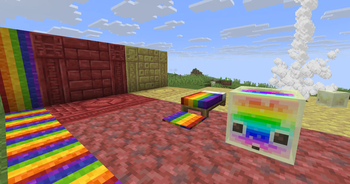
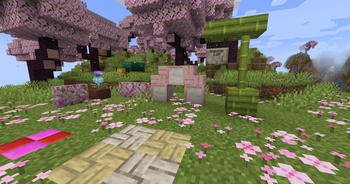
Some added blocks :
- Marble, Limestone, Bluestone & Viridite
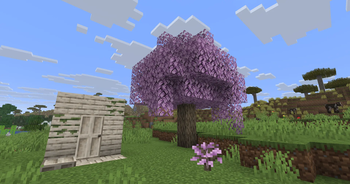
- White Oak, Raw Bamboo & Charred Planks
- Large Flower Pots
- Lava, Magma, Water, Blaze, Soaked Bricks & more
- Soul Sandstone
- Teal & Charred Nether Bricks
- Colored Tiles
- Stained Stone Bricks
- Colored Redstone Lamps
- Beveled Glass
- Patterned Wools
- Futurneo Blocks
- Asphalt that makes you go fast
- Redstone Sand
- Paper Block, Wall and Lamp
- Hedges
- Rainbow Blocks
- Food Crates
- Legacy Blocks
- Columns integration (< 1.19)
Naturally generated things
- Limestone is generated between y = 0 & y = 128 but much less between y = 64 & y = 128
- Marble is generated between y = 0 & y = 64
- Bluestone is generated below y = 0
- Viridite is generated below y = -16 & more frequently in Deep Dark.
- White Oak is generated in Forest, Dark Forest, Flower Forest, Cherry Groves & Plains.
- Fallen White Oak is generated in Forest, Flower Forest & Plains.
- Rainbow Roses spawn in Flower Forests & Meadows
Thanks to :
- Futurenp: Textures
- SynthRose: Teal Nether Bricks and Lantern Blocks (with old texture)
- shedaniel/TelepathicGrunt: new 1.16.2+ worldgen
- YanisBft: Wooden Barrels fix
Mods inspirations:
- "Quark" by Vazkii
- "Chisel" by tterrag1098, Drullkus & Minecreatr
- "Ceramics" by KnightMiner (Rainbow Bricks)
French description/Description française : https://www.minecraft-france.fr/mod-blockus/

Available Versions
How to Install Blockus on Your Server
Order Server
Order a Minecraft Java server with at least 4 GB RAM (6 GB recommended).
Set fabric Loader
In the panel under "Egg", select the fabric loader and matching Minecraft version (26.3).
Install Mod
Open the mod browser in the dashboard and search for "Blockus". Click "Install" – done! Alternatively, upload the .jar via SFTP to the /mods folder.
Compatibility
Mod Loaders
Minecraft Versions
26.3, 26.2, 26.1.2 (+23 more)
Server-side
✓ RequiredRecommended RAM
6 GB(min. 4 GB)Frequently Asked Questions
Blockus server crashes on startup – what to do?
Most common cause: wrong fabric version or insufficient RAM. Check the server log (latest.log) for "OutOfMemoryError" or "Mixin" errors. With Mado Hosting: ensure at least 4 GB RAM is allocated and the loader matches the mod version (26.3). You can switch loaders with one click in the panel.
Is Blockus compatible with fabric?
Blockus officially supports fabric for Minecraft 26.3, 26.2, 26.1.2. The Mado dashboard automatically detects incompatible loader combinations.
Server lagging with Blockus – how to optimize performance?
Recommended RAM: 6 GB (per 5 players). Use /spark profiler to check if Blockus consumes the most tick time. Common fixes: reduce server view-distance to 8-10, install "performant" or "starlight" as supplementary mods on Forge. With Mado Hosting, your server runs on NVMe SSDs with dedicated CPU cores for minimal latency.
Similar Mods

![[ETF] Entity Texture Features](https://cdn.modrinth.com/data/BVzZfTc1/af683d206d50b05258d865b0d6e4aa2f2cee12f2_96.webp)
![[EMF] Entity Model Features](https://cdn.modrinth.com/data/4I1XuqiY/6e5bbd0d06b1741bfdab6c0cfab6de8fdaf0064c_96.webp)



Rent Modded Server
Install Blockus with just one click on your server.