
Horde Nights
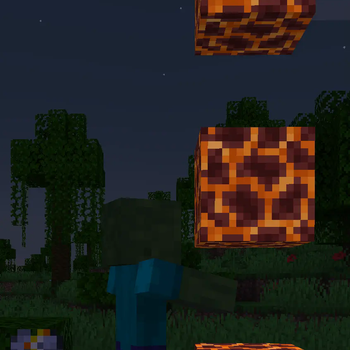
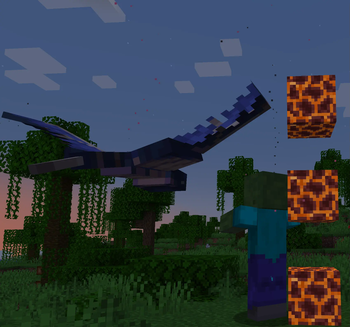
This adds Lunar Events every 30-45 days, some making mobs a lot more powerful, others remarkably tame. Can you survive them all?
Screenshots

About this Mod
Horde Nights 2.0 is in development. It will be made for Minecraft v26.1, and considered completely incompatible with any versions previous. You will be able to update your world, however most, if not all progression within the pack will be lost. For this reason, we will not be porting v1.x.x versions to MC 26.1 or above.
Ever wanted a challenge? Not just a boss fight, something more? Something unique...
Welcome to Horde Nights!
This datapack based project adds the ability to encounter Lunar Events, such as a Blood Moon. These events happen every 30-45 days based on difficulty.
During Lunar Events, you will have to face The Horde. The members of The Horde will be modified based on difficulty & Event type.
If you wish to summon a Lunar Event yourself, instead of waiting, you can perform a Blood Ritual. You will need both campfire types.
Be careful, if you mess up the ritual, things may go very weird.
We have also added 7+ advancements on our own, plus 3+ Super Challenge(s) when paired with Blaze & Cave's Advancement Pack(see Integrations below).
Support:
For questions and any other support, check out our Discord Server! Make sure to use the Support forum channel!
You might also get some sneak peaks of upcoming updates!
Configuration
By running the command /function h-nigh:config you will open the customization menu. This is a datapack based project, so text file configs are impossible.
You can customize the pack difficulty, or leave it dependent on your game difficulty.
You can customize the interval of Blood Moons, and toggle features such as Cowardice & The Blood Ritual.
Integrations
Horde Nights has integrations with several other packs. Please bear in mind sometimes this list may be a little out of date.
- RRC Resources Integration for 1.20+
- This is highly recommended for a more immersive gameplay experience, but is completely optional.
- Mo-Variants Integration for 1.20+
- This integration reduces issues with some variants, and even adds a couple unique Horde Effects for some other variants.
- Works best with Mo-Variants 7.7.0 or Higher(this version is currently in betas)
- Mo-Critters Integration for 1.20+
- This integration ensures that critters do not spawn during negative Lunar Events, keeping the creepy vibe intact.
- Ensure you have v1.0.12+ for 1.20.x or 1.3.0+ for 1.21.x as this pack split off from Mo-Variants.
- BACAP Integration for 1.20+
- This integration adds 3+ Super Challenge(s) to complete.
- Not using this integration creates a cosmetic error in log, ignore it.
- Creeper Overhaul Integration for 1.20/1.20.1 & 1.21/1.21.1
- This integration recruits 13/14 new creepers to The horde.
- Not using this integration creates a cosmetic error in log, ignore it.
- Time Lib Integration for 1.21-1.21.8
- This integration will allow the automatic enabling and disabling of:
- Festive Moons [Dec 1st to Dec 31st]
- Natural Bunk Events [April 1st]
- This integration can be toggled in the "Advanced" section of the config
- TimeLib has been discontinued for 1.21.9+, requiring manual toggles or user supplimented automation to toggle these things appropriately.
- This integration will allow the automatic enabling and disabling of:
Only these projects are guaranteed to work with this pack. While we do our best to maintain decent compatibility standards, things may interact weirdly. Please report any incompatibilities or suggest any ideas for official integration improvements in our discord!
Available Versions
How to Install Horde Nights on Your Server
Order Server
Order a Minecraft Java server with at least 3 GB RAM (4 GB recommended).
Set datapack Loader
In the panel under "Egg", select the datapack loader and matching Minecraft version (1.21.11).
Install Mod
Open the mod browser in the dashboard and search for "Horde Nights". Click "Install" – done! Alternatively, upload the .jar via SFTP to the /mods folder.
Compatibility
Mod Loaders
Minecraft Versions
1.21.11, 1.21.10, 1.21.9 (+34 more)
Server-side
✓ RequiredRecommended RAM
4 GB(min. 3 GB)Frequently Asked Questions
Horde Nights server crashes on startup – what to do?
Most common cause: wrong datapack version or insufficient RAM. Check the server log (latest.log) for "OutOfMemoryError" or "Mixin" errors. With Mado Hosting: ensure at least 3 GB RAM is allocated and the loader matches the mod version (1.21.11). You can switch loaders with one click in the panel.
Is Horde Nights compatible with datapack and fabric and forge and minecraft and neoforge and quilt?
Horde Nights officially supports datapack, fabric, forge, minecraft, neoforge, quilt for Minecraft 1.21.11, 1.21.10, 1.21.9. Note: Forge and Fabric mods are NOT cross-compatible – pick one loader and stick with it. The Mado dashboard automatically detects incompatible loader combinations.
Server lagging with Horde Nights – how to optimize performance?
Recommended RAM: 4 GB (per 8 players). Use /spark profiler to check if Horde Nights consumes the most tick time. Common fixes: reduce server view-distance to 8-10, install "performant" or "starlight" as supplementary mods on Forge. With Mado Hosting, your server runs on NVMe SSDs with dedicated CPU cores for minimal latency.
Similar Mods




Rent Modded Server
Install Horde Nights with just one click on your server.