
Modrinth · Forge, NeoForge
Butchery on your Minecraft server
Butchery runs on Minecraft servers with Forge or NeoForge. Order your server, set the loader in the panel and install the mod with one click in the mod browser.
An immersive way of harvesting mobs
- Downloads
- 1.2M
- Author
- MC_jmods
- Loader
- Forge, NeoForge
- Minecraft
- 1.20.1 – 26.1.2
- Updated
- –
Screenshots
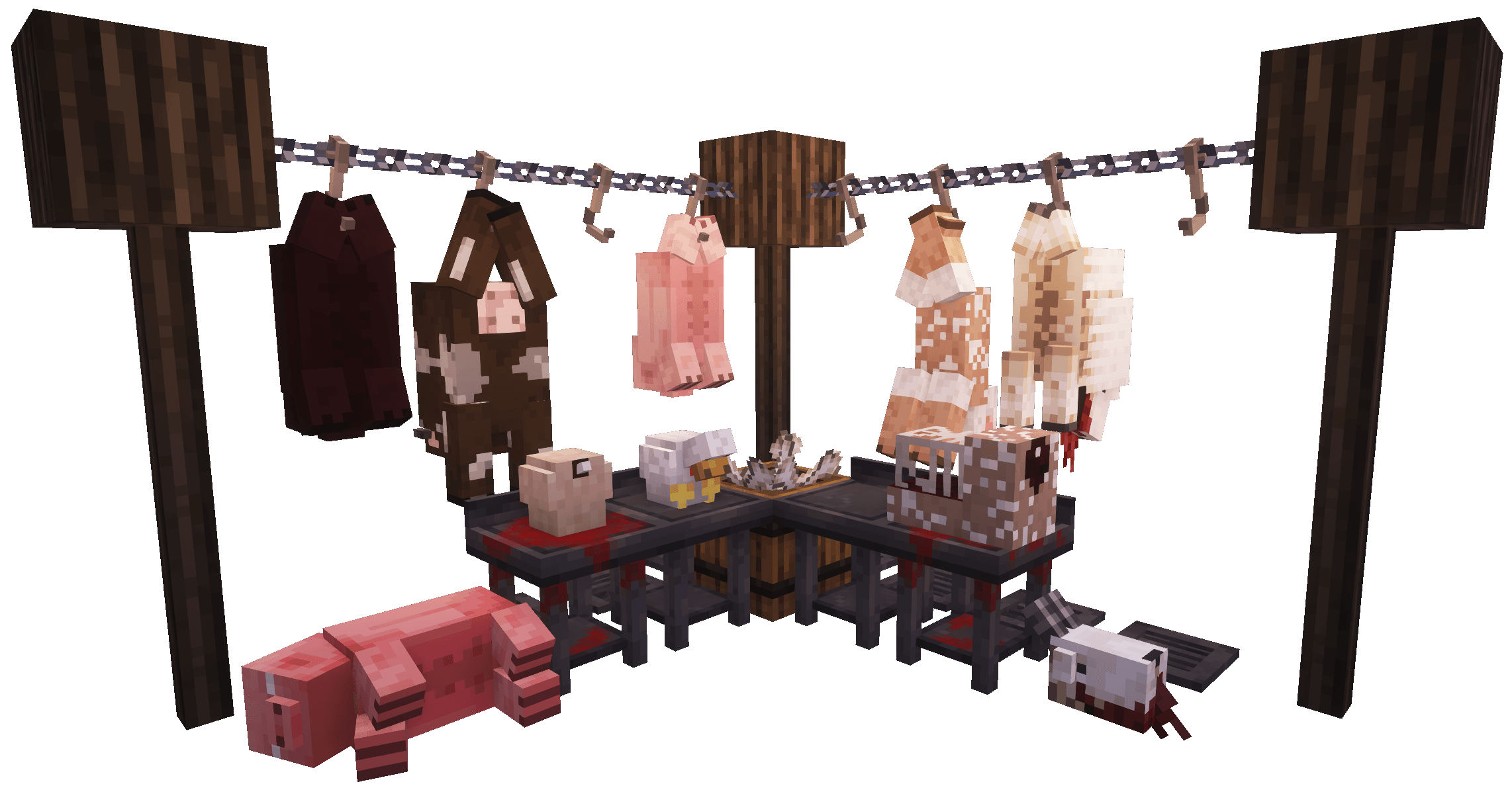
What Butchery looks like

Images: Butchery on Modrinth, published by the project team.
Setup
Install Butchery on your server
The server and players need the same loader and Minecraft version. Back up the world before adding or updating mods.
- 01
Configure
4 GB of RAM is preselected. You choose the term and add-ons and pay by credit card or PayPal.
- 02
Set the loader
In the panel, set the server software to Forge or NeoForge and choose the matching Minecraft version, for example 26.1.2.
- 03
Install the mod
Search the mod browser for “Butchery” and install the release for your loader. Alternatively, upload the .jar to the mods folder via SFTP. Required dependencies are listed on the project page.
- 04
Connect
Every player installs the same Butchery release locally and connects using the server address from the panel.
- On the server
- Required
- On the client
- Required
- Loader
- Forge, NeoForge
- Minecraft
- 26.1.2, 1.21.8, 1.21.4 +4 more
- License
- LicenseRef-All-Rights-Reserved
The panel
Install mods, find errors.
Real screenshots from the Mado panel. Both come with every Minecraft server.
Mod browser
Modrinth and CurseForge, right in the panel.
The browser filters by your Minecraft version. Install mods with one click, without uploading .jar files.

AI crash analysis
When a mod crashes, the analyzer reads the log.
Mods often fail on a wrong loader version, Java version or missing dependency. The analyzer names a likely cause and suggests a fix.

Releases
Published releases
Pick the file that matches your server’s loader and Minecraft version. The server and players need the same release.
Butchery · Modrinth- Butchery 5.3.1October 9, 2026Minecraft 1.21.8 · NeoForge
- Butchery 5.3.1October 9, 2026Minecraft 1.21.4 · NeoForge
- Butchery 5.3.1October 9, 2026Minecraft 1.21.1 · NeoForge
- Butchery 5.3.1October 9, 2026Minecraft 1.20.1 · Forge
- Butchery 5.2July 29, 2026Minecraft 26.1.2 · NeoForge
Original description by the project author


🔪 What is Butchery?
Butchery is a mod that makes harvesting mobs and animals much much more immersive and fun. Whilst simply killing mobs is still an option with this mod installed, you have the added option of kill a mob with the new Butcher's Knife. Killing a mob with the butchers knife will cause the mobs corpse to drop instead of their original loot (with the exception of sheep, they drop their corpse in addition to their wool). Once you've aquired their corpses you're free to start the butchering process.
🥩 Features
Config file to customise the mod to your specific needs
Kill mobs with the new butchers knife to obtain their corpse (You can also use the Butcher enchant or enable any tool/weapon to obtain corpses in the config.
Hang corpses from hooks to drain their blood and begin the butchering process.
Skin corpses - Hang them on skin racks, dampen and cover in salt to obtain leather.
Cut up corpses hanging or on the butchers table to obtain different selections of meat (Farmers Delight food and Vanilla foods can be enabled as an alternative in the config)
Place corpses on the rotisserie and a campfire underneath to cook the meat
Fill a mincer with beef or lamb to obtain the minced version
Use the hammer to break open turtle shells
Various different decoration blocks including barrel of cod/salmon, jar, brain in a jar, singing salmon, head mounts, barrel of bones and more
Functional blocks such as butchers display (storage for food), spike trap (made from elder guardian drop damages and applies mining fatigue on contact)
🐖 Currently Included Mobs & Bosses
Spoiler

🦬 Addons
Alex's Mobs - https://modrinth.com/mod/butchery-alexs-mobs-addon
🤩 Support Me
Creating this mod is taking me a lot of time and effort, if you'd like to support me and supply me with tasty italian fuel to continue with this mod and my others you can buy me a pizza by clicking the link below!
https://www.paypal.com/donate/?hosted_button_id=YQU6QGQ5N9ALW
📜 Common Questions
Q: Will you port to a version BELOW 1.20.1?
A: No, sorry this is not possible for me to do. Butchery will only ever update to newer versions of Forge.
Q: Fabric?
A: No, sorry.
Q: Can I request a compatibility?
A: Sure, head over to the discord and make a thread with your suggestion.
Q: How do I add mobs to the tag files so that they drop carcasses?
A: Download the butchery datapack and follow the guide in the description. You can download it here:
https://legacy.curseforge.com/minecraft/data-packs/butchery-add-mobs-datapack
Butchery server crashes on startup – what to do?
Common causes: the loader or Minecraft version does not match the mod file, a dependency is missing, or RAM is too low. Check the log (latest.log) for “OutOfMemoryError”, “Mixin” or missing mods. At Mado, the AI crash analysis reads the log and suggests a cause. You can change the loader and version in the panel.
Which loader does Butchery run on?
According to Modrinth, Butchery supports Forge, NeoForge for Minecraft 26.1.2, 1.21.8, 1.21.4.
How much RAM does a server with Butchery need?
As guidance, 3–4 GB for a server with this mod. This is an estimate, not a measured minimum. More mods, many players and long view distances need more. The spark profiler shows whether a mod is costing tick time.
Similar mods
Popular mods in the same category
 Client only

Iris Shaders
by coderbot
A modern shader pack loader for Minecraft intended to be compatible with existing OptiFine shader packs
 Client only

[ETF] Entity Texture Features
by Traben
Emissive, Random & Custom texture support for entities in resourcepacks just like Optifine but for Fabric
 Client only

[EMF] Entity Model Features
by Traben
EMF is an, OptiFine format, Custom Entity Model replacement mod available for Fabric and Forge.
 Client only

Not Enough Animations
by tr7zw
Bringing first-person animations to the third-person
Ready for your server with Butchery?
4 GB of RAM from €8.00 per month. 35% off your first month with MADO35.