
Cherished Worlds
Favorite/pin/bookmark certain worlds, which will always be at the top of the list and cannot be deleted.
Screenshots
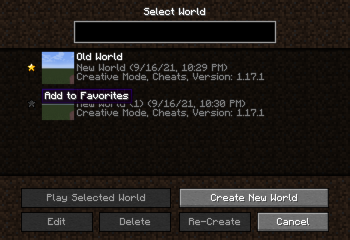
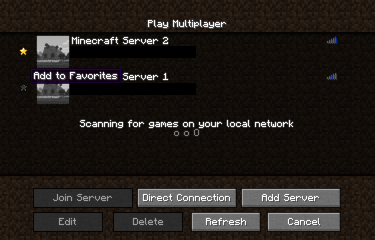
About this Mod
Cherished Worlds is a mod that adds the ability to favorite/pin/bookmark certain worlds.
When installed, empty star icons will appear next to every world on the select screen. Players can bookmark worlds by clicking on the star next to the world icon.
Bookmarking worlds will force them to always show up at the top of the world selection list and removes the ability to delete them until they are unmarked. Players can bookmark as many worlds as they want. If there are multiple bookmarked worlds, they will internally be ordered by last played date.
This mod is client-side only.
Features
Single Player Worlds

Multiplayer Worlds

Support
Please report all bugs, issues, and feature requests to the issue tracker.
For non-technical support and questions, join the developer's Discord.
License
All source code and assets are licensed under LGPL 3.0.
Donations
Donations to the developer can be sent through Ko-fi.
Affiliates
Available Versions
How to Install Cherished Worlds on Your Client
Install the Mod Loader Locally
Install fabric for your local Minecraft version.
Download the Matching File
Choose the Cherished Worlds file for fabric and Minecraft 26.3.
Install Mod
Place the .jar file in your local .minecraft/mods folder and restart Minecraft. No server-side installation is required.
Compatibility
Mod Loaders
Minecraft Versions
26.3, 26.2, 26.1.2 (+31 more)
Server-side
✗ UnsupportedRecommended RAM
4 GB(min. 3 GB)Frequently Asked Questions
Does Cherished Worlds need to be installed on the Minecraft server?
No. Modrinth marks Cherished Worlds as unsupported on the server side. Install it only in your local Minecraft mods folder. Your server can remain unchanged unless the mod page lists an additional dependency.
Which version and loader does Cherished Worlds require?
Use a file for fabric, forge, neoforge, quilt and your exact Minecraft version. Supported versions include 26.3, 26.2, 26.1.2. Files for different loaders are not interchangeable.
Cherished Worlds is not working – what should I check?
First check the Minecraft version, loader version and required dependencies. Put the .jar file in your local .minecraft/mods folder and remove older duplicates. Because this mod is client-side, adding server RAM will not fix it.
Similar Mods






Minecraft Server for Your Group
Cherished Worlds stays on your client. Host a compatible world for your group.