
CityMod:Traffic and life
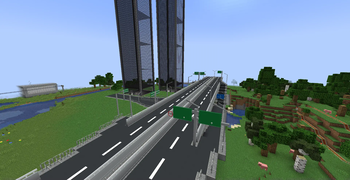
Use this mod to build realistic Chinese style city
Screenshots

About this Mod
overview
This is a Chinese style urban mod for all mod loaders on modern version.
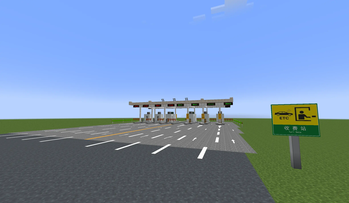
This mod adds blocks for cities, transportations and household appliances and air-condition GPUs, having strong Chinese city characteristics.
More content will be added in the future.\
Notes
This mod support English and Chinese only.Any recipe never be update.
Mod version 0.x is made by MCreator.
Mod support Minecraft 1.20.1/1.21.1/1.21.6-1.21.8/1.21.11/26.1.2 Forge/NeoForge & Fabric.
Added Blocks
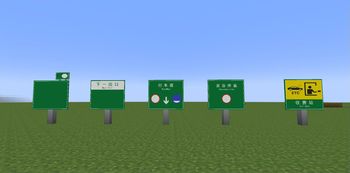
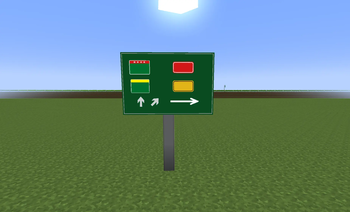
- Road line blocks and a lot of road signs
- Road Direction signs
- Pole
- Trash bin
- Many kinds of modern fences
- Solar water heater
- Fire extinguisher box
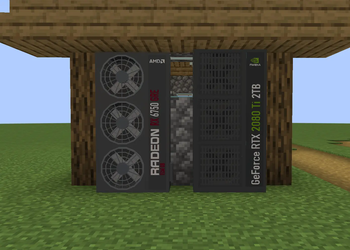
- Gaming PC
- GPUs(look like aircondition)
- AirConditions
- Some high-res household appliances model(May cause lag on low performance devices,for example mobile phones and computers with low RAM or VRAM)
- Modern Windows
- Traffic lights
Future
In theory will solve the conflict with Create 0.5.1f.
Need Architectuy API.
If your game crash
Mod may crash on low-performance devices.Usually GPUs with 1Gb or morer VRAM won't crash.
Lowest device require:2Ghz CPU,8Gb RAM and 1Gb VRAM,recommend dedicated GPU.
If you want play mod on old computers,you can tryThis mod to fix it.
If you encounter a problem(or submit localization translation),you can submit a issue on github.
If your traffic light crazy,wait for about 30 seconds and it will automatic correct.
Resources and Jar files based on CC-BY-NC 4.0,Code based on LGPL v3.
Available Versions
How to Install CityMod:Traffic and life on Your Server
Order Server
Order a Minecraft Java server with at least 3 GB RAM (4 GB recommended).
Set fabric Loader
In the panel under "Egg", select the fabric loader and matching Minecraft version (26.3).
Install Mod
Open the mod browser in the dashboard and search for "CityMod:Traffic and life". Click "Install" – done! Alternatively, upload the .jar via SFTP to the /mods folder.
Compatibility
Mod Loaders
Minecraft Versions
26.3, 26.2, 26.1.2 (+12 more)
Server-side
✓ RequiredRecommended RAM
4 GB(min. 3 GB)Frequently Asked Questions
CityMod:Traffic and life server crashes on startup – what to do?
Most common cause: wrong fabric version or insufficient RAM. Check the server log (latest.log) for "OutOfMemoryError" or "Mixin" errors. With Mado Hosting: ensure at least 3 GB RAM is allocated and the loader matches the mod version (26.3). You can switch loaders with one click in the panel.
Is CityMod:Traffic and life compatible with fabric and forge and neoforge?
CityMod:Traffic and life officially supports fabric, forge, neoforge for Minecraft 26.3, 26.2, 26.1.2. Note: Forge and Fabric mods are NOT cross-compatible – pick one loader and stick with it. The Mado dashboard automatically detects incompatible loader combinations.
Server lagging with CityMod:Traffic and life – how to optimize performance?
Recommended RAM: 4 GB (per 8 players). Use /spark profiler to check if CityMod:Traffic and life consumes the most tick time. Common fixes: reduce server view-distance to 8-10, install "performant" or "starlight" as supplementary mods on Forge. With Mado Hosting, your server runs on NVMe SSDs with dedicated CPU cores for minimal latency.
Similar Mods

![[ETF] Entity Texture Features](https://cdn.modrinth.com/data/BVzZfTc1/af683d206d50b05258d865b0d6e4aa2f2cee12f2_96.webp)
![[EMF] Entity Model Features](https://cdn.modrinth.com/data/4I1XuqiY/6e5bbd0d06b1741bfdab6c0cfab6de8fdaf0064c_96.webp)



Rent Modded Server
Install CityMod:Traffic and life with just one click on your server.
Details
- License
- Creative Commons Attribution Non Commercial 4.0 International
- Server-side
- Required