
CobbleCuisine
Snacks and treats for your Cobblemon adventures!
Screenshots
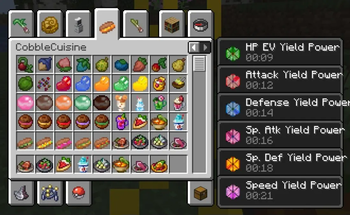
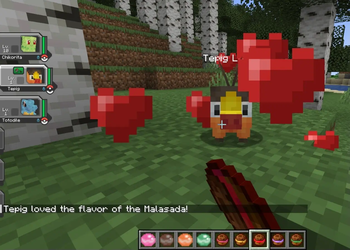
About this Mod
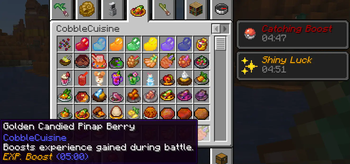
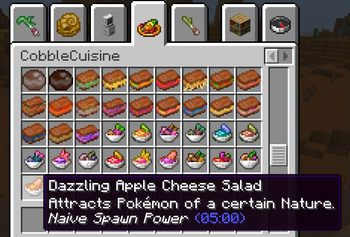
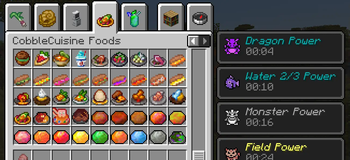
This mod is an addon for Cobblemon 1.6 and 1.7 that adds more food items to the game, such as Curries, Sandwiches and Shakes. These foods give various Cobblemon-themed effects and boosts to the player and their Cobblemon.
Foods and Drinks Added:
As of v1.2.1, the added foods are of the following types. All items use a mix of vanilla Minecraft ingredients as well as items from Cobblemon, such as Berries.
Curries, Sandwiches and Other Dishes : 🍲
Inspired by the games, these are food items that, apart from healing, allow you to make certain Types of Pokemon spawns more likely by giving you special Spawn Effects when consumed. These foods give you Type Spawn Effects, Egg Group Spawn Effects, EV Yield Spawn Effects, IV Spawn Effects, Shiny Spawn Effects, and Size Spawn Effects.
Roasted Berries 🍉:
Roast wild Berries on a campfire to gain effects and heal hearts, but don't overdo them - sometimes they might have bad effects! The 18 type damage reducing berries + Enigma berry when roasted allow for Tera Type Spawns.
- Poke Puffs and Malasadas: 🍩
These are food items from the games that can be used to raise the Friendship of your Pokemon. While all Poke Puffs will have an identical Friendship boost, the Friendship boost from Malasadas will depend on the Pokemon's nature.
Poke Beans: 🫘
Poke Beans come in different colours (Red, Blue, Green, Yellow and Orange). Bean Seeds can be obtained from Short Grass, and can be planted to grow into Beanstalks. Beans can also be found inside Chests in Villages.
Along with other ingredients, Beans are used to make the new food items added in this update. Beans, Poke Puffs and Malasadas are normally usable on owned Pokemon, but they can also be consumed by the player if sneaking, with all of them giving unique Effects.
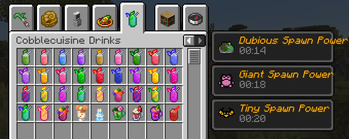
Drinks and Shakes: 🍹
Berry Shakes that boost Pokemon EVs when consumed. The amount of EVs boosted depends on the Berries used. Also includes the Fruit Punch from Scarlet / Violet, Protein Smoothie from Pokemon Sleep, and four Drinks from Cafe ReMix:
- Teddiursa Iced Coffee 🥤
- Lilligant Floral Tea 🥤
- Miltank Mix Au Lait 🥤
- Bouncy Brionne Soda 🥤
Boosts and Effects Added:
As of 1.2.1, the following Effects are implemented by the foods from this mod:
Type Spawn Power 🔥 : Spawn Pokemon of specific Types.
Egg Group Spawn Power 🪺 : Spawn Pokemon from all the Egg Groups.
Tera Type Spawn Power : Spawn Pokemon with specific Tera Types.
EV Yield Power ⚔️ : Spawn Pokemon with EV Yields of specific Stats; an effect for each Stat.
IV Power 🧬 : Spawn Pokemon with higher IVs.
Shiny Power ✨ : Increased chance to spawn Shiny Pokemon.
Exp Power 📈 : Increased Experience Gain for the entire party
Catch Power 🎊 : Increased Catch Rates.
Size Spawn Power 🔎 : Spawn larger or smaller sized Pokemon.
Addon Packs:
Works on NeoForge with Sinytra Connector, Fabric Language Kotlin and MidnightLib (Fabric)
Recipes Documentation (outdated)
Effect durations and effectiveness can be configured through MidnightLib.
Combine Effects from different foods to make hunting for specific Pokemon easier! (Note: You must be in the proper biome; for example, eating food that spawns Ice types inside a fiery biome will have no effect!)
Still in beta, make backups of your worlds before installing.
Credits to the amazing Cobblemon developers!
Available Versions
How to Install CobbleCuisine on Your Server
Order Server
Order a Minecraft Java server with at least 3 GB RAM (4 GB recommended).
Set fabric Loader
In the panel under "Egg", select the fabric loader and matching Minecraft version (1.21.1).
Install Mod
Open the mod browser in the dashboard and search for "CobbleCuisine". Click "Install" – done! Alternatively, upload the .jar via SFTP to the /mods folder.
Compatibility
Mod Loaders
Minecraft Versions
1.21.1
Server-side
✓ RequiredRecommended RAM
4 GB(min. 3 GB)Frequently Asked Questions
CobbleCuisine server crashes on startup – what to do?
Most common cause: wrong fabric version or insufficient RAM. Check the server log (latest.log) for "OutOfMemoryError" or "Mixin" errors. With Mado Hosting: ensure at least 3 GB RAM is allocated and the loader matches the mod version (1.21.1). You can switch loaders with one click in the panel.
Is CobbleCuisine compatible with fabric?
CobbleCuisine officially supports fabric for Minecraft 1.21.1. The Mado dashboard automatically detects incompatible loader combinations.
Server lagging with CobbleCuisine – how to optimize performance?
Recommended RAM: 4 GB (per 8 players). Use /spark profiler to check if CobbleCuisine consumes the most tick time. Common fixes: reduce server view-distance to 8-10, install "performant" or "starlight" as supplementary mods on Forge. With Mado Hosting, your server runs on NVMe SSDs with dedicated CPU cores for minimal latency.
Similar Mods



Rent Modded Server
Install CobbleCuisine with just one click on your server.