
Modrinth · Fabric, Forge, NeoForge, Quilt · Client mod
Colorful Hearts
Colorful Hearts is a client-side mod. Install it on your computer; the server does not need it.
A client side mod that replaces multiple vanilla heart rows with a single row using colored hearts
- Downloads
- 4.8M
- Author
- Terrails
- Loader
- Fabric, Forge, NeoForge, Quilt
- Minecraft
- 1.14 – 26.2
- Updated
- –
Setup
Install Colorful Hearts on your client
Client-side mods only run on your computer. More server RAM does not change their performance.
- 01
Install the loader locally
Install Fabric or Forge or NeoForge or Quilt for your Minecraft version in your launcher.
- 02
Download the file
Download the Colorful Hearts file for your loader and your exact Minecraft version, for example 26.2.
- 03
Add it to the mods folder
Put the .jar file in your local .minecraft/mods folder and remove older duplicates.
- 04
Launch
Launch Minecraft with the loader profile. Nothing needs to change on the server.
- On the server
- Not needed
- On the client
- Required
- Loader
- Fabric, Forge, NeoForge, Quilt
- Minecraft
- 26.2, 26.1.2, 1.21.4 +33 more
- License
- MIT License
Releases
Published releases
Pick the file that matches your server’s loader and Minecraft version. The server and players need the same release.
Colorful Hearts · Modrinth- [NeoForge] 26.2-v26.2.0.0July 3, 2026Minecraft 26.2 · NeoForge
- [Fabric] 26.2-v26.2.0.0July 3, 2026Minecraft 26.2 · Fabric
- [Fabric] 1.21.11-v21.11.0June 24, 2026Minecraft 1.21.11 · Fabric
- [NeoForge] 1.21.11-v21.11.0June 24, 2026Minecraft 1.21.11 · NeoForge
- [Fabric] 1.21.4-v21.4.0June 18, 2026Minecraft 1.21.4 · Fabric
Original description by the project author
What does it do?
Colorful Hearts is a simple client side mod that replaces vanilla heart renderer which always adds more rows when the player has more than 10 hearts of health or absorption.
Instead of vanilla behavior the mod uses colored hearts to represent each row of health and absorption. These colors can be configured in a config file that accepts a list of hex #RRGGBB values.
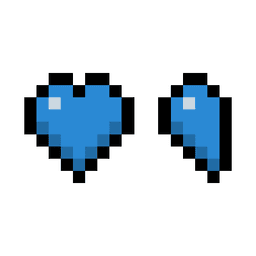
Colorful Hearts also adds half heart background textures. This means that if there is only half a heart of absorption, it will not have a black background on the right as if there is something missing. Instead the black bordered background will only cover the left half of the heart icon.
Mod Support
If there is any compatibility issue, please notify me to see if support can be added. Please avoid reporting these issues to other mods as it is most likely caused by Colorful Hearts.
| Mod | Feature | Since |
|---|---|---|
| AppleSkin | Visualization of potential health restored for currently held food item. | 1.20.1 |
| Raised | Correct movement of the heart location. | 1.20.1 |
| Farmer's Delight | Working overlay for the comfort status effect. | 1.20.1 |
| The Undergarden | Working overlay for the virulence status effect. | 1.20.1 |
| Overflowing Bars | Numerical visualization for heart rows. !! IMPORTANT !! Requires disabling the mod's own heart rendering by setting allowLayers for hearts to false. This has to be done as both mods touch the same part of vanilla code which can result in crashes or weird behaviour. |
1.20.1 |
| Eidolon:Repraised | Working overlay for chilled status effect and ethereal health renders normally after health and absorption hearts. | 1.20.1 |
Support is not available with:
| Mod | Reason |
|---|---|
| Scaling Health | Both mods touch the same vanilla code and this results in crashes or weird behaviour. If for some odd reason usage with Colorful Hearts is desired, make sure to disable any kind of custom heart rendering. Support will not be provided for any kind of crashes or weird behaviour. |
Sponsor

Does Colorful Hearts need to be installed on the Minecraft server?
No. Modrinth marks Colorful Hearts as unsupported on the server side. Install it only in your local mods folder. Your server can stay unchanged unless the project page lists an additional dependency.
Which version and loader does Colorful Hearts require?
Use a file for Fabric, Forge, NeoForge, Quilt and your exact Minecraft version. Supported versions include 26.2, 26.1.2, 1.21.4. Files for different loaders are not interchangeable.
Colorful Hearts is not working – what should I check?
First check the Minecraft version, loader version and required dependencies. Because the mod is client-side, more server RAM will not fix it.
Similar mods
Popular mods in the same category
 Client only

Iris Shaders
by coderbot
A modern shader pack loader for Minecraft intended to be compatible with existing OptiFine shader packs
 Client only

[ETF] Entity Texture Features
by Traben
Emissive, Random & Custom texture support for entities in resourcepacks just like Optifine but for Fabric
 Client only

[EMF] Entity Model Features
by Traben
EMF is an, OptiFine format, Custom Entity Model replacement mod available for Fabric and Forge.
 Client only

Not Enough Animations
by tr7zw
Bringing first-person animations to the third-person
Looking for mods for your own server?
The catalog lists mods that run on Minecraft servers.