
Cool Elytra Roll
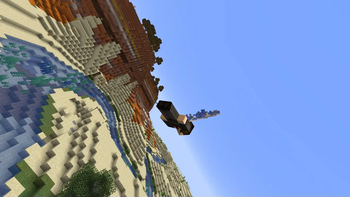
Client-side fabric mod that rotates the camera while turning during elytra flight. Uses actual physics to imitate aircraft roll maneuvers.
Screenshots
About this Mod
This is a client-side fabric mod that rotates the camera while turning during elytra flight. It's both realistic and cool since it uses actual physics to imitate the way an airplane would roll to make maneuvers.
Note: This does not in any way change how elytra flight actually moves the player or how your client interacts with the server.
Credit to Motschen for the MidnightLib config menu bundled with the mod.
I do not plan to make a forge port, however Do a Barrel Roll is a fork of this mod with both forge and fabric releases and a slightly different feature set and control scheme.
New in version 1.5: Many config options have been added to realistic mode, as well as the ability to yaw/roll with strafe keys while flying, so all three axes of rotation can be used at once. Holding sneak swaps the roll and yaw input methods as before, and this can now be inverted in the config.
Config options
Mode: Selects the flight mode. 0 disables the mod and reverts to vanilla behavior. 1 is the classic roll mechanic from 1.3. 2 is the new realistic flight mode.
Turning force: Controls the sensitivity of the rolling. Higher values make the rolling more extreme, lower values make it closer to normal. Default is 1.25
Roll smoothing: Smooths out changes to the roll angle. 0 is no smoothing, 1 stops rolling entirely. Between 0.6 and 0.9 is recommended, values closer to 1 are more noticeable than lower values. Default is 0.85
Swap roll and yaw: By default, the mouse controls roll while strafing controls yaw, and holding sneak swaps this. This option inverts the shift key behavior.
Roll/Yaw/Pitch sensitivity: Multiplier for the sensitivity of mouse inputs while flying in realistic mode. Default is 1.
Key roll/yaw sensitivity: Relative strength of rotational force applied while a strafe key is held. Default is 1 for roll, 2 for yaw.
Key roll/yaw momentum: How long it takes rotation to come to a stop after strafe key is released. Default is 1.
Key roll/yaw speed cap: The maximum angular velocity achievable with strafe keys. Default is 40 for roll, 15 for yaw.
Available Versions
How to Install Cool Elytra Roll on Your Client
Install the Mod Loader Locally
Install fabric for your local Minecraft version.
Download the Matching File
Choose the Cool Elytra Roll file for fabric and Minecraft 26.3.
Install Mod
Place the .jar file in your local .minecraft/mods folder and restart Minecraft. No server-side installation is required.
Compatibility
Mod Loaders
Minecraft Versions
26.3, 26.2, 26.1.2 (+35 more)
Server-side
✗ UnsupportedRecommended RAM
4 GB(min. 3 GB)Frequently Asked Questions
Does Cool Elytra Roll need to be installed on the Minecraft server?
No. Modrinth marks Cool Elytra Roll as unsupported on the server side. Install it only in your local Minecraft mods folder. Your server can remain unchanged unless the mod page lists an additional dependency.
Which version and loader does Cool Elytra Roll require?
Use a file for fabric and your exact Minecraft version. Supported versions include 26.3, 26.2, 26.1.2. Files for different loaders are not interchangeable.
Cool Elytra Roll is not working – what should I check?
First check the Minecraft version, loader version and required dependencies. Put the .jar file in your local .minecraft/mods folder and remove older duplicates. Because this mod is client-side, adding server RAM will not fix it.
Similar Mods





Minecraft Server for Your Group
Cool Elytra Roll stays on your client. Host a compatible world for your group.