
Create: Advanced Optimization
Optimize key Create systems and diagnose large factories, logistics networks, packages, trains, and processing chains with built-in profiling reports.
Screenshots
About this Mod
Create: Advanced Optimization
A server-focused optimization and diagnostics toolkit for Create on NeoForge.







About
Create: Advanced Optimization is a server-focused performance and diagnostics mod designed for large Create factories, logistics networks and automation-heavy worlds.
It reduces avoidable work in selected Create systems while providing built-in tools to profile machines, belts, fluids, packages, trains and logistics without changing normal Create progression or machine behavior.
Highlights
- Targeted Create performance optimizations
- Spout recipe caching
- Basin and Mechanical Crafter recipe memoization
- Belt tick fast paths
- Belt Funnel and Deployer fast rejection
- Optimized Diving Boots state checks
- Built-in Create performance profiler
- Package Entity and belt diagnostics
- TXT, HTML and JSON report exports
- Compare profiling sessions directly in-game
- MSPT, lag spike and hotspot analysis
- Configurable optimization and diagnostic systems
Requirements
Minecraft: 1.21.1
Loader: NeoForge 21.1.233+
Create: exactly 6.0.10
Java: 21
Create is a required dependency and must be installed separately.
Create: Advanced Optimization intentionally targets Create 6.0.10 exactly to avoid applying low-level optimizations against incompatible Create internals.
Performance Optimizations
Create: Advanced Optimization uses conservative fast paths and caching rather than globally slowing machines or skipping arbitrary ticks.
Active systems include:
- Spout Recipe Cache - caches bounded official Create filling recipe lookups per Spout
- Processing Memoization - reuses Basin and Mechanical Crafter recipe lookup results within safe one-tick windows
- Belt Tick Fast Paths - reduces unnecessary belt maintenance work without changing item movement cadence
- Belt Funnel Fast Rejection - avoids redundant stack operations when an exact insertion cannot succeed
- Deployer Fast Rejection - skips unnecessary copy and split work when a Deployer hand is already full
- Diving Boots Optimization - avoids redundant HeavyBoots marker writes and removals
No recipes are changed.
No machines are intentionally slowed down.
Systems such as trains, railway managers, Redstone Links, global logistics and track synchronization are profiled for diagnostics but are not automatically modified unless explicitly listed as an optimization.
Create Profiler
Profile a busy factory directly in-game and identify which Create systems consume the most server time.
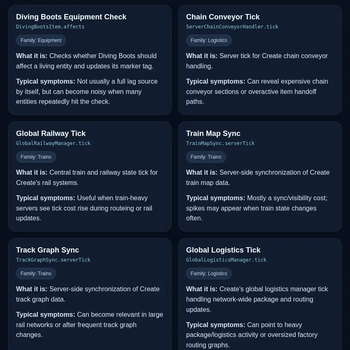
The profiler covers systems including:
- Create machine tickers
- Belts and belt inventories
- Funnels and inventory extraction
- Fluid transport and pipe resolution
- Spouts and filling recipes
- Deployers
- Package Entities
- Global logistics
- Chain Conveyors
- Railway management
- Train map synchronization
- Track graph synchronization
- Redstone Links
- Diving Boots
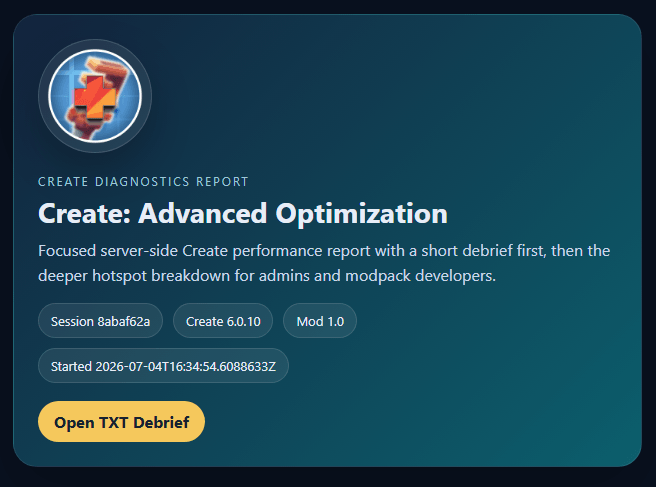
Each profiling session can export:
- Human-readable TXT report
- Visual HTML report
- Structured JSON report
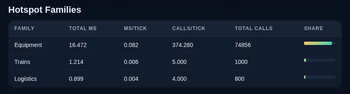
- Average and maximum MSPT
- Lag spike information
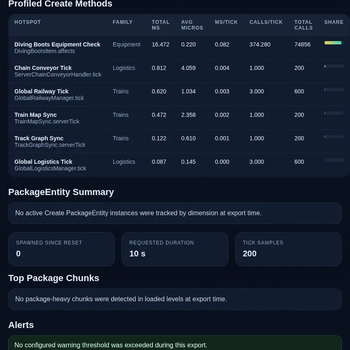
- Create-related hotspots
- Package diagnostics
- Optimization counters
- Alerts and recommendations
Reports are grouped into dedicated export folders and include clickable shortcuts to the generated files.
Diagnostics
Create: Advanced Optimization includes dedicated diagnostic tools for quickly narrowing down problematic Create systems.
/cao diagnose
Provides a combined summary of profiler activity, Package Entity signals and belt diagnostics.
/cao packages top [limit]
Finds loaded chunks containing the highest numbers of active Create packages.
/cao packages stalled [limit]
Identifies Package Entities that appear stationary for unusually long periods.
/cao belts scan [limit]
Scans loaded Create belt controllers and highlights the busiest or largest belt systems.
These tools are designed to help locate the area worth investigating before running more detailed profiling.
Report Comparison
Multiple profiler sessions can be compared directly with:
/cao report compare
The comparison includes changes in:
- Average MSPT
- Maximum MSPT
- Lag spike counts
- Profiled Create time
- Major hotspots
When available, clickable buttons can open both the older and newer HTML reports for side-by-side investigation.
Commands
All commands require permission level 2.
/cao status- View mod, profiler, optimization and package status/cao stats- View optimization and cache activity/cao stats reset- Reset optimization statistics/cao profile start- Start profiling using the configured default duration/cao profile start <seconds>- Start a 5 to 3600 second profiling session/cao profile stop- Stop the current session and export its reports/cao diagnose- Run a combined diagnostic summary/cao report- Export the latest available profiler data/cao report last- View information about the latest export/cao report compare- Compare the latest report exports/cao packages top [limit]- Find package-heavy chunks/cao packages stalled [limit]- Find stationary Package Entities/cao belts scan [limit]- Inspect loaded belt controllers/cao reset- Reset profiler, cache and package diagnostic data
The full /createadvancedoptimization command is also available as an alternative to /cao.
Configuration
Server owners can individually configure:
- Global optimization master switch
- Diagnostics and report generation
- Lag spike threshold
- Default profiler duration
- Package Entity warning threshold
- Spout recipe caching
- Spout cache size
- Processing recipe memoization
- Belt tick fast paths
- Belt Funnel fast rejection
- Deployer fast rejection
- Diving Boots optimization
- Experimental package behavior
- Debug logging
Experimental Package Entity behavior remains disabled by default.
Support the Project
Enjoying Create: Advanced Optimization?
Support future updates and upcoming Our Story projects through Patreon.


For support, profiling reports, compatibility feedback or bug reports, join the Our Story community on Discord.
Game Hosting
Need a server for your Create projects?
<img src="https://img.shields.io/static/v1?label=Partner&message=BisectHosting&color=5E76FA&logo=BisectHosting&logoColor=white&style=for-the-badge" alt="BisectHosting">
Every purchase helps support the development of Our Story projects.
Created by LevelsFR
CurseForge • Modrinth • Discord • Patreon • GitHub
Available Versions
How to Install Create: Advanced Optimization on Your Server
Order Server
Order a Minecraft Java server with at least 4 GB RAM (6 GB recommended).
Set neoforge Loader
In the panel under "Egg", select the neoforge loader and matching Minecraft version (1.21.1).
Install Mod
Open the mod browser in the dashboard and search for "Create: Advanced Optimization". Click "Install" – done! Alternatively, upload the .jar via SFTP to the /mods folder.
Compatibility
Mod Loaders
Minecraft Versions
1.21.1
Server-side
✓ RequiredRecommended RAM
6 GB(min. 4 GB)Frequently Asked Questions
Create: Advanced Optimization server crashes on startup – what to do?
Most common cause: wrong neoforge version or insufficient RAM. Check the server log (latest.log) for "OutOfMemoryError" or "Mixin" errors. With Mado Hosting: ensure at least 4 GB RAM is allocated and the loader matches the mod version (1.21.1). You can switch loaders with one click in the panel.
Is Create: Advanced Optimization compatible with neoforge?
Create: Advanced Optimization officially supports neoforge for Minecraft 1.21.1. The Mado dashboard automatically detects incompatible loader combinations.
Server lagging with Create: Advanced Optimization – how to optimize performance?
Recommended RAM: 6 GB (per 5 players). Use /spark profiler to check if Create: Advanced Optimization consumes the most tick time. Common fixes: reduce server view-distance to 8-10, install "performant" or "starlight" as supplementary mods on Forge. With Mado Hosting, your server runs on NVMe SSDs with dedicated CPU cores for minimal latency.
Similar Mods


Rent Modded Server
Install Create: Advanced Optimization with just one click on your server.