
Modrinth · Forge, NeoForge
Create Compression on your Minecraft server
Create Compression runs on Minecraft servers with Forge or NeoForge. Order your server, set the loader in the panel and install the mod with one click in the mod browser.
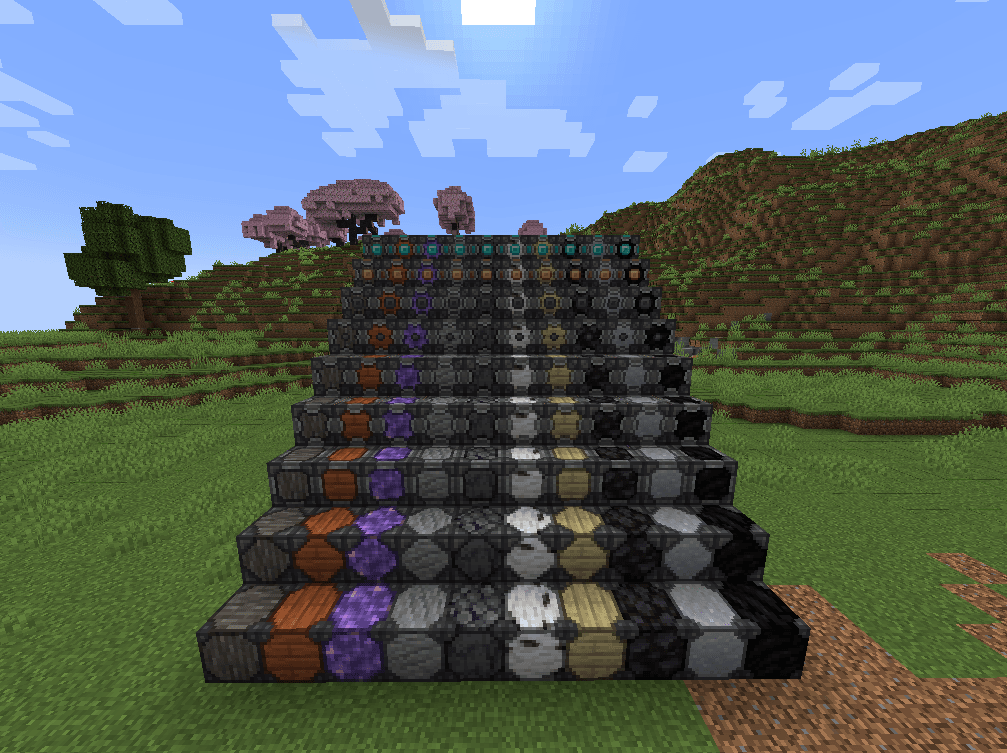
Adds many compressed blocks with the theme of create
- Downloads
- 59.6K
- Author
- TheoCreates
- Loader
- Forge, NeoForge
- Minecraft
- 1.18.2 – 1.21.1
- Updated
- –
Screenshots
What Create Compression looks like


Images: Create Compression on Modrinth, published by the project team.
Setup
Install Create Compression on your server
The server and players need the same loader and Minecraft version. Back up the world before adding or updating mods.
- 01
Configure
6 GB of RAM is preselected. You choose the term and add-ons and pay by credit card or PayPal.
- 02
Set the loader
In the panel, set the server software to Forge or NeoForge and choose the matching Minecraft version, for example 1.21.1.
- 03
Install the mod
Search the mod browser for “Create Compression” and install the release for your loader. Alternatively, upload the .jar to the mods folder via SFTP. Required dependencies are listed on the project page.
- 04
Connect
Every player installs the same Create Compression release locally and connects using the server address from the panel.
- On the server
- Required
- On the client
- Required
- Loader
- Forge, NeoForge
- Minecraft
- 1.21.1, 1.20.1, 1.19.2 +1 more
- License
- MIT License
The panel
Install mods, find errors.
Real screenshots from the Mado panel. Both come with every Minecraft server.
Mod browser
Modrinth and CurseForge, right in the panel.
The browser filters by your Minecraft version. Install mods with one click, without uploading .jar files.

AI crash analysis
When a mod crashes, the analyzer reads the log.
Mods often fail on a wrong loader version, Java version or missing dependency. The analyzer names a likely cause and suggests a fix.

Releases
Published releases
Pick the file that matches your server’s loader and Minecraft version. The server and players need the same release.
Create Compression · Modrinth- Create Compression 2.0.0October 19, 2025Minecraft 1.21.1 · NeoForge
- Create Compression 1.9.0May 29, 2025Minecraft 1.20.1 · Forge
- Create Compression 1.9.0May 29, 2025Minecraft 1.19.2 · Forge
- Create Compression 1.9.0May 29, 2025Minecraft 1.18.2 · Forge
Original description by the project author
Create Compressed
Adds 1-9x compressed versions of blocks
Very Useful for Bulk storage and modpack development
Main use is for my modpack: CreateBlock
Current Blocks:
Vanilla
 Acacia Log
 Acacia Plank
 Amethyst
 Andesite
 Basalt
 Birch Log
 Birch Plank
 Blackstone
 Clay
 Coal
 Cobbled Deepslate
 Cobblestone
 Copper
 Crimson Plank
 Crimson Stem
 Dark Oak Log
 Dark Oak Plank
 Deepslate
 Diamond
 Diorite
 Dirt
 Emerald
 End Stone
 Glass
 Glowstone
 Gold
 Granite
 Grass
 Gravel
 Hay
 Honey
 Iron
 Jungle Log
 Jungle Plank
 Lapis
 Melon
 Netherite
 Netherrack
 Oak Log
 Oak Plank
 Obsidian
 Podzol
 Pumpkin
 Quartz
 Red Sand
 Redstone
 Sand
 Snow
 Soul Sand
 Soul Soil
 Spruce Log
 Spruce Plank
 Stone
 Terracotta
 Tuff
 Warped Plank
 Warped Stem
New Blocks
 Nether Star
 Refined Radiance
 Shadow Steel
Create
 Andesite Alloy
 Asurine
 Brass
 Crimsite
 Experience
 Limestone
 Scorchia
 Scoria
 Veridium
 Zinc

Click on the picture above, select plan (at least 4 GB), use my code PANDAMC to get 25% off your first month and enjoy playing with your friends!
Have any questions, suggestions or issues please ask on discord link below thank you

Create Compression server crashes on startup – what to do?
Common causes: the loader or Minecraft version does not match the mod file, a dependency is missing, or RAM is too low. Check the log (latest.log) for “OutOfMemoryError”, “Mixin” or missing mods. At Mado, the AI crash analysis reads the log and suggests a cause. You can change the loader and version in the panel.
Which loader does Create Compression run on?
According to Modrinth, Create Compression supports Forge, NeoForge for Minecraft 1.21.1, 1.20.1, 1.19.2.
How much RAM does a server with Create Compression need?
As guidance, 4–6 GB for a server with this mod. This is an estimate, not a measured minimum. More mods, many players and long view distances need more. The spark profiler shows whether a mod is costing tick time.
Similar mods
Popular mods in the same category
 Client only

Iris Shaders
by coderbot
A modern shader pack loader for Minecraft intended to be compatible with existing OptiFine shader packs
 Client only

[ETF] Entity Texture Features
by Traben
Emissive, Random & Custom texture support for entities in resourcepacks just like Optifine but for Fabric
 Client only

[EMF] Entity Model Features
by Traben
EMF is an, OptiFine format, Custom Entity Model replacement mod available for Fabric and Forge.
 Client only

Not Enough Animations
by tr7zw
Bringing first-person animations to the third-person
Ready for your server with Create Compression?
6 GB of RAM from €12.00 per month. 35% off your first month with MADO35.