
Create: Design n' Decor - Aeronautics Compat
A lightweight compatibility mod that connects Create: Design n' Decor with Create Aeronautics
Screenshots
About this Mod
Create: Design n' Decor - Aeronautics Compat is a lightweight compatibility mod that connects Create: Design n' Decor with Create Aeronautics.
It lets Design n' Decor’s kinetic blocks work naturally with Aeronautics contraptions, so you can use DnD parts in airship and vehicle builds without losing core Create Aeronautics functionality.
Features
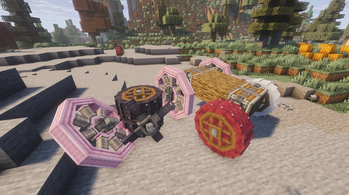
- Adds Aeronautics/Offroad wheel mount support for Design n' Decor crushing wheels
- Adds Aeronautics/Offroad wheel mount support for Design n' Decor flywheels
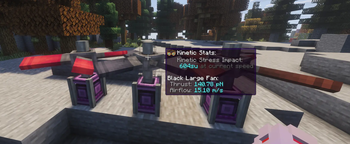
- Makes Design n' Decor large fans behave like Aeronautics propellers
- Adds lift/thrust generation for compatible DnD fan blocks
- Adds gradual propeller-style spin-up behavior to DnD fans
- Adds Create-style stress consumption for DnD fans
- Adds Create goggles kinetic stats support
- Adds Ponder support for fan behavior
- Includes configurable fan force values
Purpose
Design n' Decor adds beautiful variants of blocks, but some of them are not recognized by Create Aeronautics by default. This mod fills that gap, allowing those blocks to be used more fairly and consistently in Aeronautics builds.
Available Versions
How to Install Create: Design n' Decor - Aeronautics Compat on Your Server
Order Server
Order a Minecraft Java server with at least 4 GB RAM (6 GB recommended).
Set neoforge Loader
In the panel under "Egg", select the neoforge loader and matching Minecraft version (1.21.1).
Install Mod
Open the mod browser in the dashboard and search for "Create: Design n' Decor - Aeronautics Compat". Click "Install" – done! Alternatively, upload the .jar via SFTP to the /mods folder.
Compatibility
Mod Loaders
Minecraft Versions
1.21.1
Server-side
✓ RequiredRecommended RAM
6 GB(min. 4 GB)Frequently Asked Questions
Create: Design n' Decor - Aeronautics Compat server crashes on startup – what to do?
Most common cause: wrong neoforge version or insufficient RAM. Check the server log (latest.log) for "OutOfMemoryError" or "Mixin" errors. With Mado Hosting: ensure at least 4 GB RAM is allocated and the loader matches the mod version (1.21.1). You can switch loaders with one click in the panel.
Is Create: Design n' Decor - Aeronautics Compat compatible with neoforge?
Create: Design n' Decor - Aeronautics Compat officially supports neoforge for Minecraft 1.21.1. The Mado dashboard automatically detects incompatible loader combinations.
Server lagging with Create: Design n' Decor - Aeronautics Compat – how to optimize performance?
Recommended RAM: 6 GB (per 5 players). Use /spark profiler to check if Create: Design n' Decor - Aeronautics Compat consumes the most tick time. Common fixes: reduce server view-distance to 8-10, install "performant" or "starlight" as supplementary mods on Forge. With Mado Hosting, your server runs on NVMe SSDs with dedicated CPU cores for minimal latency.
Similar Mods

![[ETF] Entity Texture Features](https://cdn.modrinth.com/data/BVzZfTc1/af683d206d50b05258d865b0d6e4aa2f2cee12f2_96.webp)
![[EMF] Entity Model Features](https://cdn.modrinth.com/data/4I1XuqiY/6e5bbd0d06b1741bfdab6c0cfab6de8fdaf0064c_96.webp)



Rent Modded Server
Install Create: Design n' Decor - Aeronautics Compat with just one click on your server.