
Modrinth · Fabric, Forge, NeoForge · Client mod
EMF Compat: Create
EMF Compat: Create is a client-side mod. Install it on your computer; the server does not need it.
Makes Create animations work correctly with animated EMF player models.
- Downloads
- 69.3K
- Author
- stradat
- Loader
- Fabric, Forge, NeoForge
- Minecraft
- 1.20.1 – 26.2
- Updated
- –
Screenshots
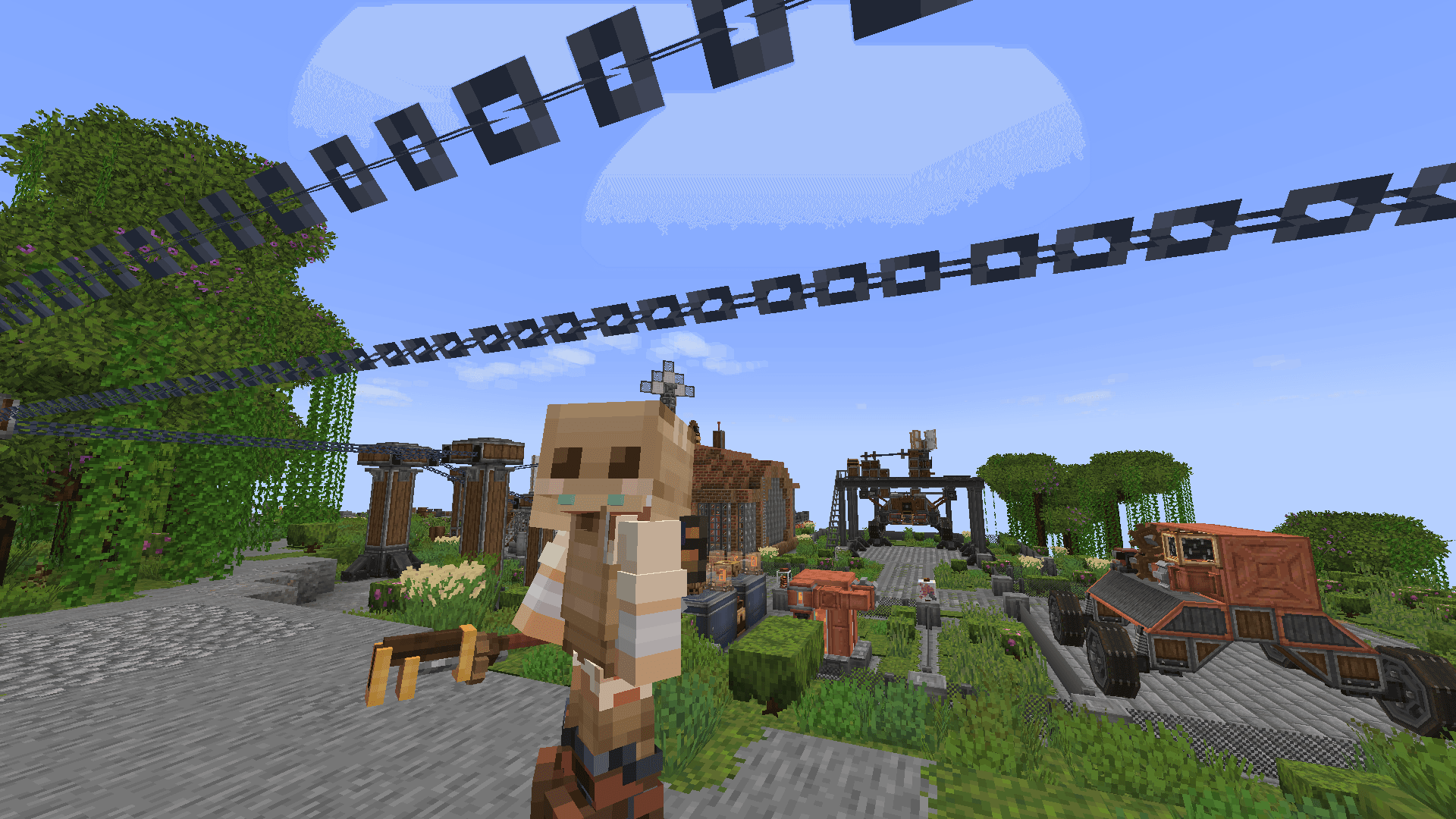
What EMF Compat: Create looks like
 Skyhook without mod and Fresh Animations: Player Extension
 Skyhook with mod and Fresh Animations: Player Extension
 Added compat for Grabbing Physics Objects!
Images: EMF Compat: Create on Modrinth, published by the project team.
Setup
Install EMF Compat: Create on your client
Client-side mods only run on your computer. More server RAM does not change their performance.
- 01
Install the loader locally
Install Fabric or Forge or NeoForge for your Minecraft version in your launcher.
- 02
Download the file
Download the EMF Compat: Create file for your loader and your exact Minecraft version, for example 26.2.
- 03
Add it to the mods folder
Put the .jar file in your local .minecraft/mods folder and remove older duplicates.
- 04
Launch
Launch Minecraft with the loader profile. Nothing needs to change on the server.
- On the server
- Not needed
- On the client
- Required
- Loader
- Fabric, Forge, NeoForge
- Minecraft
- 26.2, 26.1.2, 1.21.11 +2 more
- License
- GNU General Public License v3.0 only
Releases
Published releases
Pick the file that matches your server’s loader and Minecraft version. The server and players need the same release.
EMF Compat: Create · Modrinth- EMF Compat: Create 2.1.1November 9, 2026Minecraft 26.2 · Fabric
- EMF Compat: Create 2.1.1November 9, 2026Minecraft 26.1.2 · Fabric
- EMF Compat: Create 2.1.1November 9, 2026Minecraft 1.21.11 · Fabric
- EMF Compat: Create 2.1.1November 9, 2026Minecraft 1.21.1 · NeoForge
- EMF Compat: Create 2.1.1November 9, 2026Minecraft 1.20.1 · Forge
Original description by the project author
EMF Compat: Create

A small client-side mod that makes Create — and many of its add-ons — work correctly with Entity Model Features models.
Tested with Fresh Animations, Fresh Animations: Player Extension and Detailed Animations but it should work with any animation resource pack.
Features
- You keep the Skyhook hanging pose while riding chains and ropes.
- Your character's expressions and idle motion keep playing while you hang — the model is no longer frozen or swapped for the vanilla one.
- The engineer's and logistics hat sits on top of the head again. With Fresh Animations it used to sink to the neck on villagers and zombies, and hang in the air beside animals, far too big.
- Holding an Aeronautics handle keeps your hands on the handle, following your moving body.
- Grabbed physics objects and ragdoll grabs.
- Jetpack flight (Cosmonautics and Create S&A) can play only with Fresh Animations: Player Extension).
- Works for other players too.
Supported Create add-ons
Everything below is optional — install what you like, the matching feature turns itself on. Each one can also be toggled off in the config.
| Add-on | What it covers |
|---|---|
| Create Aeronautics | Handle grip pose |
| Climbable Ropes | Rope climbing |
| Create Grappling Hooks | Grapple and cable-trolley poses |
| Sable Ragdolls | Grabbing and being grabbed |
| Barehanded | Holding a grabbed structure in third person |
| Create Cosmonautics | Jetpack flight animation |
| Create Stuff 'N Additions | Jetpack flight, grappling whisk, block picker |
Loaders
- NeoForge 1.21.1 — everything above.
- Forge 1.20.1 — Skyhook, hats, Create Stuff 'N Additions and the Not Enough Animations fix.
- Fabric 1.21.11, 26.1.2, 26.2 — for Create Fly: Skyhook, hats and the Not Enough Animations fix.
Compatibility
- Not Enough Animations — its item-swap animation is suppressed while you're skyhooking or grappling.
- First Person Model — Skyhook poses stay visible on your body in first person.
- Freecam — Skyhook poses stay correct even when the camera is detached.
enjoy ^_^
Does EMF Compat: Create need to be installed on the Minecraft server?
No. Modrinth marks EMF Compat: Create as unsupported on the server side. Install it only in your local mods folder. Your server can stay unchanged unless the project page lists an additional dependency.
Which version and loader does EMF Compat: Create require?
Use a file for Fabric, Forge, NeoForge and your exact Minecraft version. Supported versions include 26.2, 26.1.2, 1.21.11. Files for different loaders are not interchangeable.
EMF Compat: Create is not working – what should I check?
First check the Minecraft version, loader version and required dependencies. Because the mod is client-side, more server RAM will not fix it.
Similar mods
Popular mods in the same category
 Client only

Iris Shaders
by coderbot
A modern shader pack loader for Minecraft intended to be compatible with existing OptiFine shader packs
 Client only

[ETF] Entity Texture Features
by Traben
Emissive, Random & Custom texture support for entities in resourcepacks just like Optifine but for Fabric
 Client only

[EMF] Entity Model Features
by Traben
EMF is an, OptiFine format, Custom Entity Model replacement mod available for Fabric and Forge.
 Client only

Not Enough Animations
by tr7zw
Bringing first-person animations to the third-person
Looking for mods for your own server?
The catalog lists mods that run on Minecraft servers.