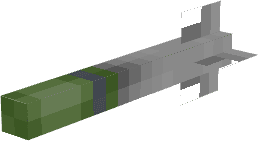

Modrinth · Forge, NeoForge
Create: The Air War on your Minecraft server
Create: The Air War runs on Minecraft servers with Forge or NeoForge. Order your server, set the loader in the panel and install the mod with one click in the mod browser.
This mod was created for aerial vehicles. The main function of the mod was to add more weapons to air transport so that people could create an air war between different factions and countries
- Downloads
- 362.2K
- Author
- –
- Loader
- Forge, NeoForge
- Minecraft
- 1.20.1 – 1.21.1
- Updated
- –
Screenshots
What Create: The Air War looks like

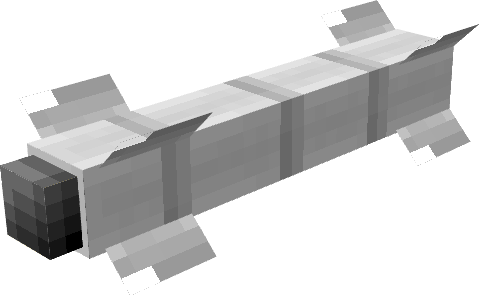
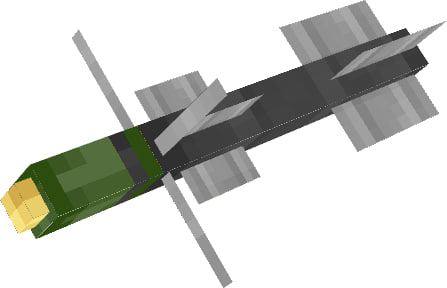
Images: Create: The Air War on Modrinth, published by the project team.
Setup
Install Create: The Air War on your server
The server and players need the same loader and Minecraft version. Back up the world before adding or updating mods.
- 01
Configure
6 GB of RAM is preselected. You choose the term and add-ons and pay by credit card or PayPal.
- 02
Set the loader
In the panel, set the server software to Forge or NeoForge and choose the matching Minecraft version, for example 1.21.1.
- 03
Install the mod
Search the mod browser for “Create: The Air War” and install the release for your loader. Alternatively, upload the .jar to the mods folder via SFTP. Required dependencies are listed on the project page.
- 04
Connect
Every player installs the same Create: The Air War release locally and connects using the server address from the panel.
- On the server
- Required
- On the client
- Required
- Loader
- Forge, NeoForge
- Minecraft
- 1.21.1, 1.20.1
- License
- MIT License
The panel
Install mods, find errors.
Real screenshots from the Mado panel. Both come with every Minecraft server.
Mod browser
Modrinth and CurseForge, right in the panel.
The browser filters by your Minecraft version. Install mods with one click, without uploading .jar files.

AI crash analysis
When a mod crashes, the analyzer reads the log.
Mods often fail on a wrong loader version, Java version or missing dependency. The analyzer names a likely cause and suggests a fix.

Releases
Published releases
Pick the file that matches your server’s loader and Minecraft version. The server and players need the same release.
Create: The Air War · Modrinth- Create: The Air War 5.00September 23, 2026Minecraft 1.21.1 · NeoForge
- Create: The Air War 1.04January 19, 2025Minecraft 1.20.1 · Forge
Original description by the project author
Create: The Air War - Second Part Of New Update
1.Weapons
C-3K - Close strike cruise missile
C-8 - Rocket box containing 9 long strike missiles
SC250 - Close strike cruise missile
OZM72 - Anti-infantry mine
RIM-7 - Long strike cruise missile
C-25 - Long strike missile
9K119M - Long strike missile
8. Hand Grenade M24 - classic german grenade
Machine Gun - less 12 bullets to sec
Tomahawk - working only with rocket designator, right click to link and set cordinates
AIM-9X - new era of air to air rockets, this is anti Create: Aeronautics ship rocket
"Vihr" - this is laser rocket can lock in aeronautics ships
X-25ML - also laser rocket and can lock in aeronautics and create big boom
2.Important
All new updates will be only on NeoForge port, and we will be upload updates on modrinth only v
very soon.
AND THIS MOD NEEDS Create Aeronautics and supports Sable
3. Very Important Items
Monitor - connect camera and rockets and chill
Camera - connect to monitor and get your target
Link Cable - this is cable
4.Support Buttons
Discord
Create: The Air War server crashes on startup – what to do?
Common causes: the loader or Minecraft version does not match the mod file, a dependency is missing, or RAM is too low. Check the log (latest.log) for “OutOfMemoryError”, “Mixin” or missing mods. At Mado, the AI crash analysis reads the log and suggests a cause. You can change the loader and version in the panel.
Which loader does Create: The Air War run on?
According to Modrinth, Create: The Air War supports Forge, NeoForge for Minecraft 1.21.1, 1.20.1.
How much RAM does a server with Create: The Air War need?
As guidance, 4–6 GB for a server with this mod. This is an estimate, not a measured minimum. More mods, many players and long view distances need more. The spark profiler shows whether a mod is costing tick time.
Similar mods
Popular mods in the same category
 Server-ready

YetAnotherConfigLib (YACL)
by isxander
A builder-based configuration library for Minecraft!
 Server-ready

Text Placeholder API
by Patbox
Placeholder and Text manipulation library for your Minecraft mods.
 Client only

Dynamic FPS
by juliand665
Reduce resource usage while Minecraft is in the background, idle, or on battery.
 Server-ready

No Chat Reports
by Aizistral
Makes chat unreportable (where possible)
Ready for your server with Create: The Air War?
6 GB of RAM from €12.00 per month. 35% off your first month with MADO35.