
Decocraft
Decocraft adds in over 3000 decorations for your Minecraft World. This mod will definitely give you a lot more variety when decorating your builds. Many of the items are actually functional as well!
Screenshots

About this Mod
NOTE: As of version 1.16+ this mod no longer requires the PTRLib library in order for it to run! (only 1.12.2 version needs it)
SUPER IMPORTANT! 1.16 Decocraft is in BETA, which means it is not complete.
📚 About
Embark on a captivating journey into the world of Decocraft, a mod that masterfully weaves a tapestry of cozy charm into your Minecraft adventures. As its name implies, this mod is a testament to the art of decorating, adding a rich tapestry of new, inviting items and objects that will transform your in-game world into a cozy haven. Here's the best part - some of these items aren't just for show; they're fully functional and come to life with captivating animations.
Create a warm and welcoming atmosphere with a delightful array of furniture, decorative blocks, soothing lighting fixtures, and a cornucopia of other heartwarming elements. Whether it's a comfy chair you can sit in or a flickering fireplace that crackles with warmth, Decocraft brings both form and function to your Minecraft world. The mod is renowned for its vast selection of items, making it the go-to choice for those who yearn to infuse their Minecraft worlds with visual warmth, a personalized touch, and the wonder of animated décor. Dive into DecoCraft and let your creativity flourish as you craft a snug and inviting haven that feels like home, complete with items that come to life with every click and interaction.
Recipes
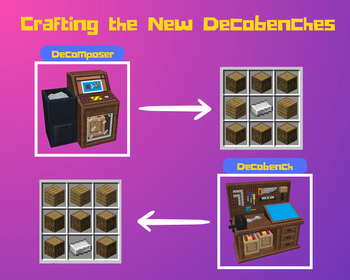
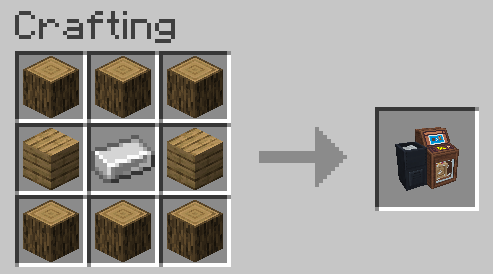
Decomposer Crafting Recipe (make Raw Material used in crafting)
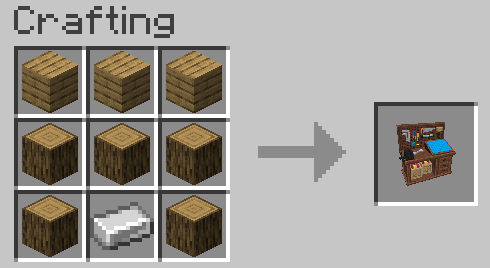
Decobench Crafting Recipe (craft your decorations here)
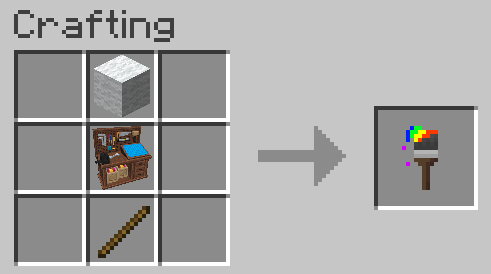
Decobrush Crafting Recipe (use to change the color of many decorations)
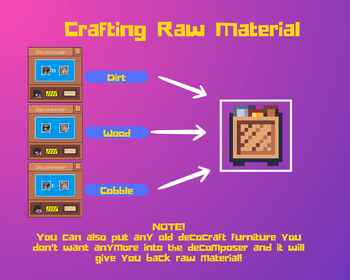
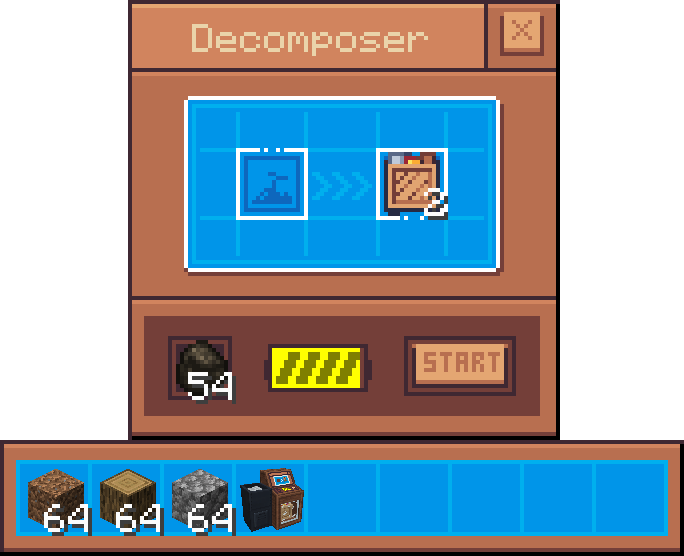
Raw Material
(Input Dirt, Logs, or Cobblestone, then add Coal or Charcoal as fuel and press START to craft your Raw Material)
Join us on Discord!

Credits
- ProfMobius Lead Coder
- RazzleberryFox 3D Models/Coder
- PhiiDelity Social Media Manager
- Momoko 3D models/Coder
- CiciHoneyBee 3D models
Check Out Our Other Mods!

❓ FAQ
Q: My game takes forever to load and/or crashes!
A: Please allocate AT LEAST 4GB RAM to your Minecraft!
Q: Can I use Decocraft in my Mod Pack?!
A: Sure
Partnered with Essential

Available Versions
How to Install Decocraft on Your Server
Order Server
Order a Minecraft Java server with at least 3 GB RAM (4 GB recommended).
Set fabric Loader
In the panel under "Egg", select the fabric loader and matching Minecraft version (1.21.11).
Install Mod
Open the mod browser in the dashboard and search for "Decocraft". Click "Install" – done! Alternatively, upload the .jar via SFTP to the /mods folder.
Compatibility
Mod Loaders
Minecraft Versions
1.21.11, 1.21.10, 1.21.9 (+26 more)
Server-side
✓ RequiredRecommended RAM
4 GB(min. 3 GB)Frequently Asked Questions
Decocraft server crashes on startup – what to do?
Most common cause: wrong fabric version or insufficient RAM. Check the server log (latest.log) for "OutOfMemoryError" or "Mixin" errors. With Mado Hosting: ensure at least 3 GB RAM is allocated and the loader matches the mod version (1.21.11). You can switch loaders with one click in the panel.
Is Decocraft compatible with fabric and forge and neoforge?
Decocraft officially supports fabric, forge, neoforge for Minecraft 1.21.11, 1.21.10, 1.21.9. Note: Forge and Fabric mods are NOT cross-compatible – pick one loader and stick with it. The Mado dashboard automatically detects incompatible loader combinations.
Server lagging with Decocraft – how to optimize performance?
Recommended RAM: 4 GB (per 8 players). Use /spark profiler to check if Decocraft consumes the most tick time. Common fixes: reduce server view-distance to 8-10, install "performant" or "starlight" as supplementary mods on Forge. With Mado Hosting, your server runs on NVMe SSDs with dedicated CPU cores for minimal latency.
Similar Mods

![[ETF] Entity Texture Features](https://cdn.modrinth.com/data/BVzZfTc1/af683d206d50b05258d865b0d6e4aa2f2cee12f2_96.webp)
![[EMF] Entity Model Features](https://cdn.modrinth.com/data/4I1XuqiY/6e5bbd0d06b1741bfdab6c0cfab6de8fdaf0064c_96.webp)



Rent Modded Server
Install Decocraft with just one click on your server.