
Ecliptic Seasons
A living seasonal world with changing landscapes, weather, crops, and 24 solar terms—even beyond the horizon.
Screenshots

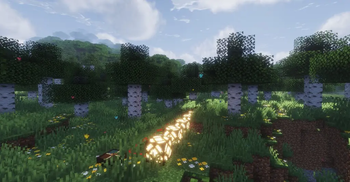


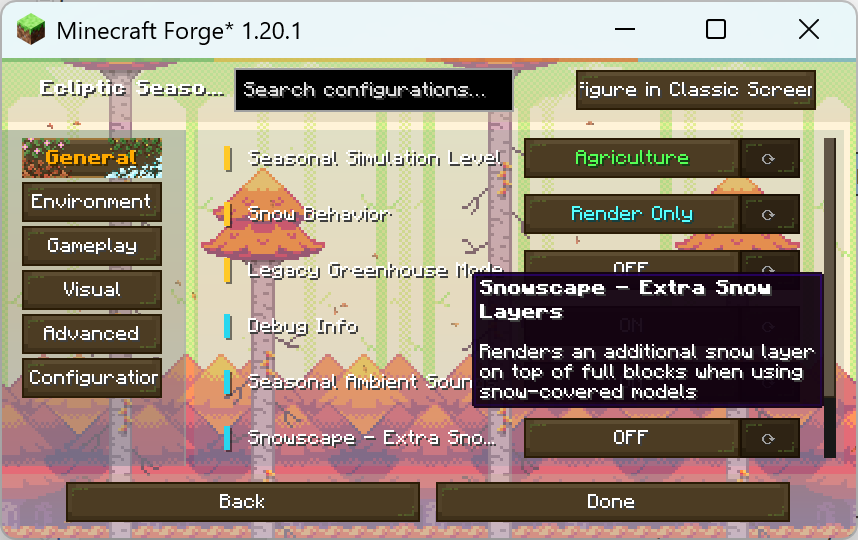

About this Mod

🍂 Ecliptic Seasons
A world that changes with the passing year.
Spring rain falls across new growth. Summer brings long days and green fields. Autumn colors the forests, and winter snow gradually covers the land.
Ecliptic Seasons is a standalone seasonal environment mod inspired by the traditional Chinese 24 Solar Terms. The year progresses through twenty-four periods, bringing gradual changes to weather, daylight, vegetation, wildlife, and the landscape around you.
Make Minecraft feel like a world where time truly passes.
🎬 Showcase
🌍 Seasons you can see
Watch forests change color, hear the sounds of different seasons, and see snow gather and retreat as the climate shifts. Seasonal particles, block appearances, and ambient effects bring those changes into the places you explore.
With supported distant-terrain renderers and the appropriate integration, seasonal scenery can reach beyond Minecraft’s normal render distance. Distant forests and mountains can reflect the season too.
🌦 Weather and snow
Weather varies by season and region. Rain and snow can continue over time, while snow cover responds to changing conditions rather than appearing all at once when winter begins.
- Seasonal weather patterns
- Rainfall and snowfall
- Gradual snow accumulation and melting
- Snow scenery with optional vanilla snow layers
- Changes to daylight length through the year
🌾 Farming and ecology
The seasons can affect crop growth and animal behavior. Optional humidity controls add depth to agriculture, while greenhouses give you ways to grow crops when the conditions outside are unfavorable.
These systems can be configured to suit the kind of world you want to play in, whether you mainly want seasonal scenery or a stronger survival challenge.
🔧 Make it your own
Ecliptic Seasons supports configuration files, datapacks, and resource packs. Players, server owners, and modpack creators can adjust seasonal behavior, landscapes, crops, and other parts of the experience. Server settings can also be synchronized with clients.
📦 Versions
| Minecraft version | Support status |
|---|---|
| 26.1+ (NeoForge 26.x) | In development |
| 1.21.1 | Continued support |
| 1.20.1 | Continued support |
In development: New features, gameplay changes, bug fixes, and compatibility updates.
Continued support: Bug fixes, compatibility updates, and localization improvements.
Ecliptic Seasons is developed primarily for NeoForge. A separate native Fabric version is available:
🧩 Integrations and compatibility
The following companion projects provide additional content or compatibility for specific setups:
- Serene Seasons API Stub Bridge — Helps mods that depend on the Serene Seasons API work with Ecliptic Seasons.
- Ecliptic Seasons: MultiMod Patch — Adds integrations and compatibility patches for supported mods.
- Ecliptic Seasons: Bundles — Provides optional datapacks, resource packs, and seasonal content.
Ecliptic Seasons also supports many Serene Seasons tags, making it easier to integrate existing seasonal content.
Most content mods work without a dedicated patch. Rendering mods may need additional support to display seasonal colors, snow scenery, or distant terrain correctly.
Minecraft 1.21+: Sodium · Iris Shaders · Distant Horizons · Voxy Compatibility Plugin
Minecraft 1.20: Embeddium · Oculus · Distant Horizons · OptiFine
Check the documentation for version-specific compatibility details.
❓ FAQ
Can I use Ecliptic Seasons in a modpack?
Yes. You may include and customize it in your modpack. Please provide proper credit and read the changelog before updating, as some releases may contain breaking changes.
Is there a Fabric version?
Yes: Ecliptic Seasons: Fabricated.
Will it be backported?
Backports are generally not planned. Older Minecraft versions often lack systems that Ecliptic Seasons depends on.
📖 Links
Documentation · GitHub · Discord
🌾 Credits
The primary artwork of Ecliptic Seasons was created by YunFei, with most of the remaining visual work completed by Aerolite_Dust.
Special thanks to the TeaCon community for testing, profiling, reviewing, and improving the mod, and to everyone who has contributed feedback, inspiration, sponsorship, and support.
Performance profiling is powered by JProfiler.

Available Versions
How to Install Ecliptic Seasons on Your Server
Order Server
Order a Minecraft Java server with at least 3 GB RAM (4 GB recommended).
Set forge Loader
In the panel under "Egg", select the forge loader and matching Minecraft version (26.3).
Install Mod
Open the mod browser in the dashboard and search for "Ecliptic Seasons". Click "Install" – done! Alternatively, upload the .jar via SFTP to the /mods folder.
Compatibility
Mod Loaders
Minecraft Versions
26.3, 26.2, 26.1.2 (+4 more)
Server-side
✓ RequiredRecommended RAM
4 GB(min. 3 GB)Frequently Asked Questions
Ecliptic Seasons server crashes on startup – what to do?
Most common cause: wrong forge version or insufficient RAM. Check the server log (latest.log) for "OutOfMemoryError" or "Mixin" errors. With Mado Hosting: ensure at least 3 GB RAM is allocated and the loader matches the mod version (26.3). You can switch loaders with one click in the panel.
Is Ecliptic Seasons compatible with forge and neoforge?
Ecliptic Seasons officially supports forge, neoforge for Minecraft 26.3, 26.2, 26.1.2. The Mado dashboard automatically detects incompatible loader combinations.
Server lagging with Ecliptic Seasons – how to optimize performance?
Recommended RAM: 4 GB (per 8 players). Use /spark profiler to check if Ecliptic Seasons consumes the most tick time. Common fixes: reduce server view-distance to 8-10, install "performant" or "starlight" as supplementary mods on Forge. With Mado Hosting, your server runs on NVMe SSDs with dedicated CPU cores for minimal latency.
Similar Mods

![[ETF] Entity Texture Features](https://cdn.modrinth.com/data/BVzZfTc1/af683d206d50b05258d865b0d6e4aa2f2cee12f2_96.webp)
![[EMF] Entity Model Features](https://cdn.modrinth.com/data/4I1XuqiY/6e5bbd0d06b1741bfdab6c0cfab6de8fdaf0064c_96.webp)



Rent Modded Server
Install Ecliptic Seasons with just one click on your server.