
Modrinth · Fabric · Client mod
ExploitPreventer
ExploitPreventer is a client-side mod. Install it on your computer; the server does not need it.
A fabric mod that prevents known client-side exploits.
- Downloads
- 522.2K
- Author
- NikOverflow
- Loader
- Fabric
- Minecraft
- 1.21.10 – 26.3
- Updated
- –
Screenshots
What ExploitPreventer looks like

Images: ExploitPreventer on Modrinth, published by the project team.
Setup
Install ExploitPreventer on your client
Client-side mods only run on your computer. More server RAM does not change their performance.
- 01
Install the loader locally
Install Fabric for your Minecraft version in your launcher.
- 02
Download the file
Download the ExploitPreventer file for your loader and your exact Minecraft version, for example 26.3.
- 03
Add it to the mods folder
Put the .jar file in your local .minecraft/mods folder and remove older duplicates.
- 04
Launch
Launch Minecraft with the loader profile. Nothing needs to change on the server.
- On the server
- Not needed
- On the client
- Required
- Loader
- Fabric
- Minecraft
- 26.3, 26.2, 26.1.2 +5 more
- License
- MIT License
Releases
Published releases
Pick the file that matches your server’s loader and Minecraft version. The server and players need the same release.
ExploitPreventer · Modrinth- ExploitPreventer 1.2.1 for 26.3September 27, 2026Minecraft 26.3 · Fabric
- ExploitPreventer 1.2.0 for 26.2September 16, 2026Minecraft 26.2 · Fabric
- ExploitPreventer 1.2.0 for 1.21.11September 16, 2026Minecraft 1.21.11 · Fabric
- ExploitPreventer 1.2.0 for 1.21.9September 16, 2026Minecraft 1.21.10, 1.21.9 · Fabric
- ExploitPreventer 1.2.0 for 26.1September 16, 2026Minecraft 26.1, 26.1.1, 26.1.2 · Fabric
Original description by the project author
ExploitPreventer
This is a fabric mod that prevents known client-side exploits.
Disclaimer: Use this mod at your own risk. The maintainers are not responsible for any bans or other consequences.
If you're interested in servers or plugins that are using these exploits then look in the Hall of Shame.
Beware of fake downloads
Only download ExploitPreventer from the official Modrinth page: https://modrinth.com/mod/exploitpreventer
Fake or unofficial versions of this mod may contain malicious code.
Exploits
This mod currently protects against the following exploits:
- Sign translation vulnerability (and other component magic)
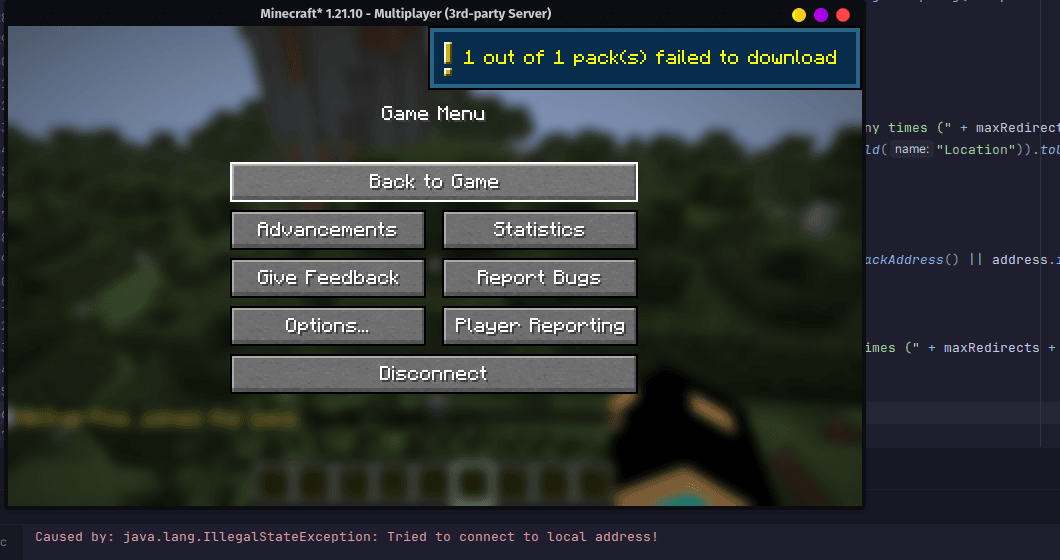
- Local HTTP request via resource pack
- Device fingerprinting via resource pack
Sign Translation Vulnerability (and other component magic)
Link: https://wurst.wiki/sign_translation_vulnerability
A server can trick a client into resolving translation keys and sending the resolved text back to the server. This allows the server to get what mods are installed on the client (by checking for mod-specific translation keys or keybinds) and player languages etc.
Our fix: We prevent the client from resolving translation keys and keybinds on sign and anvil edit screen.
Local HTTP request via resource pack
Link: https://alaggydev.github.io/posts/cytooxien/
A server can force the client to make HTTP requests to any IPs, including local services (e.g. http://localhost:8080) by sending a specially crafted resource pack URL. The server also can know whether the request was successful or not, or if the SHA1 hash of the response matches a specific value. The server can use this to detect what local services are running on the client machine (e.g. router, TVs, previously LiquidBounce).
Our fix: We block resource pack URLs that point to local IPs. Ideally, we would like to block all HTTP responses without a proper CORS header (just like a browser), but this would break backwards compatibility.
Device fingerprinting via resource pack
Link: https://alaggydev.github.io/posts/cytooxien/
A server can abuse the client-side resource pack cache to uniquely identify clients. This allows a server to track users across multiple sessions, even if they change their username or IP address.
Our fix: Each account would have its own resource pack cache directory. This way, the server cannot correlate resource packs between different accounts.
Mod detection via plugin channels
Some mods register plugin channels to communicate with the server. Servers can use these channels to detect the presence of certain mods on the client.
This behavior is intentional and required for many mods to function correctly (e.g. for mod specific features, networking, or compatibility with server-side plugins).
Because this information is explicitly exposed by the mod itself, this mod does not attempt to block or hide plugin channel registration or usage. Doing so would break legitimate mod functionality and is outside the scope of this project.
Other mods
There are other mods that attempt something similar. These mods are not recommended because they are either waiting for my patches that they can incorporate them into their own mods, were created entirely using AI or are simply cheap copies of my mod.
Getting Death Threats
Due to the nature of this project, exposing and protecting against exploits used by certain servers, I have received death threats from individuals who feel threatened by this work. These threats are serious and do not go unnoticed.
However, they will not stop me. If anything, receiving death threats only reinforces that this project is hitting where it matters. The people sending them have a clear interest in keeping these exploits alive and players unprotected. I will continue to maintain and improve this mod, expose new exploits as they are discovered and fight even harder for player privacy and security. Intimidation is not going to work here.
If you are aware of who is behind any such threats, please report them to the appropriate authorities.
Reporting
If you discover a bypass or any other client-side exploit, please contact nikoverflow on Discord or send an email to [email protected]. Include a brief summary of the issue, clear step-by-step reproduction instructions, the Minecraft version you used and any relevant logs or screenshots.
Does ExploitPreventer need to be installed on the Minecraft server?
No. Modrinth marks ExploitPreventer as unsupported on the server side. Install it only in your local mods folder. Your server can stay unchanged unless the project page lists an additional dependency.
Which version and loader does ExploitPreventer require?
Use a file for Fabric and your exact Minecraft version. Supported versions include 26.3, 26.2, 26.1.2. Files for different loaders are not interchangeable.
ExploitPreventer is not working – what should I check?
First check the Minecraft version, loader version and required dependencies. Because the mod is client-side, more server RAM will not fix it.
Similar mods
Popular mods in the same category
 Server-ready

YetAnotherConfigLib (YACL)
by isxander
A builder-based configuration library for Minecraft!
 Server-ready

Text Placeholder API
by Patbox
Placeholder and Text manipulation library for your Minecraft mods.
 Client only

Dynamic FPS
by juliand665
Reduce resource usage while Minecraft is in the background, idle, or on battery.
 Server-ready

No Chat Reports
by Aizistral
Makes chat unreportable (where possible)
Looking for mods for your own server?
The catalog lists mods that run on Minecraft servers.