
Modrinth · Forge, NeoForge
Extended Crafting on your Minecraft server
Extended Crafting runs on Minecraft servers with Forge or NeoForge. Order your server, set the loader in the panel and install the mod with one click in the mod browser.
Adds some new ways to craft items, as well as extra crafting items and utilities.
- Downloads
- 279.5K
- Author
- BlakeBr0
- Loader
- Forge, NeoForge
- Minecraft
- 1.12 – 26.1.2
- Updated
- –
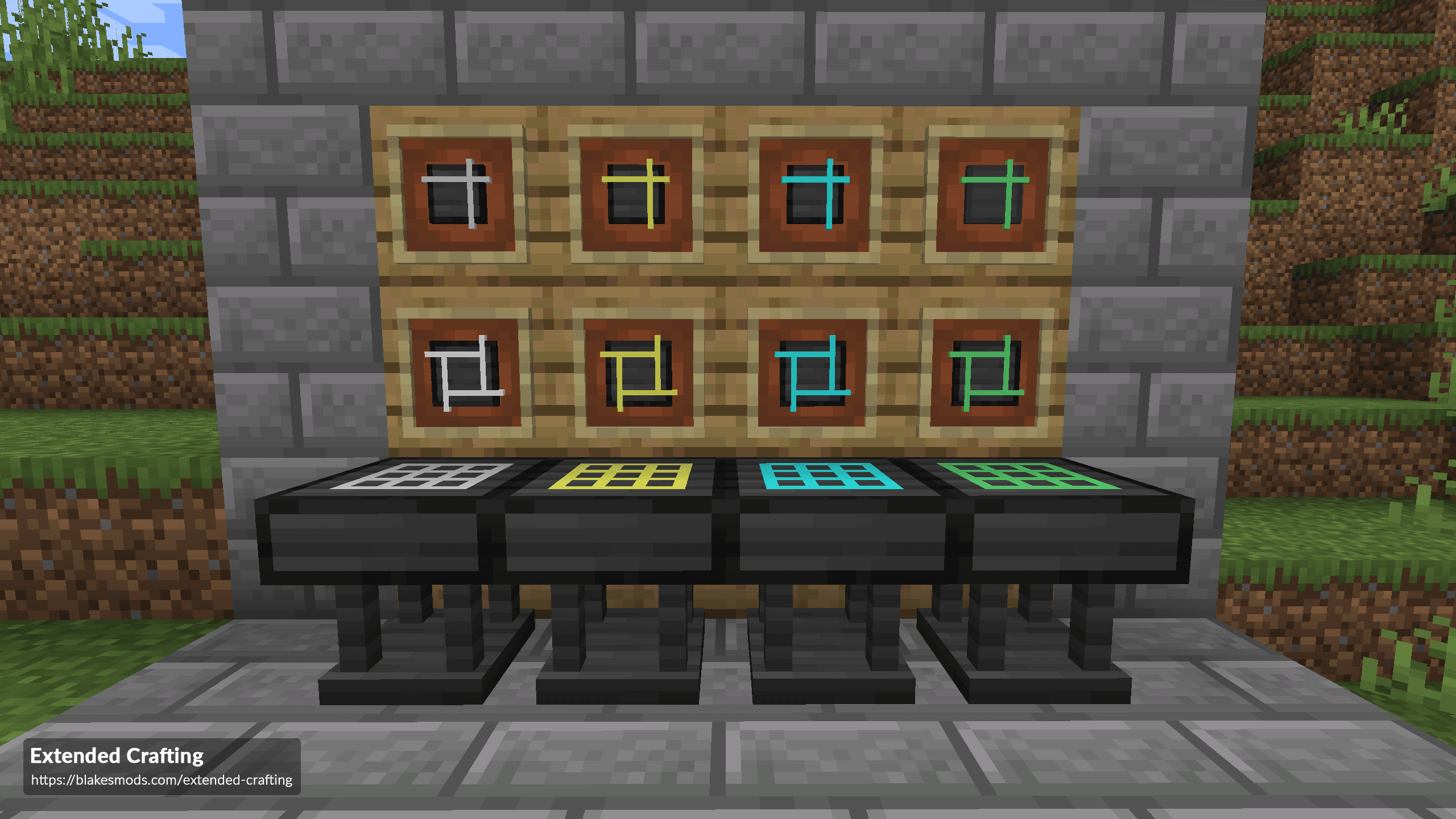
Screenshots
What Extended Crafting looks like


Images: Extended Crafting on Modrinth, published by the project team.
Setup
Install Extended Crafting on your server
The server and players need the same loader and Minecraft version. Back up the world before adding or updating mods.
- 01
Configure
4 GB of RAM is preselected. You choose the term and add-ons and pay by credit card or PayPal.
- 02
Set the loader
In the panel, set the server software to Forge or NeoForge and choose the matching Minecraft version, for example 26.1.2.
- 03
Install the mod
Search the mod browser for “Extended Crafting” and install the release for your loader. Alternatively, upload the .jar to the mods folder via SFTP. Required dependencies are listed on the project page.
- 04
Connect
Every player installs the same Extended Crafting release locally and connects using the server address from the panel.
- On the server
- Required
- On the client
- Required
- Loader
- Forge, NeoForge
- Minecraft
- 26.1.2, 1.21.1, 1.21 +16 more
- License
- MIT License
The panel
Install mods, find errors.
Real screenshots from the Mado panel. Both come with every Minecraft server.
Mod browser
Modrinth and CurseForge, right in the panel.
The browser filters by your Minecraft version. Install mods with one click, without uploading .jar files.

AI crash analysis
When a mod crashes, the analyzer reads the log.
Mods often fail on a wrong loader version, Java version or missing dependency. The analyzer names a likely cause and suggests a fix.

Releases
Published releases
Pick the file that matches your server’s loader and Minecraft version. The server and players need the same release.
Extended Crafting · Modrinth- ExtendedCrafting-26.1.2-8.0.3.jarOctober 2, 2026Minecraft 26.1.2 · NeoForge
- ExtendedCrafting-1.21.1-7.0.9.jarSeptember 3, 2026Minecraft 1.21, 1.21.1 · NeoForge
- ExtendedCrafting-1.20.1-6.0.11.jarMarch 5, 2026Minecraft 1.20.1 · NeoForge
- ExtendedCrafting-1.20.1-6.0.10.jarAugust 12, 2025Minecraft 1.20.1 · Forge
- ExtendedCrafting-1.19.2-5.1.10.jarDecember 29, 2023Minecraft 1.19.2 · Forge
Original description by the project author






Extended Crafting adds more ways to craft items, more items to craft with, and more utilities for crafting. The mod doesn't do much on it's own and is intended to be configured heavily. All the recipes and settings should be changed to fit the progression of the modpack it's in and how the modpack developer wants it to be used.
Requires Cucumber Library to run, and version 1.x requires CraftTweaker for customization.
Add Patchouli for an in game guide book: (download)
Head over to the official site for version 2.x+ documentation. Head over to the wiki for version 1.x CraftTweaker syntax.
Combination Crafting
- Combination crafting is a multiblock crafting setup that consists of a Crafting Core and Pedestals.
- The Crafting Core goes in the center of this structure, and Pedestals can go anywhere around it in a 7x7 area.
- Combination crafting uses RF to craft, which you need to give to the Crafting Core.
- An input item needs to be placed on top of the Crafting Core, and all Pedestal items go on the pedestals.
- You can right click on any side besides the top of the Crafting Core to see a GUI with information about the current setup and recipe.
- The speed of each recipe's craft is dependent on the recipes RF cost / the recipes RF rate.
- Docs: version 1.x | version 2.x+
Table Crafting
- Table crafting is a tiered crafting table system, consisting of new Crafting Tables.
- These tiers include 1. Basic (3x3), 2. Advanced (5x5), 3. Elite (7x7), and 4. Ultimate (9x9).
- Recipes can either be tier independent, and work in all tables with enough space, or tier dependent and only work in the tier specified.
- These tables have a seperate recipe pool and do not work with regular crafting recipes.
- Docs: version 1.x | version 2.x+
Compression Crafting
- Compression crafting is done inside a machine called the Quantum Compressor.
- The Quantum Compressor is a high tier RF powered machine that can craft items using high quantities of materials.
- Materials put inside of the Quantum Compressor go into a massive internal buffer.
- It also has a "Catalyst" slot, which is used to identify the recipe with the material x catalyst.
- The catalyst is not consumed once crafting is completed.
- Once enough of the material is placed into the buffer, the machine will start to use RF and craft the output.
- The speed of each recipe's craft is dependent on the recipes RF cost / the recipes RF rate.
- Docs: version 1.x | version 2.x+
Ender Crafting
- Ender Crafting is done with the Ender Crafter and a bunch of Ender Alternators.
- Ender Crafting is basically timed crafting recipes. If you've ever used the QED from previous Extra Utilities versions, it's pretty much that.
- The Ender Crafter will use the power of all the Ender Alternators in a 7x7x7 area around it, with the Ender Crafter being the center block.
- The more Ender Alternators in the area, the faster it will craft.
- Docs: version 1.x | version 2.x+
Flux Crafting
- Flux Crafting is done with the Flux Crafter and a bunch of Flux Alternators.
- Flux Crafting is basically FE-powered timed crafting recipes.
- The Flux Crafter will use the power of all the Flux Alternators in a 7x7x7 area around it, with the Flux Crafter being the center block.
- The more Flux Alternators in the area, the faster it will craft.
- Docs: version 2.x+
Singularities
- Singularities are highly compressed materials.
- These are created in the Quantum Compressor.
- The mod comes with some default Singularities, which can be individually disabled in the config.
- You can add your own Singularities very easily using the configuration file.
- The mod also adds an Ultimate Singularity, crafted by placing one of each singularity in an Ultimate Crafting Table.
- You can blacklist default and custom Singularities from this recipe in the configuration file.
- Docs: version 2.x+
Automation Interface (version 1.x only)
- A block used to automate table and Ender Crafter crafting recipes.
- Place it on top of a basic -> ultimate table or Ender Crafter.
- Set up a recipe in the table, then press "Save Recipe" in the interface.
- You can then insert items into the interface, and it will evenly distribute them around the grid.
- It will also auto-craft the recipe if it's valid.
- It also has auto-insert and auto-extract capabilities.
- You can also chose to enable Auto Eject mode. When this is enabled, items that can't be put into the table will be automatically placed into the output slot of the interface.
- Every item movement action costs RF, which can be configured in the config.
Other Things
- This mod adds a Handheld Crafting Table item for on-the-go crafting.
- This mod adds an item for easy CraftTweaker recipe making for it's tables, called the Recipe Maker.
- There is an in-game guide book that explains how the things in the mod work.

Extended Crafting server crashes on startup – what to do?
Common causes: the loader or Minecraft version does not match the mod file, a dependency is missing, or RAM is too low. Check the log (latest.log) for “OutOfMemoryError”, “Mixin” or missing mods. At Mado, the AI crash analysis reads the log and suggests a cause. You can change the loader and version in the panel.
Which loader does Extended Crafting run on?
According to Modrinth, Extended Crafting supports Forge, NeoForge for Minecraft 26.1.2, 1.21.1, 1.21.
How much RAM does a server with Extended Crafting need?
As guidance, 3–4 GB for a server with this mod. This is an estimate, not a measured minimum. More mods, many players and long view distances need more. The spark profiler shows whether a mod is costing tick time.
Similar mods
Popular mods in the same category
 Client only

Iris Shaders
by coderbot
A modern shader pack loader for Minecraft intended to be compatible with existing OptiFine shader packs
 Client only

[ETF] Entity Texture Features
by Traben
Emissive, Random & Custom texture support for entities in resourcepacks just like Optifine but for Fabric
 Client only

[EMF] Entity Model Features
by Traben
EMF is an, OptiFine format, Custom Entity Model replacement mod available for Fabric and Forge.
 Client only

Not Enough Animations
by tr7zw
Bringing first-person animations to the third-person
Ready for your server with Extended Crafting?
4 GB of RAM from €8.00 per month. 35% off your first month with MADO35.