
Fantasy's Furniture
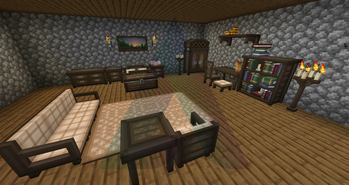
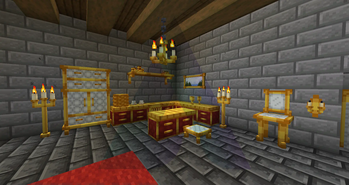
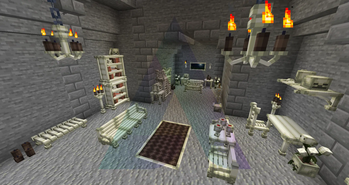
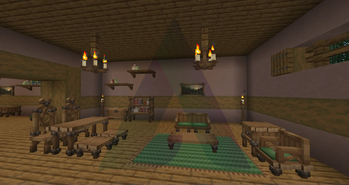
Adds Fantasy-Themed Furniture & Decorational blocks to the game
Screenshots
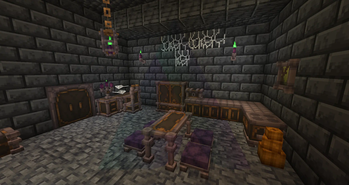
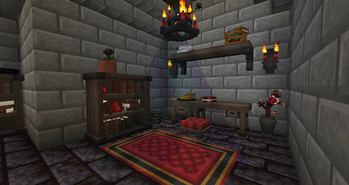
About this Mod

Fantasy's Furniture is a modular mod which adds various new Furniture Sets and Decorational blocks to Minecraft.
These furniture blocks range from but are not limited to, Beds, Seats, Bookshelves, Doors, Ovens, Sofas, Shelves, Counters and Doors.
Recipes
Each piece of furniture can be crafted from our new Furniture Station block by inserting the matching Wool & Plank blocks along side some Binding Agent item (Clay Ball).
The Furniture Station can be crafted in any 2x2 crafting grid (or larger) by inserting a Crafting Table + Leather.
Modules
Fantasy's Furniture has been split up into modules 1 for each furniture set. This is to allow players to pick and choose which furniture sets they wish to be playing with.
Installing Fantasy's Furniture standalone will gain you nothing, so please be sure to install one of the below modules.
Along side these modules comes our Decorations module, unlike the above this module does not add any new furniture set. Rather it adds various additional decorational blocks

Available Versions
How to Install Fantasy's Furniture on Your Server
Order Server
Order a Minecraft Java server with at least 3 GB RAM (4 GB recommended).
Set forge Loader
In the panel under "Egg", select the forge loader and matching Minecraft version (26.3).
Install Mod
Open the mod browser in the dashboard and search for "Fantasy's Furniture". Click "Install" – done! Alternatively, upload the .jar via SFTP to the /mods folder.
Compatibility
Mod Loaders
Minecraft Versions
26.3, 26.2, 26.1.2 (+17 more)
Server-side
✓ RequiredRecommended RAM
4 GB(min. 3 GB)Frequently Asked Questions
Fantasy's Furniture server crashes on startup – what to do?
Most common cause: wrong forge version or insufficient RAM. Check the server log (latest.log) for "OutOfMemoryError" or "Mixin" errors. With Mado Hosting: ensure at least 3 GB RAM is allocated and the loader matches the mod version (26.3). You can switch loaders with one click in the panel.
Is Fantasy's Furniture compatible with forge and neoforge?
Fantasy's Furniture officially supports forge, neoforge for Minecraft 26.3, 26.2, 26.1.2. The Mado dashboard automatically detects incompatible loader combinations.
Server lagging with Fantasy's Furniture – how to optimize performance?
Recommended RAM: 4 GB (per 8 players). Use /spark profiler to check if Fantasy's Furniture consumes the most tick time. Common fixes: reduce server view-distance to 8-10, install "performant" or "starlight" as supplementary mods on Forge. With Mado Hosting, your server runs on NVMe SSDs with dedicated CPU cores for minimal latency.
Similar Mods

![[ETF] Entity Texture Features](https://cdn.modrinth.com/data/BVzZfTc1/af683d206d50b05258d865b0d6e4aa2f2cee12f2_96.webp)
![[EMF] Entity Model Features](https://cdn.modrinth.com/data/4I1XuqiY/6e5bbd0d06b1741bfdab6c0cfab6de8fdaf0064c_96.webp)



Rent Modded Server
Install Fantasy's Furniture with just one click on your server.