
Modrinth · Fabric, Forge, NeoForge, Quilt · Client mod
LCull
LCull is a client-side mod. Install it on your computer; the server does not need it.
Cursed, performant Frustum logic for heavy culling scenes
- Downloads
- 1.8K
- Author
- Starlev
- Loader
- Fabric, Forge, NeoForge, Quilt
- Minecraft
- 1.19.2 – 26.3
- Updated
- –
Screenshots
What LCull looks like
Images: LCull on Modrinth, published by the project team.
Setup
Install LCull on your client
Client-side mods only run on your computer. More server RAM does not change their performance.
- 01
Install the loader locally
Install Fabric or Forge or NeoForge or Quilt for your Minecraft version in your launcher.
- 02
Download the file
Download the LCull file for your loader and your exact Minecraft version, for example 26.3.
- 03
Add it to the mods folder
Put the .jar file in your local .minecraft/mods folder and remove older duplicates.
- 04
Launch
Launch Minecraft with the loader profile. Nothing needs to change on the server.
- On the server
- Not needed
- On the client
- Required
- Loader
- Fabric, Forge, NeoForge, Quilt
- Minecraft
- 26.3, 26.2, 26.1.2 +13 more
- License
- GNU Lesser General Public License v3.0 only
Releases
Published releases
Pick the file that matches your server’s loader and Minecraft version. The server and players need the same release.
LCull · Modrinth- LCull 1.1.0September 29, 2026Minecraft 26.3 · NeoForge
- LCull 1.1.0September 29, 2026Minecraft 26.2 · NeoForge
- LCull 1.1.0September 29, 2026Minecraft 26.1, 26.1.1, 26.1.2 · NeoForge
- LCull 1.1.0September 29, 2026Minecraft 1.21.10, 1.21.9 · NeoForge
- LCull 1.1.0September 29, 2026Minecraft 1.21.6, 1.21.7, 1.21.8 · NeoForge
Original description by the project author
The project code was created with help of Artificial Intelligence.



An open source mod with cursed, performant Frustum logic for heavy culling scenes. More FPS, but has some side effects.
Advantages
- Culling entities that off-screen:
- Helps in different heavy scenes which increases FPS. (like in CounterMine 2)
- Accelerates work by x2 with Entity Culling, Sodium/Embeddium mods, cuz they're professionals here yea.
Weaknesses
- Useless for other scenes:
- Low amounts of entities
- Entities behind the walls.
- Modded mobs (probably)
- Increases CPU load.
Benchmarks
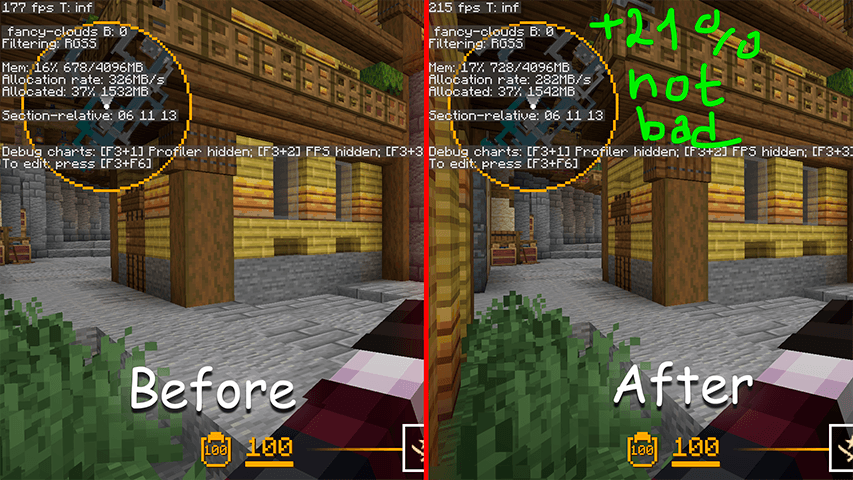
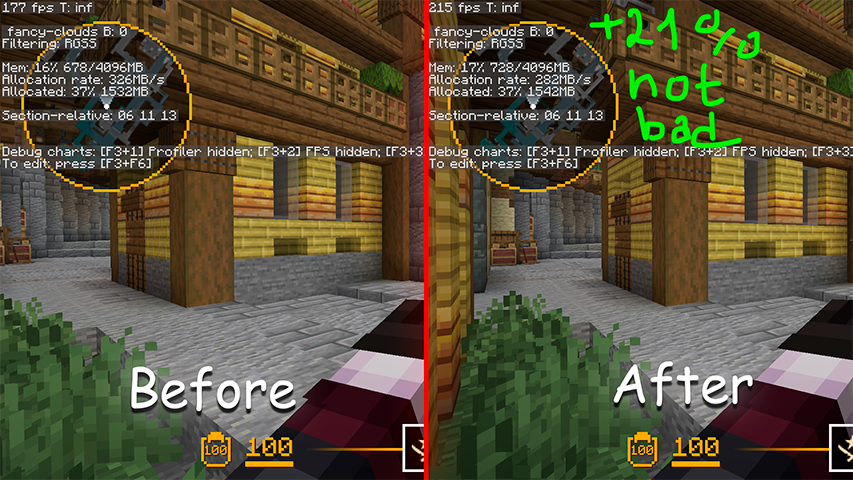
Default 1.21.11 Fabric version
Before: Without mods
After: With LCull
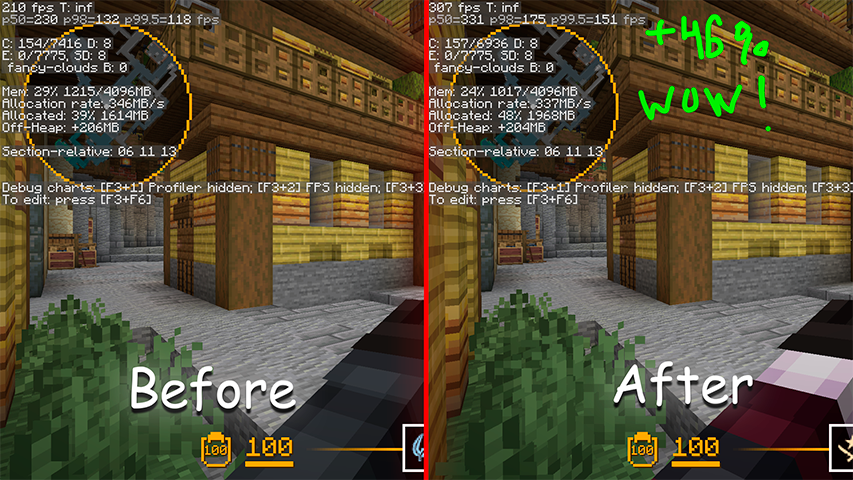
1.21.11 Fabric with mods: Sodium, Entity Culling, Fabric API
Before: Without LCull
After: With LCull
Why I made this mod?
Minecraft keeps every loaded entity in the render loop even when it is behind your back or far outside the screen, so the GPU and CPU pay full price for things you will never see. In entity-heavy scenes, like RPG-modded servers, minigame hubs or CounterMine maps WITH UP TO 10K ENTITIES (or just a much amount of Display entities), that overhead turns into a real frame-rate tax. Sodium and Entity Culling already do excellent work on the block and entity side, but I wanted a small, focused frustum path tuned specifically for thousands of entities on screen at once, and a clean place to experiment with the rendering pipeline. LCull grows out of the ideas in Lomka (my earlier work that proved tick and refresh culling help a lot) and narrows the scope to one job: stop drawing entities that are not in the view frustum.
How the LCull's Frustum checks works?
Every frame the game already builds a Frustum for the active camera. LCull asks that frustum whether an entity's axis-aligned bounding box lives inside the visible volume - the same six-plane test the renderer uses for chunks, evaluated in a branchless form that resolves the per-corner sign choices once per frame instead of per entity. When the whole box is outside, the entity is skipped during rendering and never reaches the draw call.
Two things keep the result from flickering. The safety margin around the box grows with the entity's speed - 1 block for a stationary entity, up to 2.5 for a fast mover - so nothing pops mid-stride; and a projectile cannot exempt itself by moving fast, because the margin is capped. LCull also leaves vanilla's own escapes intact: anything the renderer marks as never-cullable (fishing hooks, the ender dragon, lightning bolts, name-tag displays) is handed straight back to vanilla, and a leashed mob stays visible while the thing holding its rope is. Both deliberately leave a little on the table rather than dropping something the player can see.
What the Minecraft and LCull problem?
Minecraft does apply its own frustum to chunks and block entities, but the per-entity render loop still iterates and submits everything that is loaded, which is exactly why off-screen mobs cost as much as on-screen ones. LCull removes that off-screen cost, but it cannot remove entities hidden behind walls, because that needs occlusion culling and a visibility graph, a much harder problem than a frustum test. The mod also does nothing useful when there are only a few entities, or in singleplayer where the simulation, not rendering, is the bottleneck. Because culling is decided on the render thread, entities can pop out the instant they leave the view; that is the intended trade for the FPS win, and it trades a little extra CPU work for the frustum evaluation. There is also a narrow compatibility edge: a mod that assumes every entity is "rendered" each frame could behave oddly, which is why LCull stays an opt-in, tunable tweak rather than a silent override.
Links
Does LCull need to be installed on the Minecraft server?
No. Modrinth marks LCull as unsupported on the server side. Install it only in your local mods folder. Your server can stay unchanged unless the project page lists an additional dependency.
Which version and loader does LCull require?
Use a file for Fabric, Forge, NeoForge, Quilt and your exact Minecraft version. Supported versions include 26.3, 26.2, 26.1.2. Files for different loaders are not interchangeable.
LCull is not working – what should I check?
First check the Minecraft version, loader version and required dependencies. Because the mod is client-side, more server RAM will not fix it.
Similar mods
Popular mods in the same category
 Client only

Sodium Extra
by FlashyReese
A Sodium addon that adds features that shouldn't be in Sodium.
 Server-ready

VeinMiner
by Miraculixx
Mine the whole vein on mining a single ore/block. Make the tedious mining experience to something satisfying and fun! FTB Ultimine alternative
 Client only

Remove Reloading Screen
by dima_dencep
Makes resource packs load in the background, allowing you to do other things while waiting!
 Server-ready

Sinytra Connector
by Su5eD
Lets you play Fabric mods on NeoForge
Looking for mods for your own server?
The catalog lists mods that run on Minecraft servers.