
Lithosphere
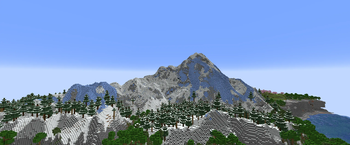
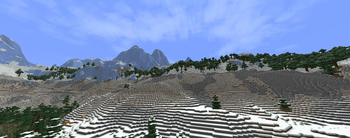
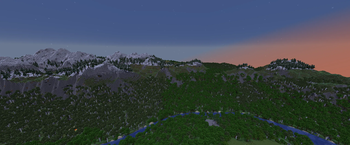
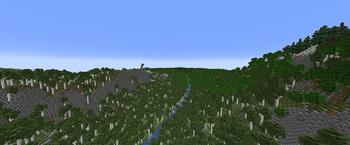
Lithosphere aims to change the overworld worldgen to be more cinematic, polished and beautiful.
Screenshots
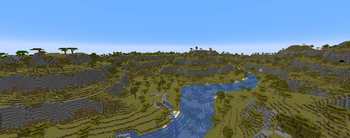
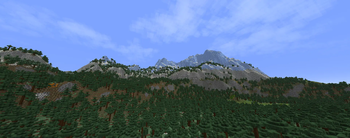
About this Mod
Lithosphere aims to change the overworld worldgen to be more cinematic, polished and beautiful.
Compatability
Most worldgen mods (like Biomes O' Plenty, Nature's Spirit, ...) should be compatible, but lithosphere changes the deafult noise_settings so worldgen datapacks that change the overworld will be incompatible.
Datapacks that change the noise_settings files can be made compatible by changing their noise_settings to refer to Lithosphere's final_density.
Recommendations
- I highly recommend using C2ME for improved chunkgen speeds
- Voxy/Distant Horizons/Nvidium
- Noisium
- Steep surface fix
Feedback, questions or screenshots
If you have some questions, suggestions or feedback, or just want to post some of your screenshots of Lithosphere you can ask/post these on discord!
Features
Continents and deeper oceans
The overworld consists of some gigantic and some smaller continents, these are seperated by deep oceans where occasional islands and archipelagos can be found.
Gradual coasts and steep cliffs
The coastlines are mostly covered in large beaches, that gradually transition into the ocean, but there are also steep cliffs near mountainous regions. These cliffs have a more realistic shape to them, than the vanilla stony shores.
Mountainous Regions
The "Onion Ring" mountains in vanilla are gone, and replaced with more cinematic looking mountain ranges, that are less pointy. These new mountains can be much higher than in vanilla.
Karst
You can find karst regions, that can sometimes look just like the Monument Valley in Arizona, or Ha Long Bay in Vietnam!
Rivers and river valleys
Rivers are much less common and carve valleys through mountainous regions. They also won't get cut off by some weird terrain generation like in some places in vanilla.
Lakes
Big lakes can sometimes appear anywhere in your world. It's quite common to also find some islands generating in them.
Unique swamp placement and terrain
Swamps now generate seperately from windswept biomes and are often located in lower regions..
Smoother terrain
The weird terrain layers and facture splines from vanilla are gone and replaced with overall smoother height transitions.
Overhauled cave generation
It's quite rare to find caves reaching the surface, but when they do, they'll most likely lead to a bigger cave system
Larger temperature and humidity regions
The size of the temperature and humidity noises has been increased to make biomes bigger and less condensed. But biomes in this datapack should still be more varied than they are like in the vanilla large biomes setting.
Available Versions
How to Install Lithosphere on Your Server
Order Server
Order a Minecraft Java server with at least 4 GB RAM (6 GB recommended).
Set datapack Loader
In the panel under "Egg", select the datapack loader and matching Minecraft version (26.2).
Install Mod
Open the mod browser in the dashboard and search for "Lithosphere". Click "Install" – done! Alternatively, upload the .jar via SFTP to the /mods folder.
Compatibility
Mod Loaders
Minecraft Versions
26.2, 26.1.2, 26.1.1 (+25 more)
Server-side
✓ RequiredRecommended RAM
6 GB(min. 4 GB)Frequently Asked Questions
Lithosphere server crashes on startup – what to do?
Most common cause: wrong datapack version or insufficient RAM. Check the server log (latest.log) for "OutOfMemoryError" or "Mixin" errors. With Mado Hosting: ensure at least 4 GB RAM is allocated and the loader matches the mod version (26.2). You can switch loaders with one click in the panel.
Is Lithosphere compatible with datapack and fabric and forge and neoforge and quilt?
Lithosphere officially supports datapack, fabric, forge, neoforge, quilt for Minecraft 26.2, 26.1.2, 26.1.1. Note: Forge and Fabric mods are NOT cross-compatible – pick one loader and stick with it. The Mado dashboard automatically detects incompatible loader combinations.
Server lagging with Lithosphere – how to optimize performance?
Recommended RAM: 6 GB (per 5 players). Use /spark profiler to check if Lithosphere consumes the most tick time. Common fixes: reduce server view-distance to 8-10, install "performant" or "starlight" as supplementary mods on Forge. With Mado Hosting, your server runs on NVMe SSDs with dedicated CPU cores for minimal latency.
Similar Mods


Rent Modded Server
Install Lithosphere with just one click on your server.