Let Me Despawn
Improves performance by tweaking mob despawn rules. Say bye to pesky unintentional persistent mobs.
Screenshots
About this Mod



LET ME DESPAWN
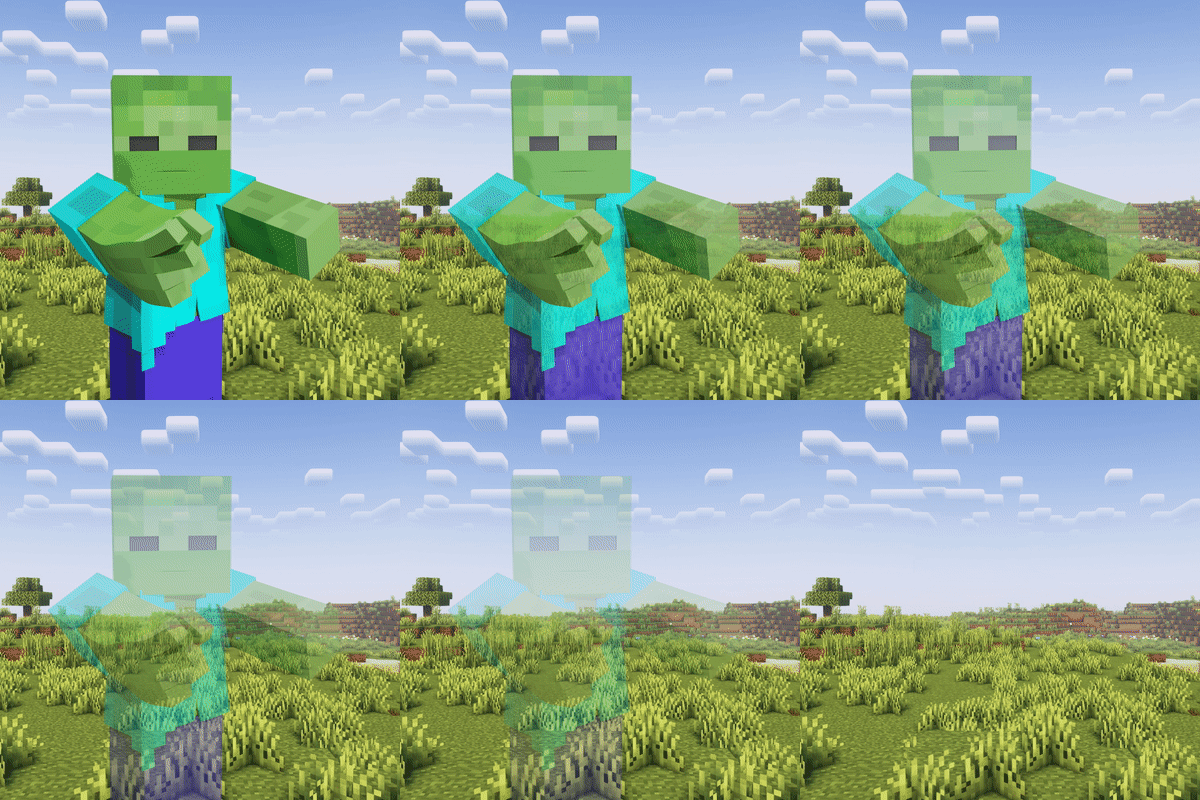
Let Me Despawn (LMD) is a Minecraft mod designed to address entity lag issues by modifying the despawn mechanics for mobs that have picked up or equipped items.
Key Features
- Allows mobs with equipped items to despawn naturally
- Preserves dropped items when mobs despawn
- Configurable mob exclusion list
- Server-side functionality (not required on client)
Functionality
In vanilla Minecraft, mobs that pick up or equip items become persistent and do not despawn naturally. This behavior can significantly contribute to entity lag, especially in modded environments with increased mob variety and spawn rates.
LMD modifies the despawn check to allow these mobs to despawn naturally, like any other mob. To prevent item loss, any picked up or equipped items are dropped when the entity despawns.
Note: Mobs named with a name tag will still be prevented from despawning naturally.
Configuration (Version 1.2.1 and later)
Config File
- Location:
config/letmedespawn.json - Reload command:
/almanac reload
Commands
| Command | Description |
|---|---|
/letmedespawn add <mobName> |
Add mobs to the config |
/letmedespawn remove <mobName> |
Remove mobs from the config |
Mobs added to the config will retain their vanilla behavior and not despawn after picking up items. All commands update the mob list in real-time, eliminating the need for game restarts or manual reloads.
Installation
This is a server-side mod and is not required on the client.
Available Versions
How to Install Let Me Despawn on Your Server
Order Server
Order a Minecraft Java server with at least 3 GB RAM (4 GB recommended).
Set bukkit Loader
In the panel under "Egg", select the bukkit loader and matching Minecraft version (26.4-snapshot-2).
Install Mod
Open the mod browser in the dashboard and search for "Let Me Despawn". Click "Install" – done! Alternatively, upload the .jar via SFTP to the /mods folder.
Compatibility
Mod Loaders
Minecraft Versions
26.4-snapshot-2, 26.4-snapshot-1, 26.3 (+142 more)
Server-side
✓ RequiredRecommended RAM
4 GB(min. 3 GB)Frequently Asked Questions
Let Me Despawn server crashes on startup – what to do?
Most common cause: wrong bukkit version or insufficient RAM. Check the server log (latest.log) for "OutOfMemoryError" or "Mixin" errors. With Mado Hosting: ensure at least 3 GB RAM is allocated and the loader matches the mod version (26.4-snapshot-2). You can switch loaders with one click in the panel.
Is Let Me Despawn compatible with bukkit and fabric and forge and neoforge and paper and purpur and quilt?
Let Me Despawn officially supports bukkit, fabric, forge, neoforge, paper, purpur, quilt for Minecraft 26.4-snapshot-2, 26.4-snapshot-1, 26.3. Note: Forge and Fabric mods are NOT cross-compatible – pick one loader and stick with it. The Mado dashboard automatically detects incompatible loader combinations.
Server lagging with Let Me Despawn – how to optimize performance?
Recommended RAM: 4 GB (per 8 players). Use /spark profiler to check if Let Me Despawn consumes the most tick time. Common fixes: reduce server view-distance to 8-10, install "performant" or "starlight" as supplementary mods on Forge. With Mado Hosting, your server runs on NVMe SSDs with dedicated CPU cores for minimal latency.
Similar Mods


Rent Modded Server
Install Let Me Despawn with just one click on your server.