
Load Support
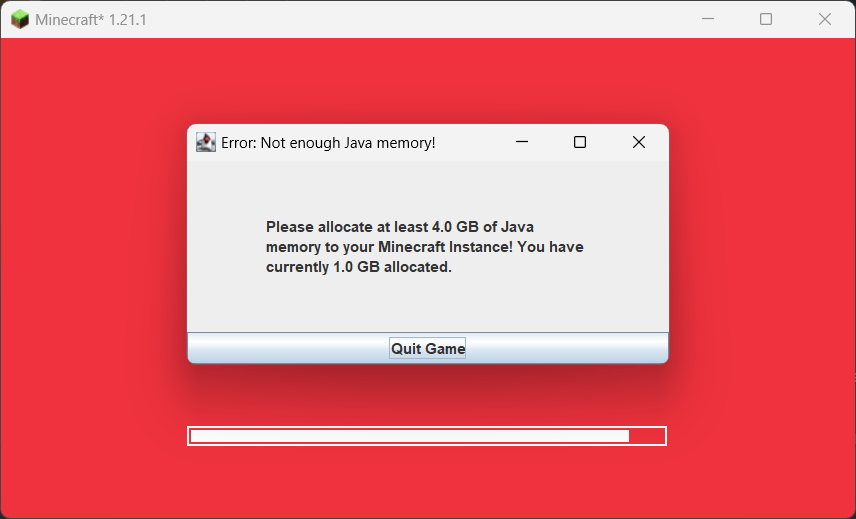
Shows when the user has too less Java memory allocated, and plays a sound when the game has loaded.
Screenshots
About this Mod
Shows when the player has too less Java memory allocated, and plays a sound when the game has finished loading.
It is fully configurable in config/loadsupport.toml.
Config 🚀
The config in config/loadsupport.toml is pretty self explainatory:
loadFinishSound = "minecraft:ui.toast.challenge_complete"
minMemory = 4.0
errorTitle = "Error: Not enough Java memory!"
errorMinMemory = "Please allocate at least {minMemory} GB of Java memory to your Minecraft instance!"
errorCurrentMemory = "You have currently {currentMemory} GB allocated."
memoryInfoLink = "https://github.com/vaporvee/LoadSupport/wiki/How-to-allocate-more-memory-to-your-Minecraft-instance"
{minMemory} and {currentMemory} get replaced by their actual values.
Planned Features 👀
- 🪛 Ingame settings (Modlist support)
- 🧩 More features letting the player know why Minecraft is not loading
Features
Directly show a warning when too less Java Memory was selected 🚨
The player doesn't need to wait just to know that they selected the wrong amount of Java Memory.
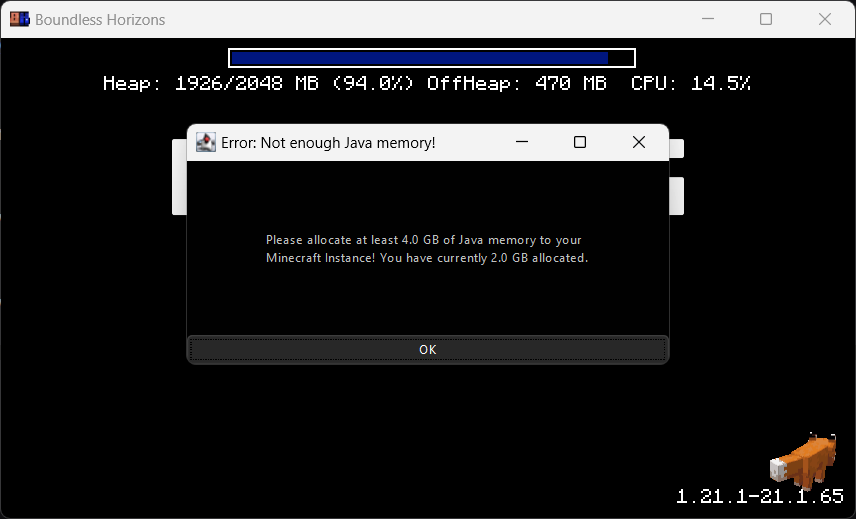
Blocks the game window🚧
Make sure the player gets the correct performance experience.
Play a sound when Minecraft finished loading 🔊
Directly know when Minecraft started when beeing in the background.
Available Versions
How to Install Load Support on Your Client
Install the Mod Loader Locally
Install fabric for your local Minecraft version.
Download the Matching File
Choose the Load Support file for fabric and Minecraft 1.21.8.
Install Mod
Place the .jar file in your local .minecraft/mods folder and restart Minecraft. No server-side installation is required.
Compatibility
Mod Loaders
Minecraft Versions
1.21.8, 1.21.7, 1.21.6 (+5 more)
Server-side
✗ UnsupportedRecommended RAM
4 GB(min. 3 GB)Frequently Asked Questions
Does Load Support need to be installed on the Minecraft server?
No. Modrinth marks Load Support as unsupported on the server side. Install it only in your local Minecraft mods folder. Your server can remain unchanged unless the mod page lists an additional dependency.
Which version and loader does Load Support require?
Use a file for fabric, neoforge and your exact Minecraft version. Supported versions include 1.21.8, 1.21.7, 1.21.6. Files for different loaders are not interchangeable.
Load Support is not working – what should I check?
First check the Minecraft version, loader version and required dependencies. Put the .jar file in your local .minecraft/mods folder and remove older duplicates. Because this mod is client-side, adding server RAM will not fix it.
Similar Mods






Minecraft Server for Your Group
Load Support stays on your client. Host a compatible world for your group.