
Methane
Explosive optimisations for your favourite block game.
About this Mod


Note: Methane is no longer being developed. The 'new' mod's codebase and features became far too large after a few weeks, which combined with other commitments + minecraft's frequent updates, really isn't something I can keep developing.
In the unlikely case that the mod is later finished, it will not replace Methane.
For now, report any non-bug related issues here
What is this?
Methane is a highly configurable optimization mod focused on destructively gaining lots of performance, with optimizations on the following:
- Disabling a lot of the functionality of the lightmapper, which improves performance on the CPU drastically.
- Allowing the user to adjust fog behavior, which allows you to see all your chunks, without them being occluded by fog. (optional)
- Optimizing how all particles behave in-game, causing them to be way less intensive on your computer when ticking. (2.3+ only)
Note: Methane (by default) will apply a "fullbright" effect on the client as a symptom of not calculating block lighting. You can disable this in Mod Menu, but this will limit the potential performance gains and restrict you to particle (always on) and destructive (optional) optimizations. Methane also removes toasts by default, but you can turn this behaviour off.
- As a side effect of some optimizations, world saving acts differently to vanilla MC, but shouldn't be noticable (aside from less save jitter), and will still save properly for the *vast* majority of crashes and rage ALT+F4's. If this scares you, please use the legacy lighting engine.
If you want mob spawning to behave properly, turn on the legacy lighting engine.
Benefits
- increased framerate, with significantly less noticable stutter.
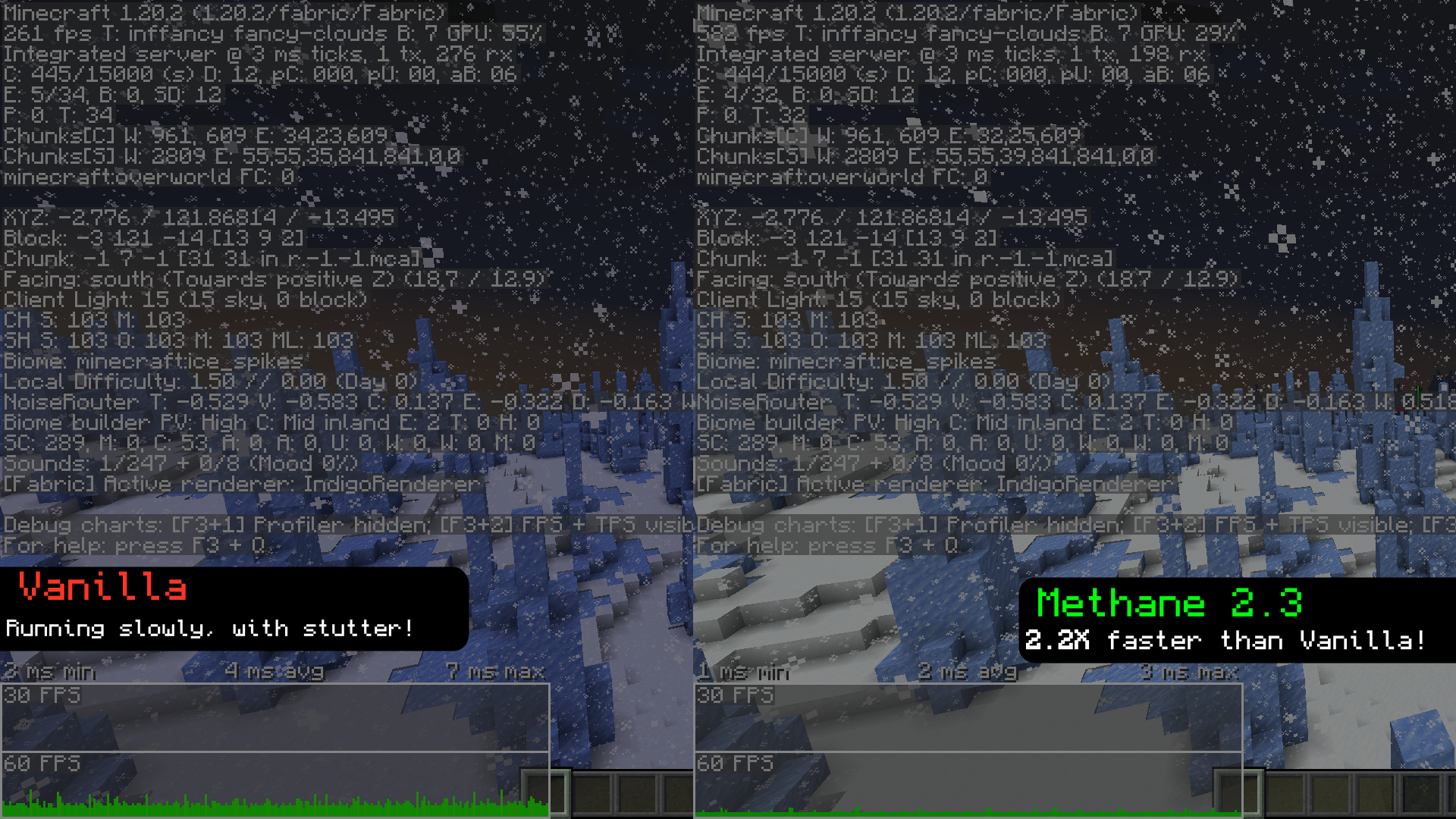
*recorded with Methane 2.3, with everything set toFancy, and with render + sim distance set to12. - The same effect as fullbright, but with actual performance gains.
- Methane can help your game run faster on Distant Horizons (toggle twice), but usually leaves random dark patches in LoD's.
Compared to fullbright
while fullbright (also known as "brightness" and "gamma") makes the world look fully lit, it still performs all those lighting calculations. Methane instead skips those, resulting in the same end product but with much better performance.
Configuration
- Methane has a variety of options available to customize a lot of the aspects of the mod, mainly its startup and fog behavior. 1.19.3 and up should also have the ability to toggle the mod with
\(will be unbound by default on 2.15+), but has some issues when re-enabling. - Server admins are now able to control the settings of Methane clients from version 2.2 onward, and you can get it here.
- Starting from 2.3 onwards: There are now a handful of settings called "Destructive Settings", that allow you to gain a lot of performance by removing certain renderer features (e.g. HUD backgrounds, sky renderers, etc). This can help in GPU-constrained scenarios.
Can i use this with starlight?
Starlight should work on 1.19.x (obviously it only does things when Methane is OFF), and Methane will crash on 1.20+ with starlight (although most of Starlight's functionality has been merged into 1.20).
Compatibility
- Methane has had quite a bit of time to mature, and compatibility has improved greatly since the first release. Most mods should work just fine with methane. If not, make an issue!
Methane should be playable on forge via Sinytra Connector, but past that there probably wont be much in the way of forge support.
Getting early builds
Most of the time, a perfectly stable update will be pushed to the repository, but the mod wont be uploaded, usually because I'm planning on adding other things. If you really want to grab one early, you can do it here
Dependencies
- Fabric API
- Mod Menu
- Cloth Config
modpacks
feel free to put Methane in your modpack, but please link back to Methane's Modrinth and/or GitHub repo.
Translations
Methane has a small amount of (likely very outdated) translations. If you want to help translate the mod, feel free to make a PR.




Available Versions
How to Install Methane on Your Client
Install the Mod Loader Locally
Install fabric for your local Minecraft version.
Download the Matching File
Choose the Methane file for fabric and Minecraft 1.21.1.
Install Mod
Place the .jar file in your local .minecraft/mods folder and restart Minecraft. No server-side installation is required.
Compatibility
Mod Loaders
Minecraft Versions
1.21.1, 1.21, 1.20.6 (+15 more)
Server-side
✗ UnsupportedRecommended RAM
4 GB(min. 3 GB)Frequently Asked Questions
Does Methane need to be installed on the Minecraft server?
No. Modrinth marks Methane as unsupported on the server side. Install it only in your local Minecraft mods folder. Your server can remain unchanged unless the mod page lists an additional dependency.
Which version and loader does Methane require?
Use a file for fabric, quilt and your exact Minecraft version. Supported versions include 1.21.1, 1.21, 1.20.6. Files for different loaders are not interchangeable.
Methane is not working – what should I check?
First check the Minecraft version, loader version and required dependencies. Put the .jar file in your local .minecraft/mods folder and remove older duplicates. Because this mod is client-side, adding server RAM will not fix it.
Similar Mods





Minecraft Server for Your Group
Methane stays on your client. Host a compatible world for your group.