
Mob Flow Utilities
A mob farming automation mod. Yup
About this Mod
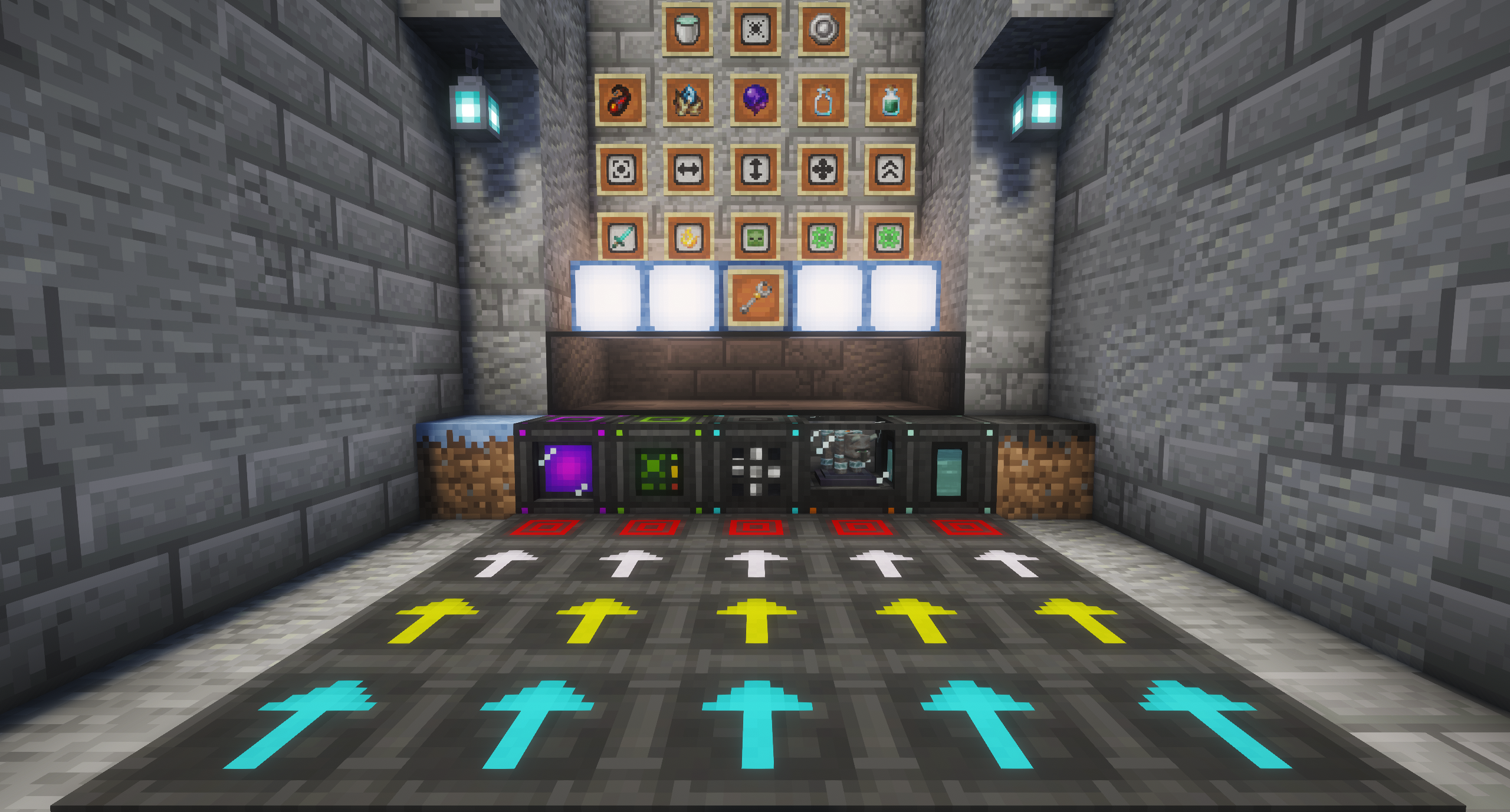
Automate Mobs
A mob farming automation mod.
Flow Pads
- Push mobs and items in the direction you place them
Damage Pads + Controller
- One Controller manages multiple Damage Pads in multiple farms
- Connect pads to a controllers with the pad wrench
- 5 damage enchantment slots, up to 10 modules per slot
- Sharpness
- Fire Aspect
- Smite
- Bane of Arthropods
- Looting
- Requires a redstone signal to work
- Prevents Endermen from teleporting
Collector Block
- Configurable collection area and size. Can be be increased with modules
- Can collect and store XP as a fluid.
- Automatically trash junk with up to 3 filter modules (45 slots per filter)
Genesis Chamber
- Spawn mobs from spawn eggs using fuel
- Uses most vanilla furnace fuels (coal, lava buckets, blaze rods, etc.)
- 5x5 spawn area, expandable to 10x10 with modules
- Base 200 tick spawn interval, down to 50 ticks with Speed Modules
- Respects vanilla spawning rules (hostiles in darkness, passives in light)
- Configurable mob limit per zone (default 12)
Genesis Infuser
- Infuses coal and charcoal with liquid XP to make Infused Coal and Infused Charcoal, each burning 8x longer than its vanilla counterpart
- Takes 125mB of liquid XP per item — a full bucket makes 8 infused items
Fan
Pushes mobs in the facing direction.
- Area of effect can be upgraded using fan upgrade module
Pad Wrench
- Operation Modes: Add or Remove mode
- Selection Types: Single pad or area selection
Mob Spawning
- Gloom Spores: Craftable item that transforms dirt into Dark Dirt
- Converts 5x5 area
- Can also be found in not-so-nice loot chests (fortress, bastion, stronghold, etc)
- Dark Dirt: Hostile mob spawning blocks
- Spawns up to 12 hostile mobs per area (can be changed in config)
- Functions in darkness, ignores player proximity
- Reverts to dirt in direct sunlight
- Giving the dark dirt a redstone signal accelerates spawn tick rate for faster spawn bursts
- Glimmer Sprouts: Craftable item that transforms dirt into Glimmer Grass
- Converts 5x5 area
- Can also be found in friendly loot chests (villages, shipwrecks, etc)
- Glimmer Grass: Passive mob spawning blocks
- Spawns up to 12 passive mobs per area
- Functions in bright light, ignores player proximity
Gene Sampling
- Empty Gene Vial: Used to collect DNA from mobs
- Gene Sample Vial: Contains collected DNA that can be used for crafting spawn eggs
- Life Catalyst: Used for crafting spawn eggs
Using a Gene Sample Vial with some DNA, a life Catalyst and an emerald, you can craft the sampled DNA into a spawn egg. Doesn't work on bosses (except the Warden, cause why not)
Infused Coal and Charcoal
- Burns 8x longer than vanilla coal and charcoal. One Infused Coal/Charcoal can smelt a stack (64) of items.
Utility Tools
- Mob Catcher: Capture and release any non-boss mob
Decorative Blocks
- Dark Glass: Blocks light and is wither immune
- Glimmer Lamp: Fancier redstone lamp
Available Versions
How to Install Mob Flow Utilities on Your Server
Order Server
Order a Minecraft Java server with at least 3 GB RAM (4 GB recommended).
Set neoforge Loader
In the panel under "Egg", select the neoforge loader and matching Minecraft version (26.3).
Install Mod
Open the mod browser in the dashboard and search for "Mob Flow Utilities". Click "Install" – done! Alternatively, upload the .jar via SFTP to the /mods folder.
Compatibility
Mod Loaders
Minecraft Versions
26.3, 26.2, 26.1.2 (+1 more)
Server-side
✓ RequiredRecommended RAM
4 GB(min. 3 GB)Frequently Asked Questions
Mob Flow Utilities server crashes on startup – what to do?
Most common cause: wrong neoforge version or insufficient RAM. Check the server log (latest.log) for "OutOfMemoryError" or "Mixin" errors. With Mado Hosting: ensure at least 3 GB RAM is allocated and the loader matches the mod version (26.3). You can switch loaders with one click in the panel.
Is Mob Flow Utilities compatible with neoforge?
Mob Flow Utilities officially supports neoforge for Minecraft 26.3, 26.2, 26.1.2. The Mado dashboard automatically detects incompatible loader combinations.
Server lagging with Mob Flow Utilities – how to optimize performance?
Recommended RAM: 4 GB (per 8 players). Use /spark profiler to check if Mob Flow Utilities consumes the most tick time. Common fixes: reduce server view-distance to 8-10, install "performant" or "starlight" as supplementary mods on Forge. With Mado Hosting, your server runs on NVMe SSDs with dedicated CPU cores for minimal latency.
Similar Mods
![[EMF] Entity Model Features](https://cdn.modrinth.com/data/4I1XuqiY/6e5bbd0d06b1741bfdab6c0cfab6de8fdaf0064c_96.webp)


Rent Modded Server
Install Mob Flow Utilities with just one click on your server.