
Modern World Creation
Gives the Create World screen a makeover!
Screenshots
About this Mod



About
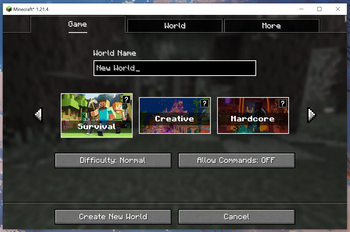
Modern World Creation replaces Vanilla's Create World screen with a more modern looking one!
It features smooth hover animations for the game mode buttons and is fully controllable by using the arrow and tab keys to make it as accessible as possible.
For support, tips, and to connect with other users, join the official Discord server.
Settings
Modern World Creation lets you customize some visual aspects of the Create World screen.
The config file is located at /config/modernworldcreation/config.txt.
A game restart is needed after changing things in the config!
Game Mode Info
The little info thingy in the top-right corner of the game mode buttons can be disabled by setting show_gamemode_info to false.
Button Border Thickness
The border of the game mode buttons is too t h i c c ?! Well, I'm a bit disappointed tbh, but you can change it by editing the button_border_thickness value.
Button Border HEX Color
Want a different color for the game mode button borders? Just change the button_border_hex_color value to the HEX color you like!
Copyright
Modern World Creation Copyright © 2021-2024 Keksuccino.
Modern World Creations is licensed under DSMSLv2 (DON'T SNATCH MA STUFF LICENSE V2.0).
See LICENSE.md for more information about the license.
Special Thanks
This mod was made possible by u/HobbylosUwU and their great menu concept.
Server Needed?
Looking to play Minecraft with friends but setting up a server is just too time-consuming?
No worries! Simply rent a pre-configured server and start playing in a snap.
Just click the image below and use code keksuccino to enjoy a 25% discount on your first month!
Available Versions
How to Install Modern World Creation on Your Client
Install the Mod Loader Locally
Install fabric for your local Minecraft version.
Download the Matching File
Choose the Modern World Creation file for fabric and Minecraft 1.21.4.
Install Mod
Place the .jar file in your local .minecraft/mods folder and restart Minecraft. No server-side installation is required.
Compatibility
Mod Loaders
Minecraft Versions
1.21.4, 1.21.1, 1.20.1 (+9 more)
Server-side
✗ UnsupportedRecommended RAM
4 GB(min. 3 GB)Frequently Asked Questions
Does Modern World Creation need to be installed on the Minecraft server?
No. Modrinth marks Modern World Creation as unsupported on the server side. Install it only in your local Minecraft mods folder. Your server can remain unchanged unless the mod page lists an additional dependency.
Which version and loader does Modern World Creation require?
Use a file for fabric, forge, neoforge and your exact Minecraft version. Supported versions include 1.21.4, 1.21.1, 1.20.1. Files for different loaders are not interchangeable.
Modern World Creation is not working – what should I check?
First check the Minecraft version, loader version and required dependencies. Put the .jar file in your local .minecraft/mods folder and remove older duplicates. Because this mod is client-side, adding server RAM will not fix it.
Similar Mods




![[ETF] Entity Texture Features](https://cdn.modrinth.com/data/BVzZfTc1/af683d206d50b05258d865b0d6e4aa2f2cee12f2_96.webp)

Minecraft Server for Your Group
Modern World Creation stays on your client. Host a compatible world for your group.