
Modrinth · Forge
QuantumChunks on your Minecraft server
QuantumChunks runs on Minecraft servers with Forge. Order your server, set the loader in the panel and install the mod with one click in the mod browser.
Multi-core, region-aware chunk loading for large modded servers
- Downloads
- 6.9K
- Author
- Mental
- Loader
- Forge
- Minecraft
- 1.20.1 – 1.20.6
- Updated
- –
Screenshots
What QuantumChunks looks like
Images: QuantumChunks on Modrinth, published by the project team.
Setup
Install QuantumChunks on your server
The server and players need the same loader and Minecraft version. Back up the world before adding or updating mods.
- 01
Configure
4 GB of RAM is preselected. You choose the term and add-ons and pay by credit card or PayPal.
- 02
Set the loader
In the panel, set the server software to Forge and choose the matching Minecraft version, for example 1.20.6.
- 03
Install the mod
Search the mod browser for “QuantumChunks” and install the release for your loader. Alternatively, upload the .jar to the mods folder via SFTP. Required dependencies are listed on the project page.
- 04
Connect
QuantumChunks is not needed on the client. Players connect using the server address from the panel.
- On the server
- Required
- On the client
- Not needed
- Loader
- Forge
- Minecraft
- 1.20.6, 1.20.5, 1.20.4 +3 more
- License
- LicenseRef-All-Rights-Reserved
The panel
Install mods, find errors.
Real screenshots from the Mado panel. Both come with every Minecraft server.
Mod browser
Modrinth and CurseForge, right in the panel.
The browser filters by your Minecraft version. Install mods with one click, without uploading .jar files.

AI crash analysis
When a mod crashes, the analyzer reads the log.
Mods often fail on a wrong loader version, Java version or missing dependency. The analyzer names a likely cause and suggests a fix.

Releases
Published releases
Pick the file that matches your server’s loader and Minecraft version. The server and players need the same release.
QuantumChunks · ModrinthOriginal description by the project author
QuantumChunks ⚡
Multi-core, region-aware chunk loading for busy Forge servers.
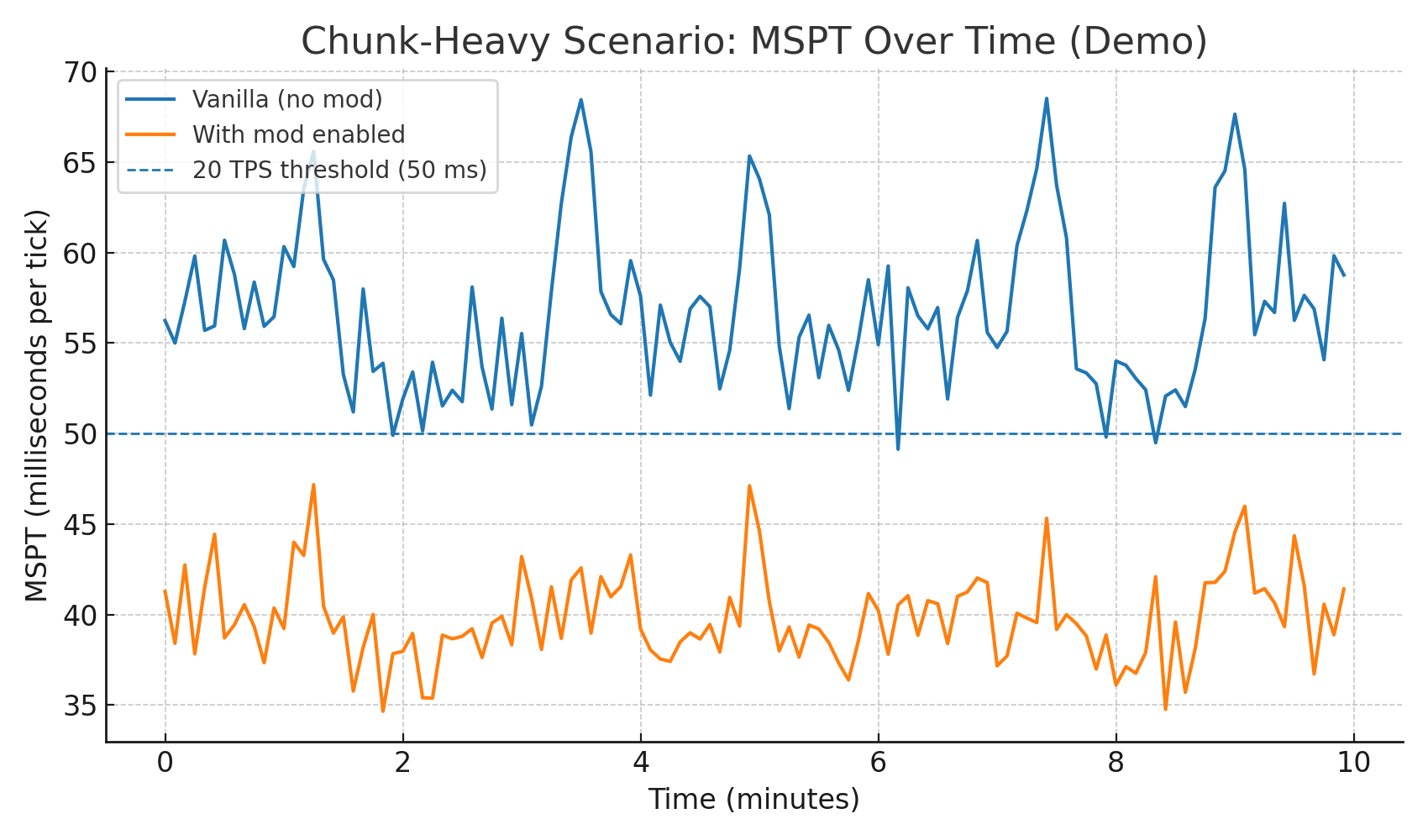
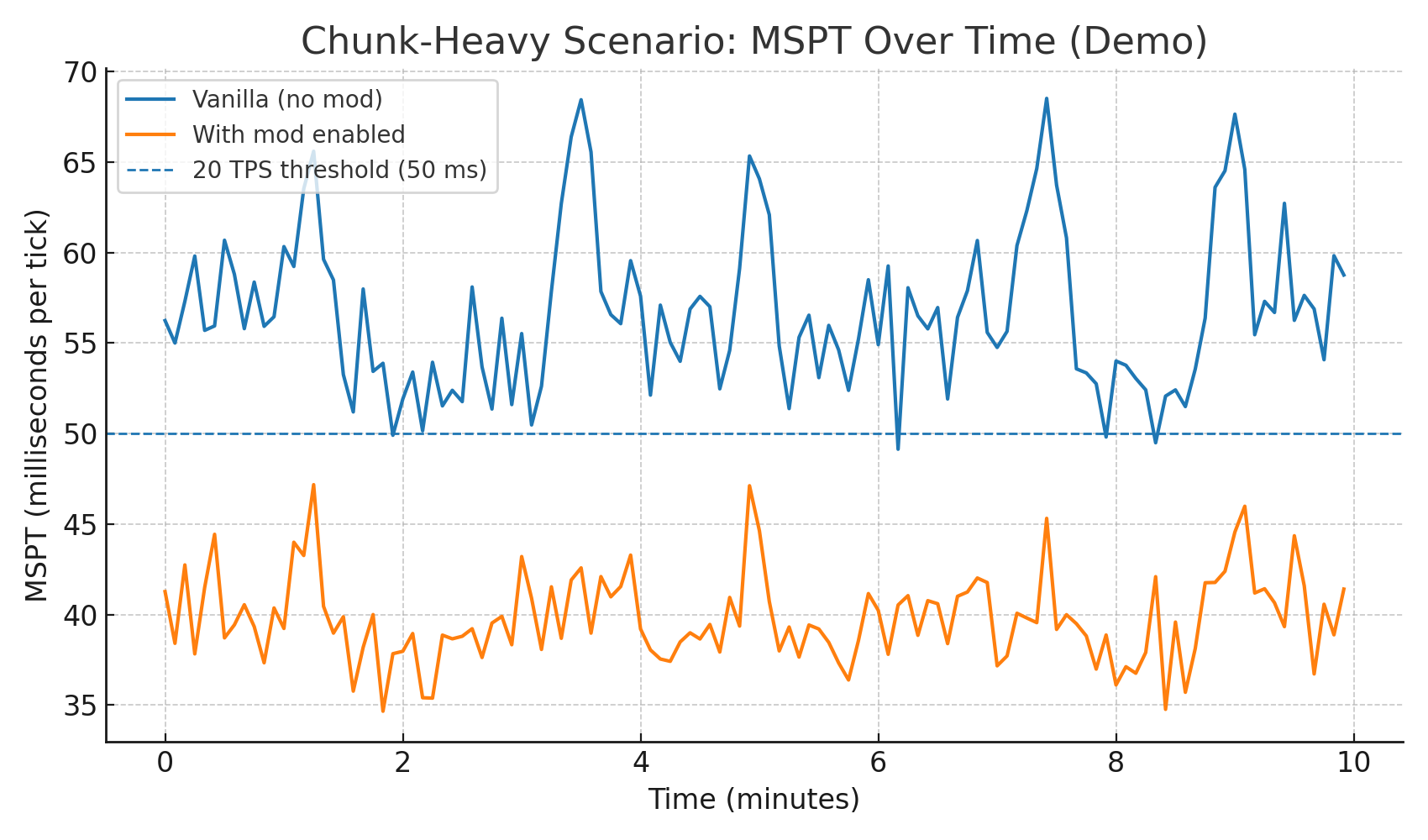
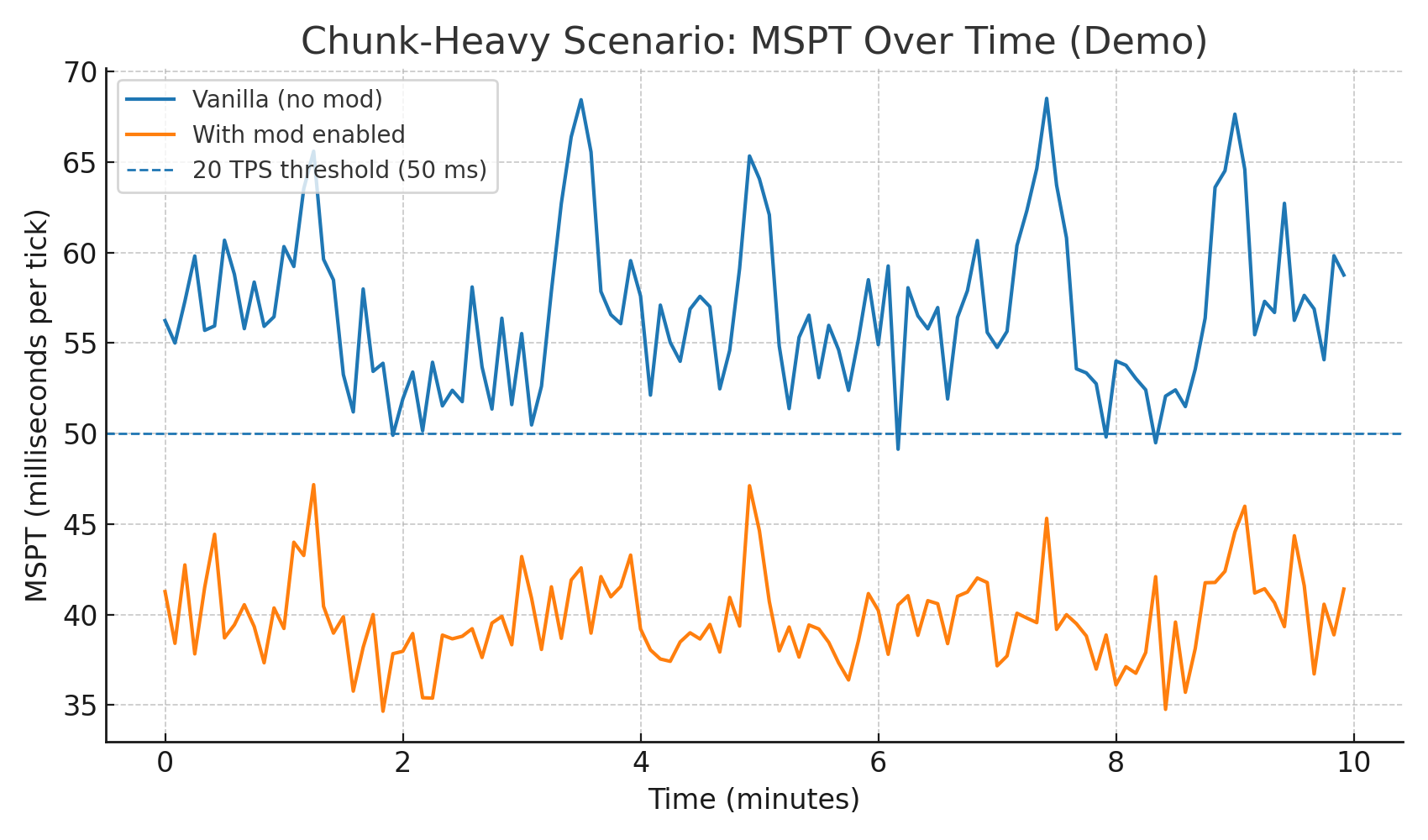
When many players explore, vanilla tends to pile chunk work onto a single thread. QuantumChunks routes chunk preparation and parts of generation onto a smart worker pool, parallelizing across CPU cores while serializing work inside the same 32×32 region to keep worlds safe and stable.
📈Statistics:
🧠 How it works (in plain English)
Minecraft often asks for a “background executor” to run chunk tasks.
QuantumChunks swaps those calls to a dedicated worker pool.
Each task is tagged with its 32×32 chunk region:
Same region → processed one at a time (no races)
Different regions → processed in parallel across your cores
Result: smoother TPS and fewer MSPT spikes when many players move at once.
🔧 Config (server)
config/quantumchunks-server.toml

📊 Verifying improvements
Use your favorite profiler (e.g., Spark):
/quantumchunks - CPU average usage, chunks loaded for 10 secs/1 minute
/spark tps — watch MSPT during exploration
/spark profiler --timeout 60 — look for chunk work on worker threads
You should see higher total CPU usage (multiple cores active) and fewer >50ms ticks during chunk storms.
QuantumChunks server crashes on startup – what to do?
Common causes: the loader or Minecraft version does not match the mod file, a dependency is missing, or RAM is too low. Check the log (latest.log) for “OutOfMemoryError”, “Mixin” or missing mods. At Mado, the AI crash analysis reads the log and suggests a cause. You can change the loader and version in the panel.
Which loader does QuantumChunks run on?
According to Modrinth, QuantumChunks supports Forge for Minecraft 1.20.6, 1.20.5, 1.20.4.
How much RAM does a server with QuantumChunks need?
As guidance, 3–4 GB for a server with this mod. This is an estimate, not a measured minimum. More mods, many players and long view distances need more. The spark profiler shows whether a mod is costing tick time.
Similar mods
Popular mods in the same category
 Server-ready

YetAnotherConfigLib (YACL)
by isxander
A builder-based configuration library for Minecraft!
 Server-ready

Text Placeholder API
by Patbox
Placeholder and Text manipulation library for your Minecraft mods.
 Client only

Dynamic FPS
by juliand665
Reduce resource usage while Minecraft is in the background, idle, or on battery.
 Server-ready

No Chat Reports
by Aizistral
Makes chat unreportable (where possible)
Ready for your server with QuantumChunks?
4 GB of RAM from €8.00 per month. 35% off your first month with MADO35.