
Modrinth · Fabric · Client mod
Quick menu Renewed
Quick menu Renewed is a client-side mod. Install it on your computer; the server does not need it.
This is a renewed fork based on the original (abandoned?) quick-menu.
- Downloads
- 9.5K
- Author
- doggyfox
- Loader
- Fabric
- Minecraft
- 1.21.11 – 26.3
- Updated
- –
Screenshots
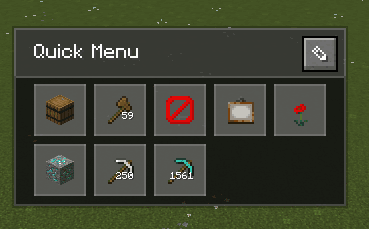
What Quick menu Renewed looks like


Images: Quick menu Renewed on Modrinth, published by the project team.
Setup
Install Quick menu Renewed on your client
Client-side mods only run on your computer. More server RAM does not change their performance.
- 01
Install the loader locally
Install Fabric for your Minecraft version in your launcher.
- 02
Download the file
Download the Quick menu Renewed file for your loader and your exact Minecraft version, for example 26.3.
- 03
Add it to the mods folder
Put the .jar file in your local .minecraft/mods folder and remove older duplicates.
- 04
Launch
Launch Minecraft with the loader profile. Nothing needs to change on the server.
- On the server
- Not needed
- On the client
- Required
- Loader
- Fabric
- Minecraft
- 26.3, 26.2, 26.1.2 +3 more
- License
- GNU General Public License v3.0 only
Releases
Published releases
Pick the file that matches your server’s loader and Minecraft version. The server and players need the same release.
Quick menu Renewed · Modrinth- Quick menu Renewed 2.4.0November 1, 2026Minecraft 26.3 · Fabric
- Quick menu Renewed 2.4.0November 1, 2026Minecraft 26.2 · Fabric
- Quick menu Renewed 2.4.0November 1, 2026Minecraft 26.1, 26.1.1, 26.1.2 · Fabric
- Quick menu Renewed 2.4.0November 1, 2026Minecraft 1.21.11 · Fabric
Original description by the project author
Quick Menu (Renewed)
A Fabric mod for Minecraft that lets you register commands and keybindings to buttons and execute them quickly from a menu.
A reconstruction of the original Fork by ImCodist, built without heavy dependencies like owo-lib.
Features
| Feature | Description |
|---|---|
| Folder navigation | Organize buttons into folders |
| Breadcrumb list | Visual display of folder hierarchy |
| Search (F key) | Search button names and execute instantly |
| Edit mode (E key) | Add, edit, and delete buttons |
| Quick reorder | Ctrl+click in edit mode |
| Quick delete | Shift+click in edit mode |
| Release to execute | Execute action the moment you release the key |
| Import / Export | Share button layouts via clipboard (JSON + Base64) |
Usage
- Open menu:
G(default) - Edit mode:
Ekey or pencil icon - Search:
Fkey or magnifying glass icon - Navigate folders: Click folder icon
- Go back: Click
Rootin the breadcrumb list - Export: In edit mode, click
Exportto copy your button layout to the clipboard - Import: In edit mode, click
Importto load a layout from the clipboard (mode selectable)
Configuration
- Buttons per row
- Number of visible rows
- Close on key release
- Close after action execution
- Hide edit icon
- Default import mode (
Ask Each Time/Replace All/Merge by Name/Add Only)
Does Quick menu Renewed need to be installed on the Minecraft server?
No. Modrinth marks Quick menu Renewed as unsupported on the server side. Install it only in your local mods folder. Your server can stay unchanged unless the project page lists an additional dependency.
Which version and loader does Quick menu Renewed require?
Use a file for Fabric and your exact Minecraft version. Supported versions include 26.3, 26.2, 26.1.2. Files for different loaders are not interchangeable.
Quick menu Renewed is not working – what should I check?
First check the Minecraft version, loader version and required dependencies. Because the mod is client-side, more server RAM will not fix it.
Similar mods
Popular mods in the same category
 Server-ready

YetAnotherConfigLib (YACL)
by isxander
A builder-based configuration library for Minecraft!
 Server-ready

Text Placeholder API
by Patbox
Placeholder and Text manipulation library for your Minecraft mods.
 Client only

Dynamic FPS
by juliand665
Reduce resource usage while Minecraft is in the background, idle, or on battery.
 Server-ready

No Chat Reports
by Aizistral
Makes chat unreportable (where possible)
Looking for mods for your own server?
The catalog lists mods that run on Minecraft servers.