
Rendersnap
A Minecraft Mod that improves performance by using aggressive culling techniques.
Screenshots
About this Mod
Rendersnap
The mod, in it's name, improves on the current (inadequate) rendering engine, by applying aggressive (but subtle) optimizations to cut down the amount of things to render, without causing incompatibility issues.

Highlights
It's simple!
The mod uses culling techniques to lower the load on cpu, gpu, and this improves the performance on low-end devices and this allows low-end users to play minecraft in a smoother way!
Other, visual features are also added, including zooming and not rendering some details.
It's modular!
All can be controlled, enabled or disabled, aggressive or conservative, through vanilla settings.
It's compatible!
Fix, not change, so vanilla renderer features such as vanilla shaders are completely supported. Any compatibility issues with vanilla or other mods will be fixed.
Installation
Download
Fabric API(it is a required dependency) and the mod from the latest snapshot available. (You may ignore the Minecraft version for both mods, as snapshot versions from the same update usually do not break compatibility.)Install the mod as you normally would in your launcher. If your launcher does not have a mod installer, manually move the downloaded
.jarfile into themodsfolder of your instance.
Benchmarks
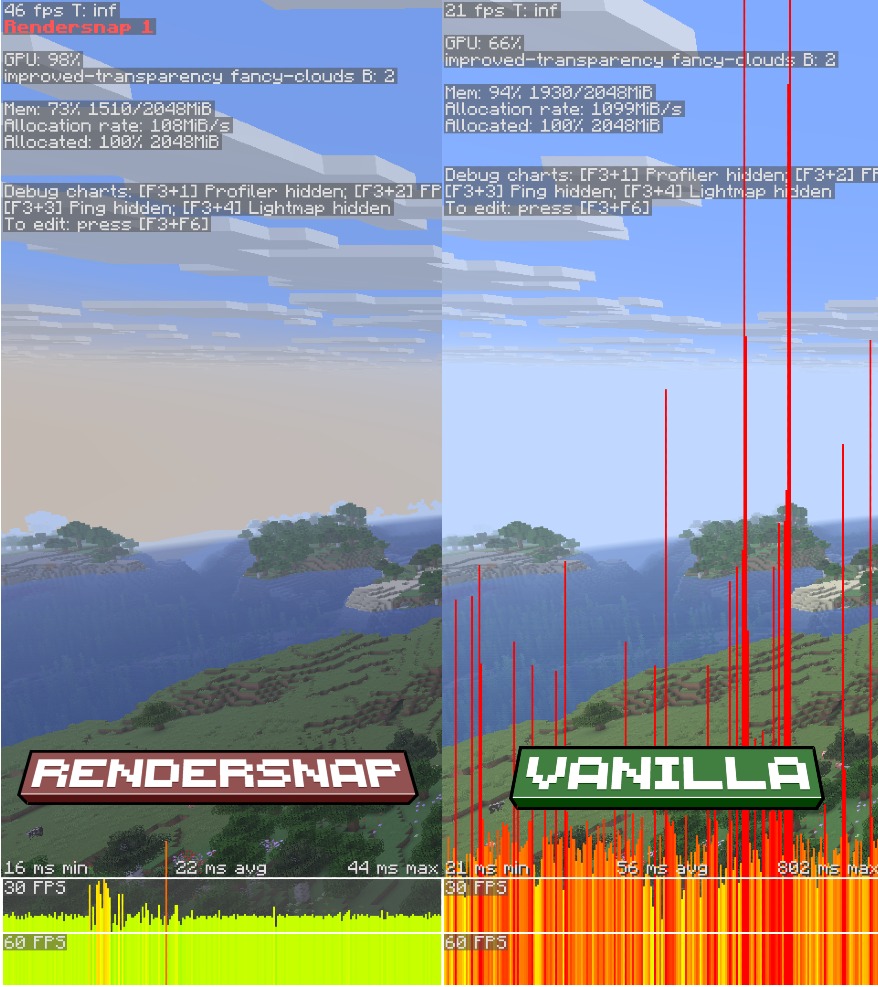
Hardware configuration:
- CPU: Intel Core i5 1035G1
- GPU: Nvidia MX330
- RAM: 8GB DDR4 RAM
- Storage: 1TB NVMe SSD

Software configuration:
- Minecraft 26.1.2
- Fabric API 0.149.1
- Rendersnap 1.0

Settings configuration: Fabulous preset (32 chunks render distance, 12 chunks simulation distance)

World configuration:
- Seed: -4562913757330550907
- Location: -203.83 142.01 647.58 179.26 9.14
Extras
It is recommended to use complementary mods like ModernFix and Ixeris. The mod only fills the gaps that are left by those mods.
This mod is not a one-size-fits-all renderer, and it benefits most on integrated GPUs that cannot take advantage of complex optimizations. Consider other renderer mods that work best on your hardware.
License
Rendersnap is currently licensed under the Star-end License.
Available Versions
How to Install Rendersnap on Your Client
Install the Mod Loader Locally
Install fabric for your local Minecraft version.
Download the Matching File
Choose the Rendersnap file for fabric and Minecraft 26.3.
Install Mod
Place the .jar file in your local .minecraft/mods folder and restart Minecraft. No server-side installation is required.
Compatibility
Mod Loaders
Minecraft Versions
26.3, 26.2, 26.2-pre-3 (+12 more)
Server-side
✗ UnsupportedRecommended RAM
4 GB(min. 3 GB)Frequently Asked Questions
Does Rendersnap need to be installed on the Minecraft server?
No. Modrinth marks Rendersnap as unsupported on the server side. Install it only in your local Minecraft mods folder. Your server can remain unchanged unless the mod page lists an additional dependency.
Which version and loader does Rendersnap require?
Use a file for fabric and your exact Minecraft version. Supported versions include 26.3, 26.2, 26.2-pre-3. Files for different loaders are not interchangeable.
Rendersnap is not working – what should I check?
First check the Minecraft version, loader version and required dependencies. Put the .jar file in your local .minecraft/mods folder and remove older duplicates. Because this mod is client-side, adding server RAM will not fix it.
Similar Mods


Minecraft Server for Your Group
Rendersnap stays on your client. Host a compatible world for your group.
Details
- License
- Creative Commons Attribution Non Commercial Share Alike 4.0 International
- Server-side
- Unsupported