
Modrinth · Forge
SDM Shipping Box on your Minecraft server
SDM Shipping Box runs on Minecraft servers with Forge. Order your server, set the loader in the panel and install the mod with one click in the mod browser.
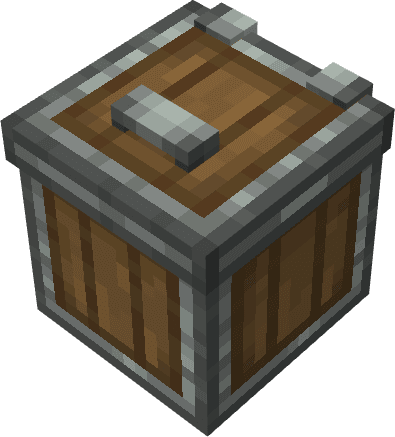
SDM Shipping Box is an auto-selling block (5 tiers: Wood→Iron→Gold→Diamond→Netherite) that converts configured items to SDM (Property Points) at fixed intervals. Higher tiers = shorter intervals & larger (even unlimited for Netherite) batch capacity. Price
- Downloads
- 1.4M
- Author
- qingye520
- Loader
- Forge
- Minecraft
- 1.20.1
- Updated
- –


Setup
Install SDM Shipping Box on your server
The server and players need the same loader and Minecraft version. Back up the world before adding or updating mods.
- 01
Configure
4 GB of RAM is preselected. You choose the term and add-ons and pay by credit card or PayPal.
- 02
Set the loader
In the panel, set the server software to Forge and choose the matching Minecraft version, for example 1.20.1.
- 03
Install the mod
Search the mod browser for “SDM Shipping Box” and install the release for your loader. Alternatively, upload the .jar to the mods folder via SFTP. Required dependencies are listed on the project page.
- 04
Connect
Every player installs the same SDM Shipping Box release locally and connects using the server address from the panel.
- On the server
- Required
- On the client
- Required
- Loader
- Forge
- Minecraft
- 1.20.1
- License
- LicenseRef-All-Rights-Reserved
The panel
Install mods, find errors.
Real screenshots from the Mado panel. Both come with every Minecraft server.
Mod browser
Modrinth and CurseForge, right in the panel.
The browser filters by your Minecraft version. Install mods with one click, without uploading .jar files.

AI crash analysis
When a mod crashes, the analyzer reads the log.
Mods often fail on a wrong loader version, Java version or missing dependency. The analyzer names a likely cause and suggests a fix.

Releases
Published releases
Pick the file that matches your server’s loader and Minecraft version. The server and players need the same release.
SDM Shipping Box · ModrinthOriginal description by the project author
The SDM Shipping Box is an auto-selling block that converts eligible items into SDM (Property Points). Once valid materials (configured in the trade list) are placed inside, it automatically settles earnings at fixed intervals—no manual trading required. It comes in 5 tiers (Wood → Iron → Gold → Diamond → Netherite); higher tiers mean shorter intervals and larger single-batch processing capacities.
Wooden SDM Shipping Box: Basic tier, ideal for early-game.
Iron SDM Shipping Box: Balanced interval & batch size.
Golden SDM Shipping Box: Faster intervals + larger single-batch capacity.
Diamond SDM Shipping Box: High-frequency intervals + large batch size.
Netherite SDM Shipping Box: Fastest intervals + unlimited single-batch capacity.
Pricing Notes
Prices are affected by multipliers, random fluctuations, supply-demand (over-selling the same item lowers its price), batch/type bonuses, and handling fees. Final earnings are subject to actual shipping—estimated earnings appear in the item tooltip.
How to Obtain
Wooden SDM Shipping Box: Crafting Table → 8 Oak Planks + 1 Chest
Iron SDM Shipping Box: Crafting Table → 8 Iron Ingots + 1 Wooden SDM Shipping Box
Golden SDM Shipping Box: Crafting Table → 8 Gold Ingots + 1 Iron SDM Shipping Box
Diamond SDM Shipping Box: Crafting Table → 8 Diamonds + 1 Golden SDM Shipping Box
Netherite SDM Shipping Box: Smithing Table → Netherite Upgrade Template + 1 Diamond SDM Shipping Box + 1 Netherite Ingot
How to Use
Place the box on the ground, right-click to open its interface.
Insert eligible items (configured in the trade list) into the left slots.
The box auto-converts items to SDM at its tier’s interval. Check the right panel for the next shipping time.
Trade Configuration (Admins/Server Owners)
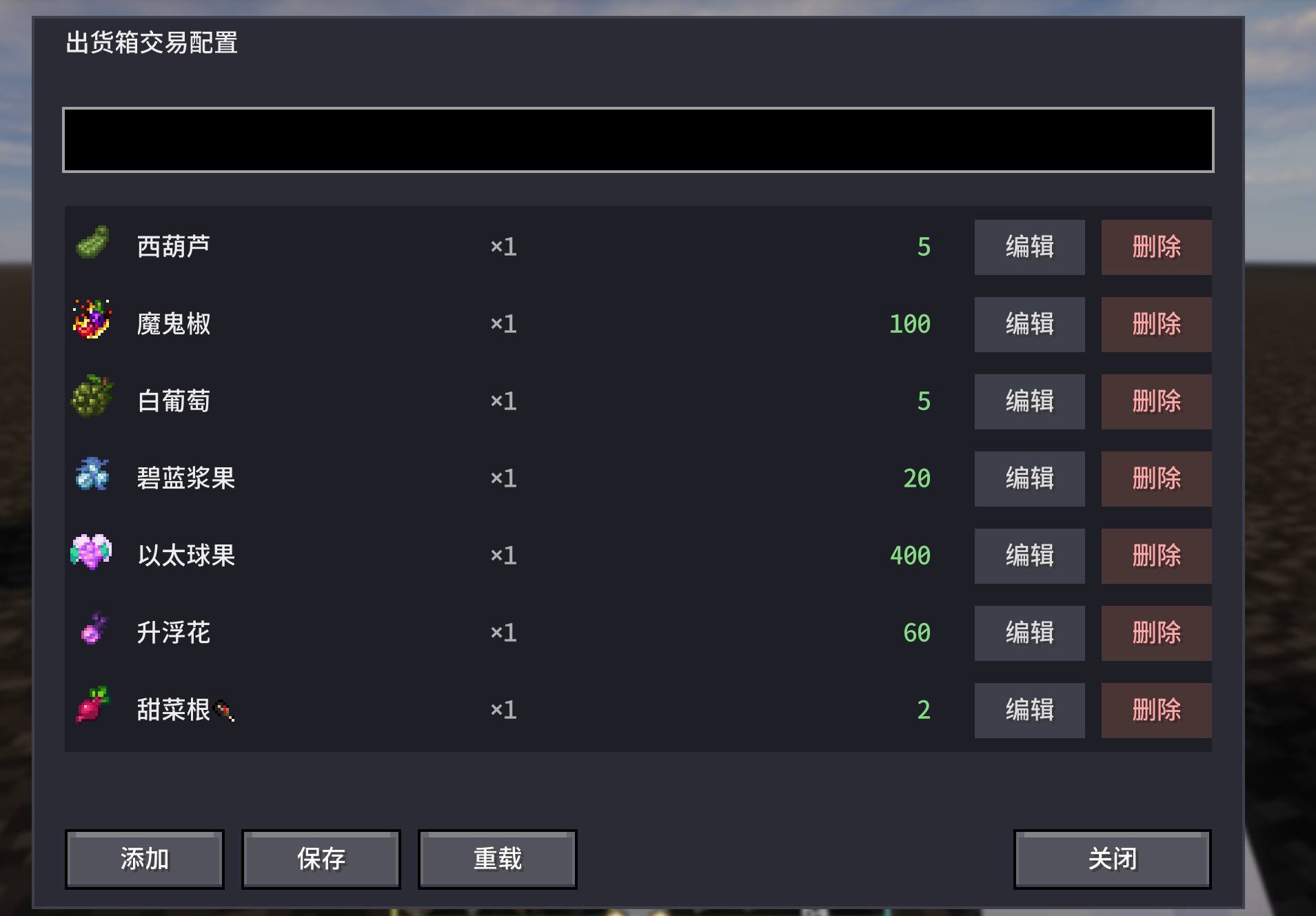
Open Config UI: Use the command /xiangcaomengjia config (requires OP permissions) to access the trade configuration interface.
Reload Trades: Click "Reload" in the config UI, or use /xiangcaomengjia reload to refresh trades.json (no game restart needed).
Refresh Price Multipliers: Use /xiangcaomengjia refreshPrice (if price fluctuation is enabled) to update current world price multipliers.
In the config UI, you can add/edit/delete trades: select an item, set its quantity & base price, then save to trades.json.
Dependencies
Requires sdmshop
出货箱是一个基于 SDM(财产点数)的自动出售方块。放入符合配置的物资后,会按设定周期自动结算为财产点数,无需手动交易。共有五种材质:木、铁、金、钻石、下界合金,材质越高档,出货间隔越短、单次处理数量越大。
- 木出货箱:最基础,适合前期。
- 铁出货箱:速度与容量适中。
- 金出货箱:更快,单次可处理更多。
- 钻石出货箱:高频率、大单次处理量。
- 下界合金出货箱:最快,单次处理无上限。
价格会受倍率、随机波动、供需(同种卖多会跌)、批量与种类加成、手续费等影响,具体以实际出货为准;物品提示中会显示预估出售所得。
获取方式
- 木出货箱:工作台,8 个橡木木板 + 1 个箱子。
- 铁出货箱:工作台,8 个铁锭 + 1 个木出货箱。
- 金出货箱:工作台,8 个金锭 + 1 个铁出货箱。
- 钻石出货箱:工作台,8 个钻石 + 1 个金出货箱。
- 下界合金出货箱:锻造台,下界合金升级模板 + 钻石出货箱 + 下界合金锭。
使用方法
- 将出货箱放置在地上,右键打开界面。
- 在左侧格子放入要出售的物品(需在交易列表中已配置)。
- 出货箱会按自身材质对应的间隔自动将物品按配置价格折算为财产点数;右侧可查看下次出货时间等。
配置交易(管理员/服主)
- 打开配置界面:在游戏中输入命令
/xiangcaomengjia config(需 OP 权限),即可打开出货箱交易配置界面。 
- 重载交易:在配置界面点击「重载」按钮,或输入
/xiangcaomengjia reload,可重新加载trades.json,无需重启游戏。 - 刷新价格倍率(若开启价格变动):
/xiangcaomengjia refreshPrice,手动刷新当前世界的价格倍率。
在配置界面中可添加 / 编辑 / 删除交易:选择物品、设置数量与基础价格,保存到 trades.json。
依赖说明
- 本 Mod 依赖sdmshop
SDM Shipping Box server crashes on startup – what to do?
Common causes: the loader or Minecraft version does not match the mod file, a dependency is missing, or RAM is too low. Check the log (latest.log) for “OutOfMemoryError”, “Mixin” or missing mods. At Mado, the AI crash analysis reads the log and suggests a cause. You can change the loader and version in the panel.
Which loader does SDM Shipping Box run on?
According to Modrinth, SDM Shipping Box supports Forge for Minecraft 1.20.1.
How much RAM does a server with SDM Shipping Box need?
As guidance, 3–4 GB for a server with this mod. This is an estimate, not a measured minimum. More mods, many players and long view distances need more. The spark profiler shows whether a mod is costing tick time.
Similar mods
Popular mods in the same category
 Server-ready

ChoiceTheorem's Overhauled Village
by ChoiceTheorem
Enhances and creates new villages and pillager outposts, that perfectly fit into your Minecraft world.
 Server-ready

Cobblemon additions
by strikebyte
A Mod that adds villages with Pokemon Village/City variants - Originally made for the Brocraft server. This will spawn in a variety of structures within the villages as well. We are planning on adding rare structures!
 Server-ready

VillagersPlus
by LithiumPlus
A villager extension mod, adding new villager types, trades and beautiful workstations.
 Server-ready

Bountiful
by ejektaflex
Adds bounty boards, giving rewards for collecting different blocks and items.
Ready for your server with SDM Shipping Box?
4 GB of RAM from €8.00 per month. 35% off your first month with MADO35.