
Modrinth · Fabric · Client mod
Seamless Shader Reload
Seamless Shader Reload is a client-side mod. Install it on your computer; the server does not need it.
Reloads and applies new shader settings without loading time
- Downloads
- 21
- Author
- mikovogel2008
- Loader
- Fabric
- Minecraft
- 26.3
- Updated
- –
Screenshots
What Seamless Shader Reload looks like

Images: Seamless Shader Reload on Modrinth, published by the project team.
Setup
Install Seamless Shader Reload on your client
Client-side mods only run on your computer. More server RAM does not change their performance.
- 01
Install the loader locally
Install Fabric for your Minecraft version in your launcher.
- 02
Download the file
Download the Seamless Shader Reload file for your loader and your exact Minecraft version, for example 26.3.
- 03
Add it to the mods folder
Put the .jar file in your local .minecraft/mods folder and remove older duplicates.
- 04
Launch
Launch Minecraft with the loader profile. Nothing needs to change on the server.
- On the server
- Not needed
- On the client
- Required
- Loader
- Fabric
- Minecraft
- 26.3
- License
- LicenseRef-All-Rights-Reserved
Releases
Published releases
Pick the file that matches your server’s loader and Minecraft version. The server and players need the same release.
Seamless Shader Reload · ModrinthOriginal description by the project author
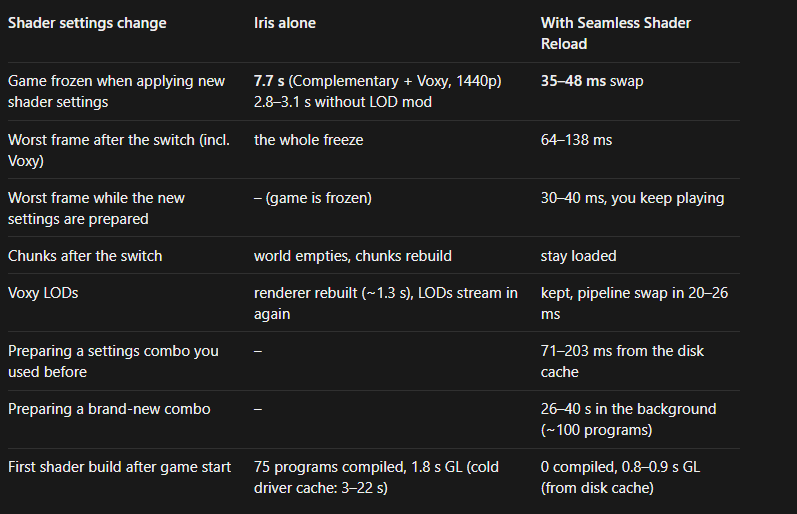
Reduces the time your game freezes when changing shader settings or turning a shader on or off by preparing the new shader in the background.
Reloading shaders with R or turning them on no longer freezes your game for seconds – the switch takes about 0.4 s, and the world stays visible. Changing the render distance, smooth lighting, biome blend or leaves no longer empties the world while chunks rebuild. With Voxy, your LODs stay loaded through all of it.
What it does
Iris normally loads and compiles a shader pack on the render thread, and every reload makes Sodium (and Voxy) throw away and rebuild all chunk meshes. Seamless Shader Reload prepares the new pack on a background thread, compiles its shaders in a separate GL context and loads them as finished program binaries, so the game keeps rendering until the switch. Chunk meshes are only rebuilt when the new pack actually needs it, and then in the background while the old ones stay visible. Each feature checks your Iris, Sodium and Voxy versions at startup and turns itself off, falling back to the normal behaviour, if anything doesn't match.
Requires: Minecraft 26.3, Fabric Loader ≥ 0.19.5, Java 25. Optional: Iris, Sodium, Voxy, LoadShift. Fabric API is not needed.
Does Seamless Shader Reload need to be installed on the Minecraft server?
No. Modrinth marks Seamless Shader Reload as unsupported on the server side. Install it only in your local mods folder. Your server can stay unchanged unless the project page lists an additional dependency.
Which version and loader does Seamless Shader Reload require?
Use a file for Fabric and your exact Minecraft version. Supported versions include 26.3. Files for different loaders are not interchangeable.
Seamless Shader Reload is not working – what should I check?
First check the Minecraft version, loader version and required dependencies. Because the mod is client-side, more server RAM will not fix it.
Similar mods
Popular mods in the same category
 Client only

Sodium
by jellysquid3
A high-performance rendering engine replacement for Minecraft, which greatly improves frame rates and reduces micro-stutter.
 Client only

Iris Shaders
by coderbot
A modern shader pack loader for Minecraft intended to be compatible with existing OptiFine shader packs
 Client only

Entity Culling
by tr7zw
Using async path-tracing to hide Block-/Entities that are not visible
 Server-ready

FerriteCore
by malte0811
Memory usage optimizations
Looking for mods for your own server?
The catalog lists mods that run on Minecraft servers.