
Modrinth · Fabric · Client mod
Shader Carry
Shader Carry is a client-side mod. Install it on your computer; the server does not need it.
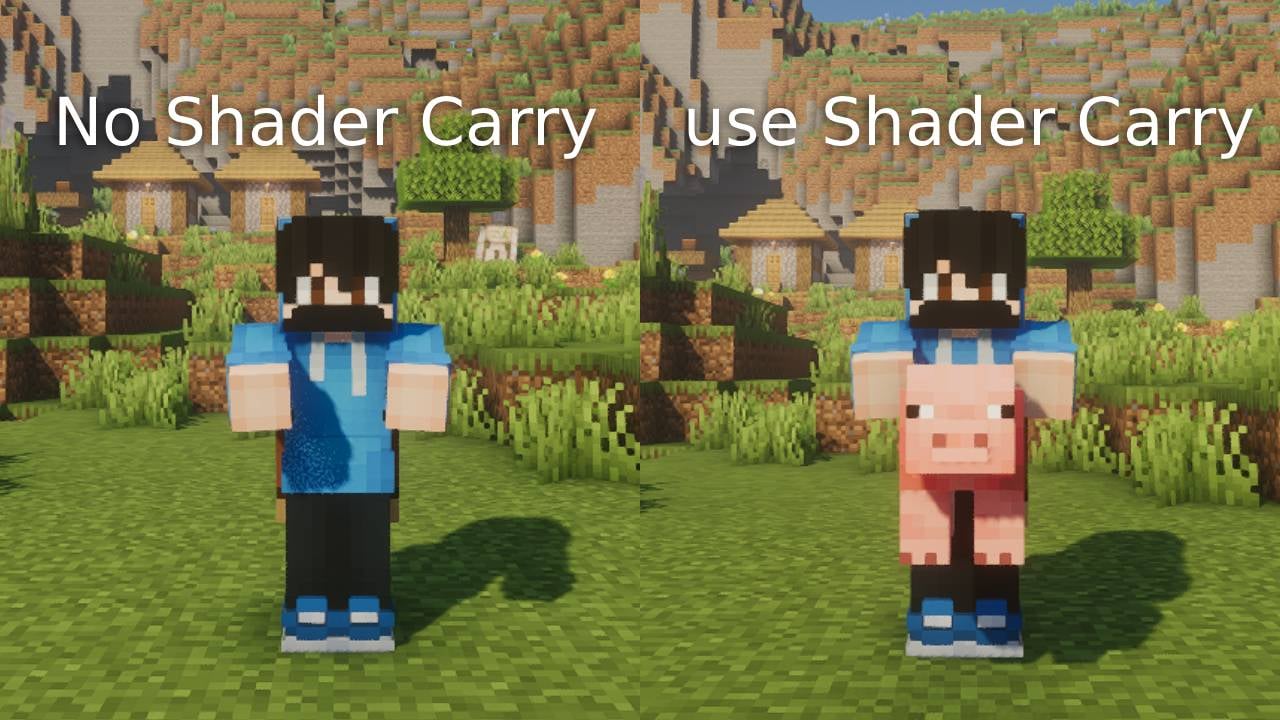
Fixes the invisibility and broken lighting bugs when carrying entities or blocks with the Carry On mod while using Shaders.
- Downloads
- 1.7K
- Author
- PGC
- Loader
- Fabric
- Minecraft
- 1.20.1 – 26.2
- Updated
- –
Screenshots
What Shader Carry looks like


Images: Shader Carry on Modrinth, published by the project team.
Setup
Install Shader Carry on your client
Client-side mods only run on your computer. More server RAM does not change their performance.
- 01
Install the loader locally
Install Fabric for your Minecraft version in your launcher.
- 02
Download the file
Download the Shader Carry file for your loader and your exact Minecraft version, for example 26.2.
- 03
Add it to the mods folder
Put the .jar file in your local .minecraft/mods folder and remove older duplicates.
- 04
Launch
Launch Minecraft with the loader profile. Nothing needs to change on the server.
- On the server
- Not needed
- On the client
- Required
- Loader
- Fabric
- Minecraft
- 26.2, 26.1.2, 1.21.4 +4 more
- License
- MIT License
Releases
Published releases
Pick the file that matches your server’s loader and Minecraft version. The server and players need the same release.
Shader Carry · Modrinth- Shader Carry 26.2-1.1.0September 6, 2026Minecraft 26.2 · Fabric
- Shader Carry 26.1.2-1.1.0September 6, 2026Minecraft 26.1.2 · Fabric
- Shader Carry 1.21.4-1.1.0September 6, 2026Minecraft 1.21.4 · Fabric
- Shader Carry 1.21.1-1.1.0September 6, 2026Minecraft 1.21.1 · Fabric
- Shader Carry 1.20.6-1.1.0September 6, 2026Minecraft 1.20.6 · Fabric
Original description by the project author
📦 Carry On Shader Fix (Shader Carry)
A client-side add-on for the Carry On mod that completely fixes rendering issues when playing with Shaders (Iris, Oculus, Optifine).
🐛 The Problem
If you use the original Carry On mod alongside shaders, you might have noticed two annoying bugs:
- Invisible Entities: Animals or mobs you pick up completely disappear.
- Broken Lighting: Blocks or chests you carry have weird half-black shadows or broken lighting.
This happens because the original mod uses a custom rendering buffer and disables vanilla depth testing, which breaks how shaders calculate light and geometry.
🛠️ The Solution
This mod carefully patches the rendering system of Carry On without modifying the original mod's core logic.
- It completely rewrites the carrying renderer to use the vanilla
RenderLayer(for entities) andItemRenderer(for blocks). - Entities and blocks are properly attached to the player's body layer, meaning they move smoothly with your camera and receive 100% accurate shadows, lighting, and normal maps from your shaders.
⚙️ Compatibility & Requirements
- Client-side only! You only need this on your client. Servers don't need it.
- Requires Carry On to be installed.
- Compatible with Iris, Oculus, and any shader pack
🤝 Credits
All credits for the original carrying mechanics go to the creator of Carry On (Tschipp). This is purely a visual rendering patch for shader users.
Does Shader Carry need to be installed on the Minecraft server?
No. Modrinth marks Shader Carry as unsupported on the server side. Install it only in your local mods folder. Your server can stay unchanged unless the project page lists an additional dependency.
Which version and loader does Shader Carry require?
Use a file for Fabric and your exact Minecraft version. Supported versions include 26.2, 26.1.2, 1.21.4. Files for different loaders are not interchangeable.
Shader Carry is not working – what should I check?
First check the Minecraft version, loader version and required dependencies. Because the mod is client-side, more server RAM will not fix it.
Similar mods
Popular mods in the same category
 Client only

Sodium
by jellysquid3
A high-performance rendering engine replacement for Minecraft, which greatly improves frame rates and reduces micro-stutter.
 Client only

Iris Shaders
by coderbot
A modern shader pack loader for Minecraft intended to be compatible with existing OptiFine shader packs
 Client only

Entity Culling
by tr7zw
Using async path-tracing to hide Block-/Entities that are not visible
 Server-ready

FerriteCore
by malte0811
Memory usage optimizations
Looking for mods for your own server?
The catalog lists mods that run on Minecraft servers.