![[SCM] Simply Create Model Mod](https://cdn.modrinth.com/data/4cnrKlAs/cf7b8e88f44bea491491ce32bc756ee0df32755b_96.webp)
[SCM] Simply Create Model Mod
(Mod ver.) Optimise many Create mod models
Screenshots
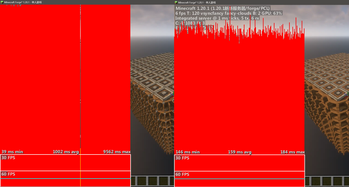
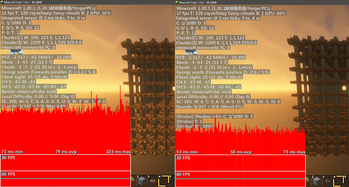
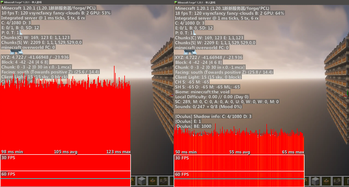
About this Mod
Mod version for easier use
Author: YaTangDragon
Simplified most of Create mod's models
The optimization effect of resource pack is limited, and the actual optimization situation may not be obvious.
If it doesn't load successfully, please press F3+T once.
模组版本,使用更简单
作者:亚龙糖浆
简化了大量原版机械动力模型,减少渲染卡顿。
资源包的优化效果有限,实际优化情况可能并不明显。
如未能成功加载请按一次 F3+T
Available Versions
How to Install [SCM] Simply Create Model Mod on Your Client
Install the Mod Loader Locally
Install fabric for your local Minecraft version.
Download the Matching File
Choose the [SCM] Simply Create Model Mod file for fabric and Minecraft 1.21.1.
Install Mod
Place the .jar file in your local .minecraft/mods folder and restart Minecraft. No server-side installation is required.
Compatibility
Mod Loaders
Minecraft Versions
1.21.1, 1.21, 1.20.1
Server-side
✗ UnsupportedRecommended RAM
6 GB(min. 4 GB)Frequently Asked Questions
Does [SCM] Simply Create Model Mod need to be installed on the Minecraft server?
No. Modrinth marks [SCM] Simply Create Model Mod as unsupported on the server side. Install it only in your local Minecraft mods folder. Your server can remain unchanged unless the mod page lists an additional dependency.
Which version and loader does [SCM] Simply Create Model Mod require?
Use a file for fabric, forge, neoforge and your exact Minecraft version. Supported versions include 1.21.1, 1.21, 1.20.1. Files for different loaders are not interchangeable.
[SCM] Simply Create Model Mod is not working – what should I check?
First check the Minecraft version, loader version and required dependencies. Put the .jar file in your local .minecraft/mods folder and remove older duplicates. Because this mod is client-side, adding server RAM will not fix it.
Similar Mods


Minecraft Server for Your Group
[SCM] Simply Create Model Mod stays on your client. Host a compatible world for your group.